
Ads


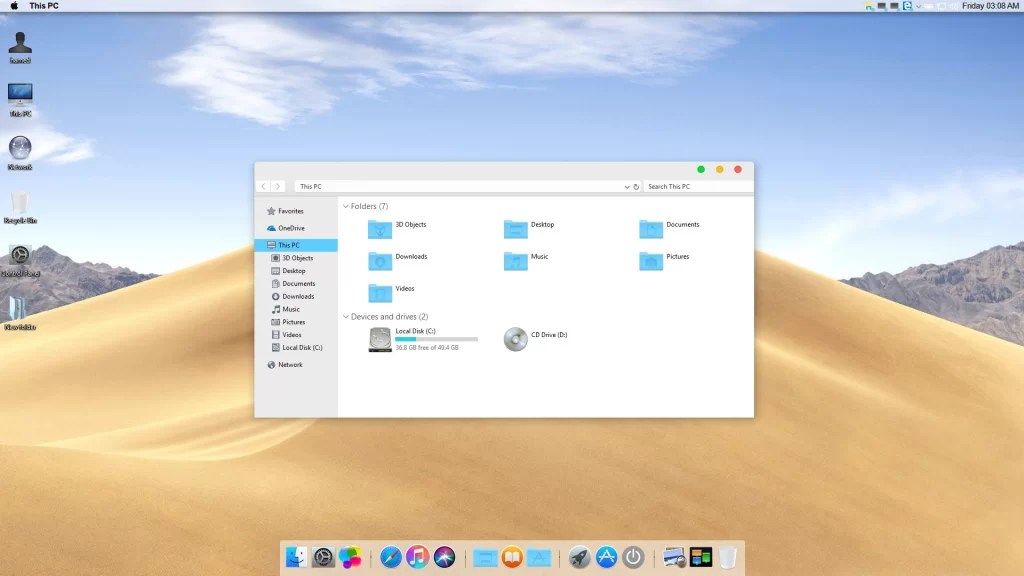
 Transform Windows 10 and 11 to macOS Ventura Dark
 Download from kofi for Windows 11
Download from kofi for Windows 10
Download from gumroad for Windows 11
Download from gumroad for Windows 10
 macOS &iOS SkinPack Collection
The Windows 11 theme’s themselves are experimental, much of the overall look and results will vary depending on each users dpi settings, Best work on 100% scale and layout size, you need to set it from display setting, Also for enable start menu and taskbar skin you need to install startisback from startisback.com
Password: skinpacks.com
Malware/virus warning? Read the FAQ.
Support:
Windows 10 and 11
INCLUDES :
Theme for Windows
Original animated cursors
Original system icons
Original wallpapers
Exclusive sound scheme
Rocketdock skin
Note: Please unistall old or other version of skin packs before install new one. if your theme not changed or its like classic windows you need to install uxtheme patcher from here and after restart select new theme from personalization.
Because skin packs will change file system (imageres.dll) to change icons so maybe Windows show warning, if you’re have any problem with installer then just use portable version. all theme have been fully tested, once purchase has been completed no refund will be available, however we will try to provide all possible technical assistants as required.
You’re advised to Create a System Restore Point before installing skinpack.If you have problem with install or uninstall skinpack, please check our help page.

[…] visit download page […]
on gumroad page, win11 only supported with 22H2 only..but in this page, it supports 23H2 too..which one is correct?
its works on both version
“Also for enable start menu and taskbar skin you need to install startisback from startisback.com”
strartisback is $4.99
so beside paying for the skinpack, I have to pay for the startisback too?
its limit of microsoft windows to remove the start menu from windows 10 and 11 and startisback not from us
if you want skinned taskbar and start menu you need to install startisback too
if you dont want skinned start menu and taskbar then you dont need to buy it
you can try it without startisback and if its good for you then you dont need to buy it
for this skin you can use without startisback but for premium skins its better to have startisback
Thanks for sharing this skinpack. It is so awesome
Will this work on Windows 10 22H2?
I paid for windows 10 version macos ventura, but now i have windows 11 will i get a free upgrade
Unfortunately only works to a limited extent.
An error occurs during installation.
StatrisBack 3.6.2 is already installed, but the Skinpack wants to install an older version of StartisBack
Error: Reg64.exe “Cannot find clb.dll”
if you installed then dont install startisback
Where can I select the one that does not install StartisBack
just cancel installer of startisback
I was able to narrow down the problem now.
In your installer is a “reg64.exe”. When running this file, the error comes that “clb.dll” was not found.
just ignor it
I already bought this, but I have old version do I have to buy it again
?
were i need macdock for paid version or not ?
no
Hi, this pack woks with 2 or 3 screens?? the dock can be in each screen or how it works un a pc wirh multi screen??
I’ve bough the full version. It works properly, but whenever I use the middle click, it opens a window with predefined options. I use it a lot to open webs in new tabs, so I would like to disable that.
Thanks for your help
can you send screen shot of problem
[…] download Dark version […]
any version i downloaded (catalina, big sur,monterey) the top bar don’t change 100% for macos style, and the bottom bar is invisible. i notice that when i’m installing,at the step of selecting what components is gonna be installed, its just the uxtheme, and the owm theme, its missing some files like the rocketdoc and finderbar and others. someone can help me?
just full version have all things, not free version
There is no menue bar please update this I paid for it It has every thing like dock but no menue bar on the top
I purchased theme, I need icons 16×16 they are missing… (((
Please can you pass me the theme? And I’ll do the icons larger for you
Pay for it.
Pls can anyone pas me the windows 10 icons +extra please I really don’t have money
Stop begging..
how to uninstall?
cmdow.exe cmd error coming no menu bar not working fully and dock is not working too pls hel
send screen shot of problem please
wonderful theme
Hi
I Just bought this skin, but it’s asking for a password.
password: skinpacks.com
password: skinpacks.com
[…] Visit Download Page Share 0 Tweet Share Share Share […]
Hi, can i buy at online store, cause i don’t have a credit card or paypal account 😥
It is work with windows 10 21h1
yes
i have pay for it ,my email address is [email protected], but i don’t understand how can i download file!!1
Pls when you can can you pass me the link please I don’t have money
what is the difference between the complete theme and the basic one?
does it work for 1909 win 10
yes
I have a 4K screen with 125% scaling. Will the theme work with this?
my excel background is black if i use this theme..is there anyone experience like this too?
https://github.com/matafokka/ExcelDarkThemeFix
thanks
Works nearly perfect. How can i set the shortcut for example battlenet? Im setting the Location of the .exe but it wont run.
just drag and drop you shortcut or file
Thanks that worked.
After like 3 PC restarts i lost my Rocket Dock icons.
EeEeE
[…] Visit Download Page Share 0 Tweet Share Share Share Share […]