My screen suddenly have color lines and then it stars to get blurry then suddenly shuts off. I tried forcing it off and turn it on. The the fan works and my laptop turn on like usual but the screen is off. Please help.
I have an Lenovo Windows 8.1 and I installere the Yosemite skinpack and I Wanted to uinstall it, bukt I didn’t know how so I deleted some files and restarted the pc and the black screen comes up, I have tried on websites to find a method that will help and I tried yours but nothing happens when I do it, help me plz
I did everything but every time my laptop restarts, it just pops up the startup repair (for both options: launch startup repair and start windows normally). I tried to start windows in safe mode (after pressing F8) and still it keeps starting the starup repair. Overall, whatever I do, it all comes back to the startup repair.
I have win 7 32 bit.
I keep getting file system error (65535). Ive tried reinstalling windows a couple times and then downloading the skin packs again but I keep getting the same error messages when I try to run a program on windows 8.1 I really like the skins.. any ideas?
I installed Windows 10 SkinPack, but when I boot it there’s no form for user password. It’s just stuck with the log on page. I can’t launch my Windows as a result. Please help.
Have a HP laptop show the HP logo loading then when its supposed to go to lgin screen its just black and flashes the WiFi and mouse Ctrl +alt + Del doesn’t work f8 or anything doesn’t work I can’t login just a black screen runing win 8.1 how do I fix this help me with clear details I don’t know much bout laptops so please reply asap
Please help after download jarvis skin pack for win 7 i cant do personalization, the message appears after click on personalization “explorer.exe unspecified error” please help to fix this.
I have a Windows 8 PC. I uninstalled the Yosemite skinpack with the uninstaller and my desktop has turned orange and I cannot access anything. When I next boot up the mouse cursor will be shown but it will be a blank screen. Any help?
Uninstalled the skinpack my pc is stuck on black screen, can’t see the windows logon or anything, the screen is blank and occasionally flash wifi bars below the screen . I can’t enter safe mode neither does any command work on boot. My pc is toast.
Any idea how I can get out of this?. Will be much appreciated.
i uninstalled alien ware skinpack and now my dell w8 only gives a black screen with a mouse cursor… i tried to reboot 3 times but that did nothing please help,.. how to go safe mode plz help me to restore my w8 back
BLACK SCREEN FIX. NO SYSTEM RESTORE NEEDED.
1. Copy the three theme files(themeui.dll, UXInit.dll and uxtheme.dll) from another Windows 8 machine’s windows\system32 folder.
1a. I did this by using pstools(psexec \\machine cmd.exe) on another machine to remote shell into the machine then cd to windows\system32 then rename those three files to .old like move themeui.dll themeui.dll.old. I used command because windows was giving me permission warnings and such.
1b. Copy the new theme files to the machine using \\machinename\c$\windows\system32.
2. Connect to the network registry of the machine to change the default theme back to Aero.msstyles.
2a. Start -> Run -> type regedit. File -> Connect to network registry. Input remote machine and connect to load the hive.
3. Search for key ThemeManager and make sure your values for DllName are set back to default(%SystemRoot%\resources\themes\Aero\Aero.msstyles). I had one key set to the a theme at location HKEY_USERS\S-1-5-18\Software\Microsoft\Windows\CurrentVersion\ThemeManager. I looked under HK_LocalMachine and All Users at the location \Software\Microsoft\Windows\CurrentVersion\ThemeManager to verify they were all default as different themes change it at different places.
depply ,.i uninstalled lion skinpack and now my pc only gives a black screen with a mouse cursor… i tried to reboot 3 times but that did nothing please help
help i uninstalled lion skinpack and now my pc only gives a black screen with a mouse cursor… i tried to reboot 3 times but that did nothing please help
i cannot open personalize (change my desktop wallpaper) after installing aeropatch and skinpack. i uninstalled them and still cannot open personalize. it shows explorer.exe.. unspecified error.. helpppp
i press ctrl alt delete and nothing happened. btw i installed the neon skinpack, its been happening since i had to reboot my computer. sry for bad grammer
I can restore back to my Win9 State.. but Is it possible to OVERSWRITE win9 theme with MacOS Yosemite theme? Im kinda bored ;( If I install Material Design theme and Overwrite my Win9 will I get blank screen again?
After uninstall windows 9 skin, i got black screen. What could happened? I can’t get to safe mode in windows 8.1. Reply me fast or I won’t use your skin again!

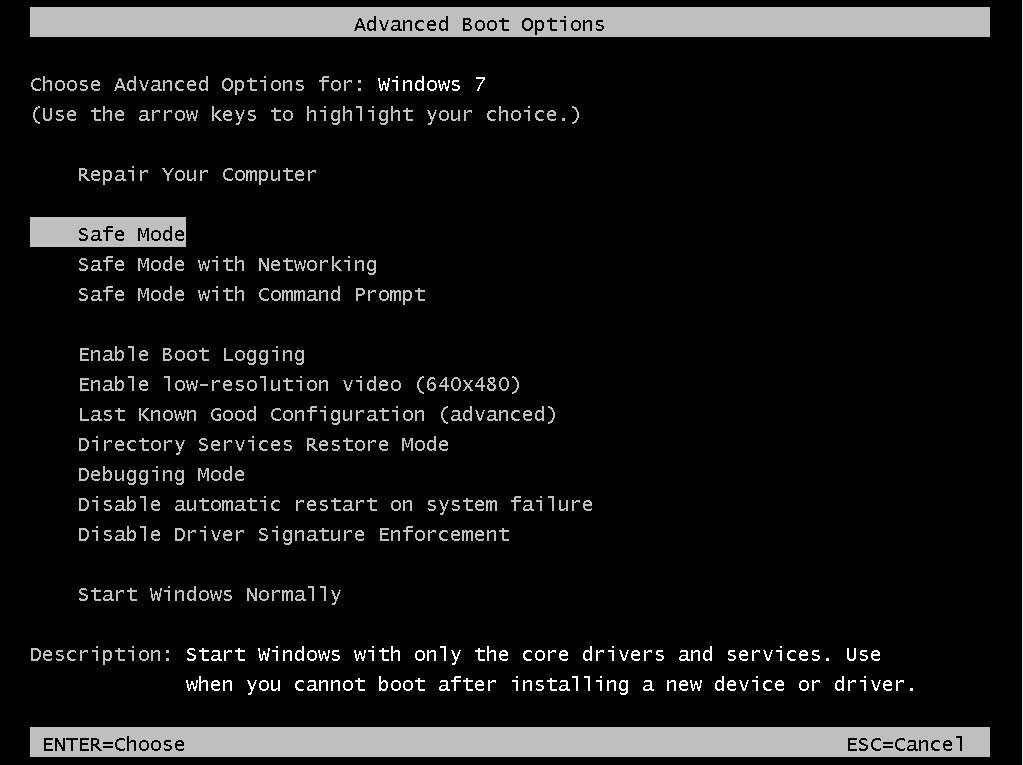
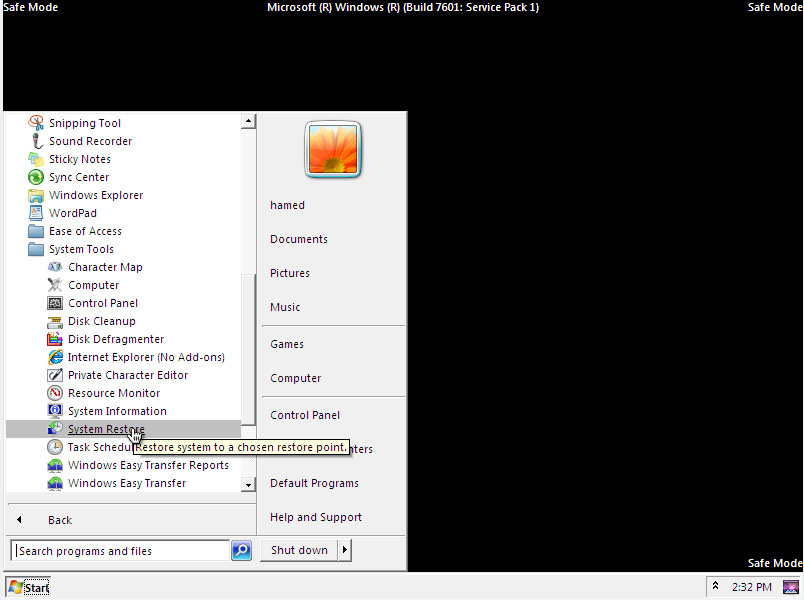
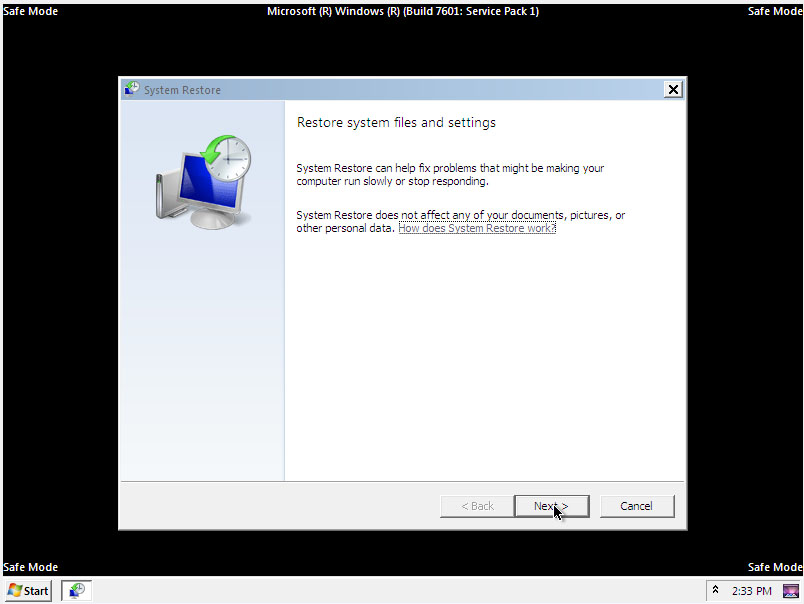
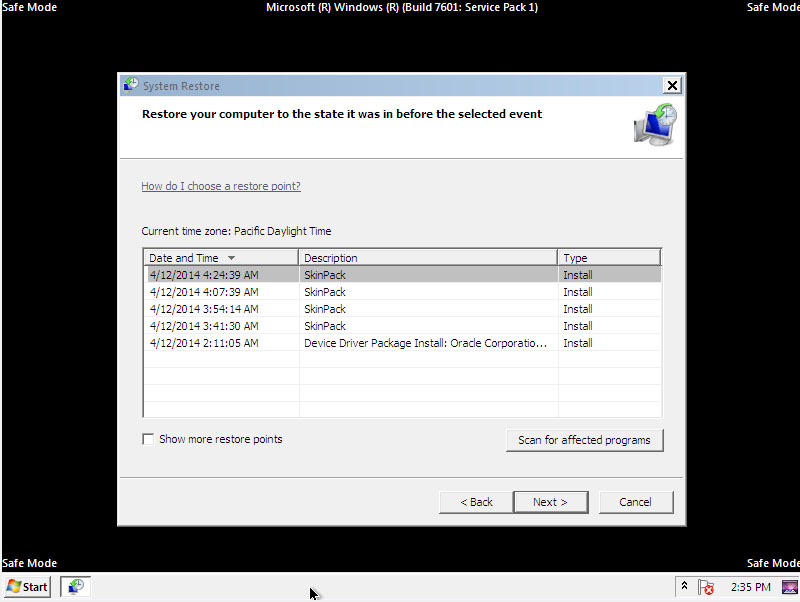
My screen suddenly have color lines and then it stars to get blurry then suddenly shuts off. I tried forcing it off and turn it on. The the fan works and my laptop turn on like usual but the screen is off. Please help.
Adding my comment above. I installed a few themes and my laptop started to lag. Installed uxthemepatcher and the screen problem happened.
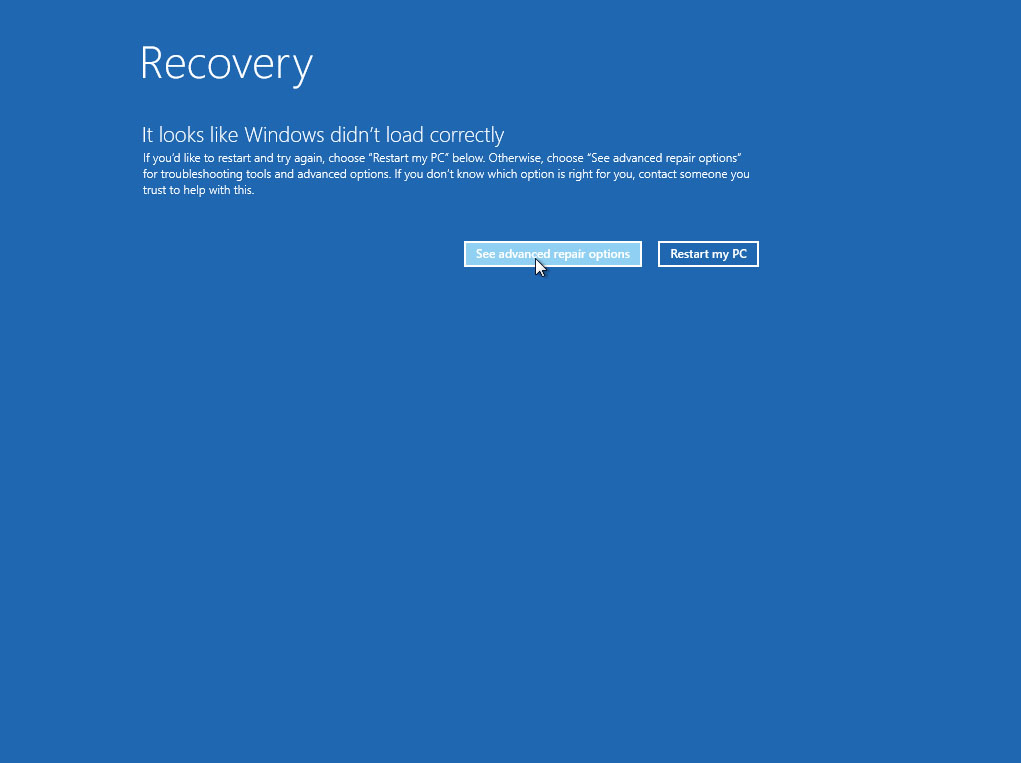
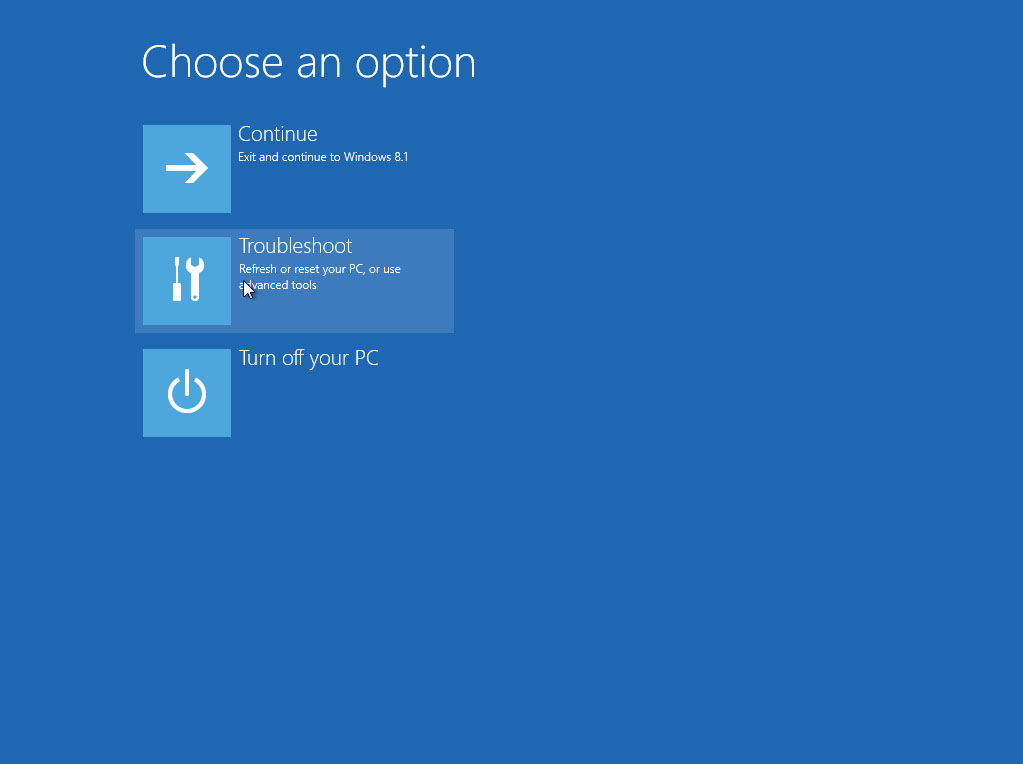
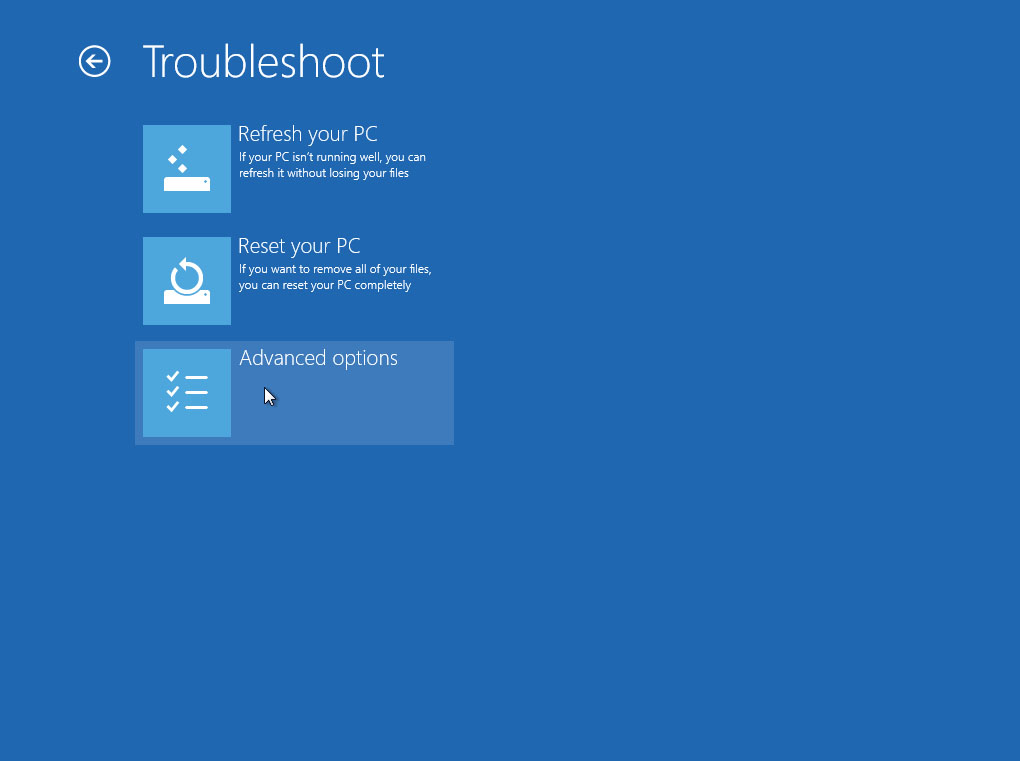
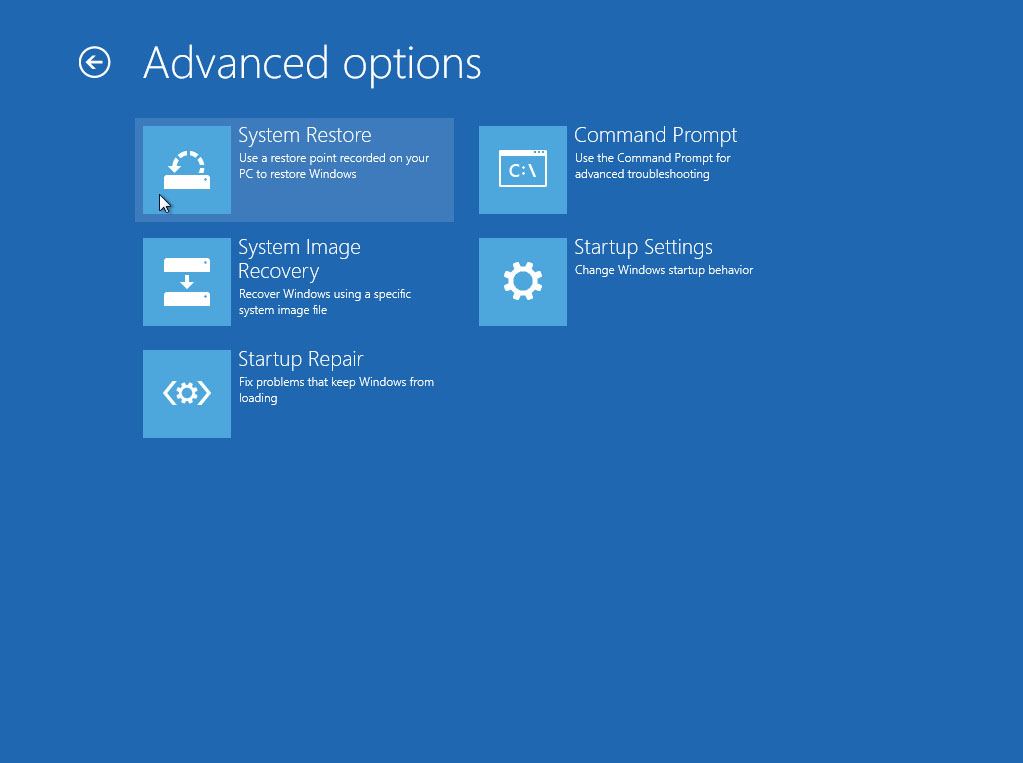
Reboot it 3 times using the power button and follow the instructions above.
Same here, my labtop also Lenovo. Until now, still black screen. Please help me
I have an Lenovo Windows 8.1 and I installere the Yosemite skinpack and I Wanted to uinstall it, bukt I didn’t know how so I deleted some files and restarted the pc and the black screen comes up, I have tried on websites to find a method that will help and I tried yours but nothing happens when I do it, help me plz
i had installed skinpack on my windows8.1….i am trying to uninstall it but i cant…why
I did everything but every time my laptop restarts, it just pops up the startup repair (for both options: launch startup repair and start windows normally). I tried to start windows in safe mode (after pressing F8) and still it keeps starting the starup repair. Overall, whatever I do, it all comes back to the startup repair.
I have win 7 32 bit.
I keep getting file system error (65535). Ive tried reinstalling windows a couple times and then downloading the skin packs again but I keep getting the same error messages when I try to run a program on windows 8.1 I really like the skins.. any ideas?
I have Windows 8.1
When I turned on the System Restore was not there shown skin pack. Help :-(
I installed Ubuntu skin pack in windows 8. When I open my PC an after sign in screen comes black. Help me now.
I installed Windows 10 SkinPack, but when I boot it there’s no form for user password. It’s just stuck with the log on page. I can’t launch my Windows as a result. Please help.
Have a HP laptop show the HP logo loading then when its supposed to go to lgin screen its just black and flashes the WiFi and mouse Ctrl +alt + Del doesn’t work f8 or anything doesn’t work I can’t login just a black screen runing win 8.1 how do I fix this help me with clear details I don’t know much bout laptops so please reply asap
Black screen after startup and nothing happens if i restart 3 times
I used system restore but then it says that there is no restore point? what to do if this happened?
Please help after download jarvis skin pack for win 7 i cant do personalization, the message appears after click on personalization “explorer.exe unspecified error” please help to fix this.
I have a Windows 8 PC. I uninstalled the Yosemite skinpack with the uninstaller and my desktop has turned orange and I cannot access anything. When I next boot up the mouse cursor will be shown but it will be a blank screen. Any help?
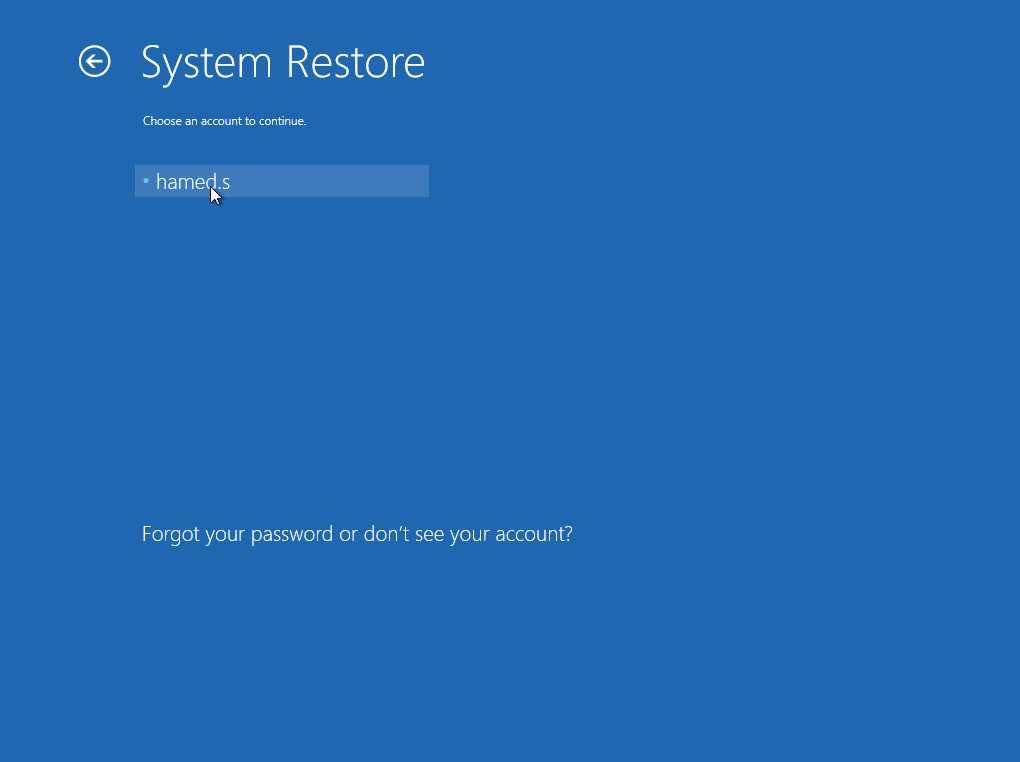
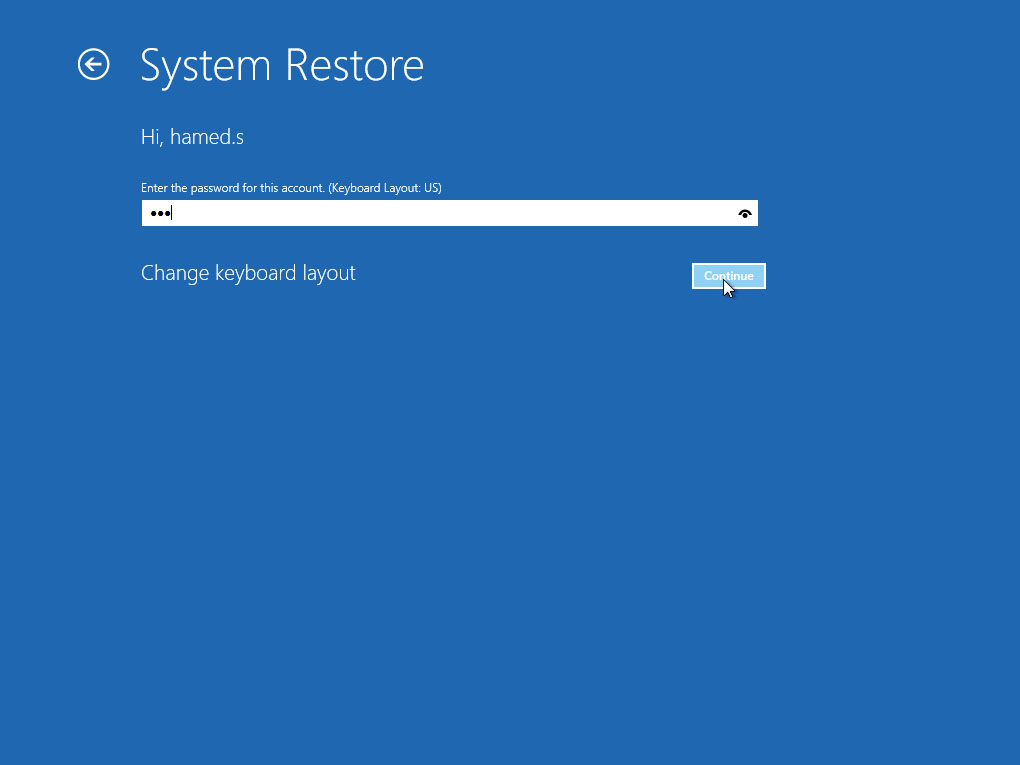
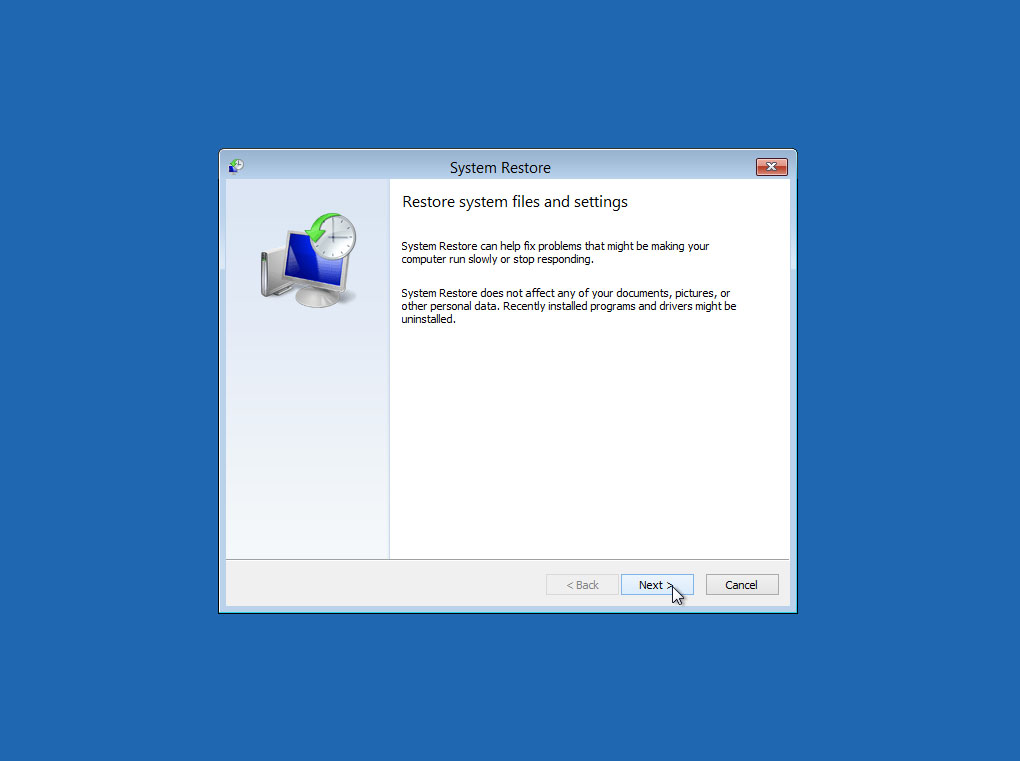
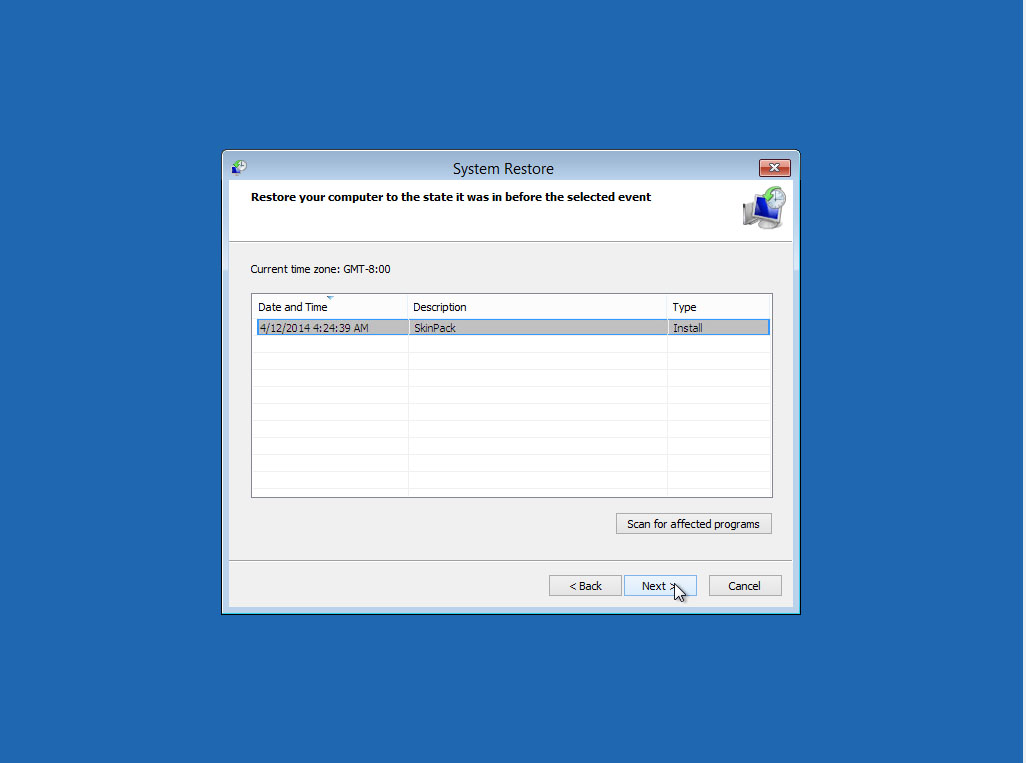
you need to run system restore
That didn’t do it for me. F5 got to me to the recovery option. And I did a system restore, then uninstalled skin pack again without issue.
Uninstalled the skinpack my pc is stuck on black screen, can’t see the windows logon or anything, the screen is blank and occasionally flash wifi bars below the screen . I can’t enter safe mode neither does any command work on boot. My pc is toast.
Any idea how I can get out of this?. Will be much appreciated.
just reset your pc 3 times with button and it will show the recovery system
i uninstalled alien ware skinpack and now my dell w8 only gives a black screen with a mouse cursor… i tried to reboot 3 times but that did nothing please help,.. how to go safe mode plz help me to restore my w8 back
https://skinpacks.com/help-faq/how-to-recovery-windows/#comment-18789
BLACK SCREEN FIX. NO SYSTEM RESTORE NEEDED.
1. Copy the three theme files(themeui.dll, UXInit.dll and uxtheme.dll) from another Windows 8 machine’s windows\system32 folder.
1a. I did this by using pstools(psexec \\machine cmd.exe) on another machine to remote shell into the machine then cd to windows\system32 then rename those three files to .old like move themeui.dll themeui.dll.old. I used command because windows was giving me permission warnings and such.
1b. Copy the new theme files to the machine using \\machinename\c$\windows\system32.
2. Connect to the network registry of the machine to change the default theme back to Aero.msstyles.
2a. Start -> Run -> type regedit. File -> Connect to network registry. Input remote machine and connect to load the hive.
3. Search for key ThemeManager and make sure your values for DllName are set back to default(%SystemRoot%\resources\themes\Aero\Aero.msstyles). I had one key set to the a theme at location HKEY_USERS\S-1-5-18\Software\Microsoft\Windows\CurrentVersion\ThemeManager. I looked under HK_LocalMachine and All Users at the location \Software\Microsoft\Windows\CurrentVersion\ThemeManager to verify they were all default as different themes change it at different places.
depply ,.i uninstalled lion skinpack and now my pc only gives a black screen with a mouse cursor… i tried to reboot 3 times but that did nothing please help
which windows you have?
help i uninstalled lion skinpack and now my pc only gives a black screen with a mouse cursor… i tried to reboot 3 times but that did nothing please help
what version of windows you have?
i cannot open personalize (change my desktop wallpaper) after installing aeropatch and skinpack. i uninstalled them and still cannot open personalize. it shows explorer.exe.. unspecified error.. helpppp
your system not support to patch aero so unistall aero patch
my laptop went blank after loading,startup page not showing,itryed safe mode the samething ppppllllllzzz what do i do?
win7 or 8?
Awesome :)
is that only for the online vesion because the online version did not work for me so i used the offline version
i press ctrl alt delete and nothing happened. btw i installed the neon skinpack, its been happening since i had to reboot my computer. sry for bad grammer
neon not support win8
im on win 7 giga byte pc .
ok we will fix it soon
need help F8 doesn’t work
just reset your os in boot load 2 or 3 times
how to reset
with reset button on your case
i opened safe mode and all i see is a blank screen with my mouse. pls reply fast i cant use my computer
press alt+ctrl+delete then open taskmanager and run c:\skinpack\uninst.exe
I can restore back to my Win9 State.. but Is it possible to OVERSWRITE win9 theme with MacOS Yosemite theme? Im kinda bored ;( If I install Material Design theme and Overwrite my Win9 will I get blank screen again?
After uninstall windows 9 skin, i got black screen. What could happened? I can’t get to safe mode in windows 8.1. Reply me fast or I won’t use your skin again!
just restart your os 2 or 3 times on boot section then you will see and option to restore your os
I have a last question, if i have windows 8, and i download a skin, and itdoesnt say it is available for w8, is gonna be a problem.
thank you
yes sure
Should I take a System Restore ?
yes
help, i have windows 8, push f8 and notinh happend !
just reset your pc in boot part 3 times and it will going to boot option
Screen blank after uninstall KitKat skinpack