Ads
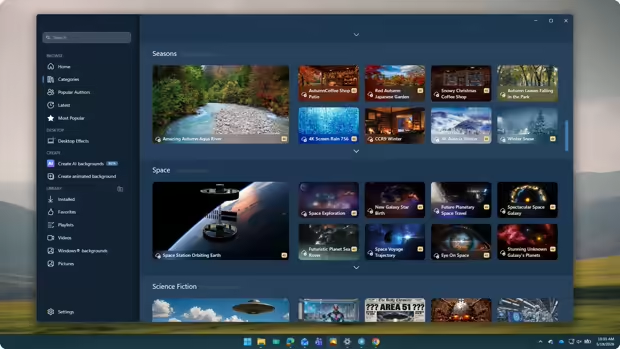
RainWallpaper is a program that provides the ability to install live wallpaper on the Windows operating system.
Available for setting live wallpaperAvailable for any screen resolutionCan make its own live wallpaperSupports the work without internet connectionAvailable for adding soundtrack to the set wallpaperSupport for multi-monitor systems

Make Your Wallpaper Yours!
RainWallpaper is a powerful customizable live wallpaper engine that allows you to easily create wallpapers containing videos, web pages, clocks, weather, text, images, etc. via the built-in WYSIWYG visual designer with minimal CPU and RAM usage. You are only limited by your imagination and creativity.

FEATURES
- Support Translucent Taskbar(win10)
- Build-in WYSIWYG visual designer makes it easy to create wallpapers with videos, web pages, clocks, weather etc.
- Build-in Steam Workshop makes it easy to download and share wallpapers with just One-Click.
- Clean UI, Easy to use and minimum CPU and RAM usage.
- Wallpapers will pause while playing games or running full screen application.
- Support Multi-Monitors
- Bring life to your desktop with realtime graphics, videos, applications or websites.
- Personalize your wallpaper or create your own wallpapers using the built-in Wallpaper Designer.
- Interactive wallpapers that can be controlled with your mouse and with click-on cool effects.
- Support for all aspect ratios and native resolutions including 16:9, 21:9, 16:10, 4:3 etc.
- Animate new live wallpapers from live themes or import HTML or video files for the wallpaper.
- Supported video formats: mp4, avi, mov, wmv.
How to install and use:
Download the file and run the installer in exe format, agree to all terms during the download and wait for the program to complete installation. The downloaded program will appear in the system tray. Click on the program and wait for the window to open, where there will be a few wallpapers, coming with the application. In the upper right corner click on “Download Wallpaper“, then you’ll get a window – “RainWalpaper“, where will be a wide range of live wallpapers, which you can download to install on your computer. If you want to create your own live wallpaper, you should click on the file with a cross just below “Download Wallpaper”, where the editor window will open. The program supports file formats: mp4, WebM, avi, m4v, mov, wmv. For web wallpaper you must specify the path to the html file.