
Ads


 Transform Windows 10 to JARVIS 2 Premium
 Download from kofi
 JARVIS 2 Premium SkinPack for WindowBlinds
JARVIS 2 Premium SkinPack Win11
The Windows 11 theme’s themselves are experimental, much of the overall look and results will vary depending on each users dpi settings, Best work on 100% scale and layout size, you need to set it from display setting, Also for enable start menu and taskbar skin you need to install startallback from startisback.com
Password: skinpacks.com
Malware/virus warning? Read the FAQ.
Support:
Windows 10
INCLUDES :
Theme for Windows 10
Original animated cursors
Original system icons
Original wallpapers
Exclusive sound scheme
Rocketdock skin
Rainmeter theme
Original fonts
The THEME is PROFESSIONAL. 100% of the details have been worked out.
Note: first you need to install uxtheme patcher from here.
Because skin packs will change file system (imageres.dll) to change icons so maybe Windows show warning, if you’re have any problem with installer then just use portable version. all theme have been fully tested, once purchase has been completed no refund will be available, however we will try to provide all possible technical assistants as required.
You’re advised to Create a System Restore Point before installing skinpack.If you have problem with install or uninstall skinpack, please check our help page.

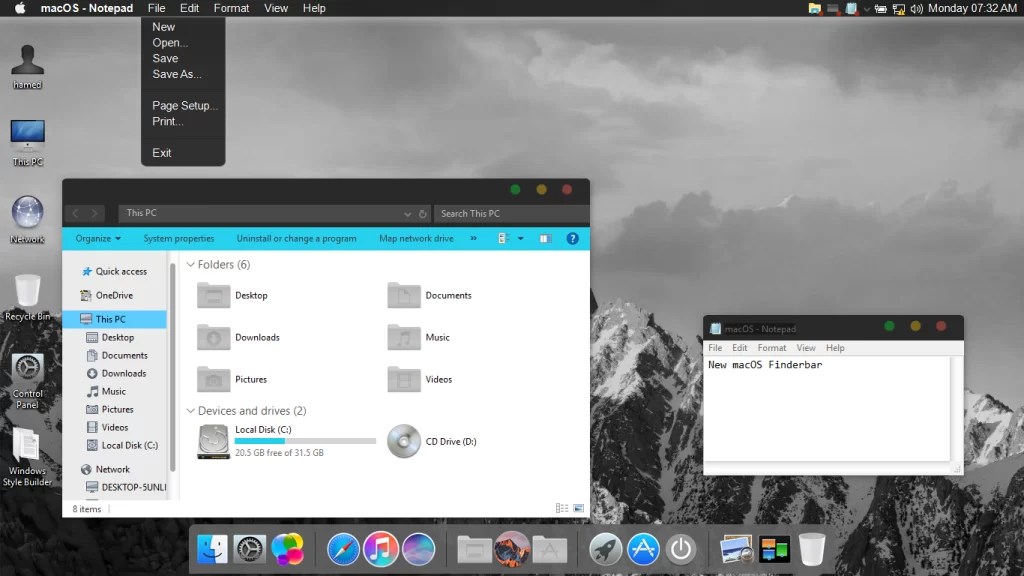
[…] JARVIS 2 Premium SkinPack Win10 […]
Unable to install the whole pack in my Windows 11. Is it going to be available at some point?
can not install on my pc
[…] Visit Download Page Share 0 Tweet Share Share Share […]
Hallo als ich es das erste mal installiert habe, konnte ich die einzelnen App-punkte und Ordner-punkte anklicken. Leider kann ich diese jetzt nicht mehr anklicken.
Wie kann ich diese Funktion wieder benutzen? Ich habe die Vollversion gekauft und würde es schade finden wenn die Funktion nicht mehr funktioniert.
Hallo am Anfang konnte ich die app und folder punkte anklicken das geht jetzt nicht mehr wie kann ich diese wieder benutzen
Say, you got a nice article.Really thank you! Want more.
how to download this thems?
this effects not working on my windows 10 only cursor and background, please help
[…] Visit Download Page (adsbygoogle = window.adsbygoogle || []).push({}); Share 0 Tweet Share Share 0 Share Share […]
I tried installing the Jarvis Blue skin on my computer today, as I saw that it was updated for Windows 10 RS4 (thank you so much by the way !), but after installing it seems that the taskbar, the start menu and the Shell32 icons are stil unchanged. I tried uninstalling and reinstalling, reloading the icon cache, reinstalling only the icons… these three elements are still missing (although, the icons in the RocketDock are as they should with the skin on, but I think those come from the imageres .dll and not the Shell32 one, which still contains regular Windows icon when I open it). Did I do something wrong ? How can I fix that ?
After readig your answer, I thought that I should have done something wrong. So I uninstalled everything, then redownloaded everything, made a clean install of uxtheme (3.4.1) and reinstalled the Jarvis Skin, then selected Jarvis theme from the settings. I still have the same issues ; start menu and taskbar lack the skin (although the tasks name are blue and the date/hour also), and the Shell32 icons are still Windows-like. Everything else works, I guess ; the windows have the right design, some icons works, the cursor too… I don’t understand.
[…] Visit Download Page […]
Hello, it is compatible with win 10 april 2018 update? :)
not yet
It would be wonderful if it would be :)
we will update it soon
Does this one work with Windows 10 Redstone 4?
not yet
[…] Jarvis Skin Pack. […]
[…] Visit Download Page […]
bro jab main ise install karne lagta hu to ye bich me hi phas jata hai help me bro
hey man, I tried installing the jarvis blue theme on my pc since I had it on my W8.1 before but now I got W10 and for some reason windows kept white the background and also the taskbar didn’t changed, Is there anyway I can fix that?
Uninstall uxstyle and install this: https://uxthemepatcher.com/
[…] iOS9 Skin Pack | For Win7/8/8.1/10 Iron Man Skin Pack | For Win7/8/8.1 Jarvis Skin Pack | For Win7/8/8.1/10 Jarvis Green Skin Pack | For Win7/8/8.1 Jarvis Red Skin […]
how to download this thems?
https://my.skinpacks.com/download-jarvis-skinpack/
my window is still white instead of being transparent!
how to download it????
what is jarvis 2.0 password
skinpacks.com
i cant download any skinpack sad huhu
How to uninstall so I can change to another skinpack?
its not download
skinpacks.com Are Not Working Incorrect Pass Showing My windows 8.1
best
app
thanks, i like it :)
What the password
skinpacks.com
skinpacks.com
Does it still not working on win 10?? D,:
its work on win10RS1
how can i get the password for installing the skin pack?
skinpacks.com
if anyone has noticed if you have blue jarvis set you cannot access device manager or any mmc.exe options but if any other theme set then you can. very odd. i even reinstalled windows and same thing. i found out by ading another user to my pc and testing.
it is very very nice.
after this my PC is looking like JARVIS and my brother is impressed from me because he is thinking that i made the program known as JARVIS…..
Download MiniTool Power Data Recovery Free Edition 6.0.0
good post,it is useful to me and others,please just keep it on….
I installed the skin then uninstalled it but the ads keeps coming and coming… how the hell could I delete it?
you need to uninstall skinpack extra
nice
Hi, how do I set the white background in word and excel? The theme is beautiful, but microsoft word and excel have a blue background and I can not work! Thank you
it applying theme to only icons please update for installing theme to all
im currently installing it i hope it works
it’s work for windows 10?
shopper pro3??? ㅠ.ㅠ
[…] Visit Download Page […]
[…] 14. Jarvis Skinpack for Windows 7/ 8/ 8.1/ 10 (Download) […]
Great theme thanks..
I installed the theme , its amazing but the preview which is shown here on the website accordingly my dialog box should appear in the color given in theme but its in white color which is previous color, please help me with this problem
same problem
It’s Automatically deletes from my computer :(
with new windows 10 update,this theme doesent work anymore
this theme is succesfully applied in windows 10 everything is as it should but the only problem is that the ribbon in file explorer reamins white. is there any fix for that?
i used the ribbon disabler but the box below it is still white the one which contains the back forward buttons and the search bar
it’s fixed, i used oldexplorer
i cant fix the task bar its really weird ..the start icon is present but invisible the input indicator and clock are huge on the task bar is there any way so that i can just change the for taskbar ?
can some one help me with the password please?”
skinpacks.com
what is the password??????
skinpacks.com
I mean this skin pack password is skinpacks.com
will it work on windows 10
no
yes it does
[…] Jarvis Skin for Windows 7 – 10 […]
very very very ……………….like it…………….
nice pack. awesome. how to download a hacker theme?
hw to rename itthe optin for rename is nly nt cmng nw wat to do plz hlp
I don’t know why I can’t rename it
after opening the zip file. It is only setup.cmd and setup.ex and is not opening even after a restart
rename the setup.ex to setup.exe and try installing it again
the file setup.ex right click it and rename to setup.exe then click it open and it will install
awesome skin pack
good theme im like
let’s dry machi
where a download iron man jarvis
It work well and very interesting
thank you. working 100%
ITS NOT WORKING, YOU BETTER CHECK IT OUT
It´s work to 100% :) Win 7 home.
Why can I make it work???
Please help me just PM me in Facebook Link below
https://www.facebook.com/angelopogi34
How do i download it ?
how to unistall a skin pack i unistall it by goin to programs and features but i still see the wallpapers and themes and also the task bar of the skin pack
just go to your control panel and uninstall it
why cant i get the blue background when i open any folder !!
I have installed it and was able to get all the features of it but after restarting, the taskbar and some effects was lost.
can you help me fix this without using the the uxtheme patcher?
please…
my taskbar didnot transformed
nice skinpack
i don’t know why but every skin pack i use, the icon won’t load up!!!! Please help!!!!!
Awesome skinpack and it’s working perfectly fine, but there’s a little problem with start menu transparent.
let’s say im browsing skinpack site. The site background is white, because of the start menu transparant the white/light background of the site make the start menu almost unread able.
is it possible to make it non transparant?
I also just noticed that the theme messes with my Microsoft office 2007 programs and documents…… any fix for that?
Hey I just downloaded you skin and I love it! just a small problem everything has changed in style which is what i wanted all except the clock next to the calendar it is till the same and it looks really bad with the rest of the theme. Any help with that?
I’m getting a black background in all documents file and in the browser too. Can it be changed ?
Cant use, showing virus
HI! this is a great theme, thank you so much! everything is cool, I just need one thing if is possible. The Start Menu with Jarvis is too transparent, where can I change it please. Thank you
from where we download uxtheme patcher
Is there a way to change the font color from black when viewing, for example, “computer” folder? On the far left side of the view I can see the icons but the words are almost invisible and I have to hover over them to highlight what the files/folders are. However, in the main viewing area (apologies I am not sure what these areas in the panels are technically called) under the headers “Folders” or “Devices and drives” for example, the font is blue and everything is visible. Excellent work by the way! I absolutely love your design!!
Thanks
application working stopped while installing
i heard that cortana is comming to windows this will be a great thee if we can use an icon to open corttana
How do you uninstall?
from Programs and Features
how to transparent all window in jarvis
go to control pannel the ton uninstall programmes
search for it
please support for Windows 10 TP.
I can’t download this skin by IDM ???
its fixed now, we are change our servers and hosts
Sorry, but something is wrong with the download: offline.
its fixed now, we are change our servers and hosts
why my start and the task bar don’t change as the theme above?it looks like windows xp or something :/
you need to install uxtheme patcher first
it is true failing download.
does this skin pack included jarvis sounds?
IT SHOWS: The webpage at https://dl.skinpacks.com/skinpack/jarvis/SkinPack_Jarvis_1.0.zip might be temporarily down or it may have moved permanently to a new web address.
fixed
i have that problem
it keeps asking for a password?
Fixed thanks for report
IAM NOT GETTING THE COMPLETE THING , IN MYCOMPUTER THE BACKGROUND WAS STILL WHITE IN COLOUR !!!!!!!!!!!!!!
you need to install uxtheme patcher first
Can i download only parts of the skin?
after download you can select which part you want to install
I asked for it U Made it.. Thank You Hamid and your friends.. Perfect
i found some major bugs… i wanna send u a screenshot…
Well Nevermind , it was just my PC’s fault, now it runs Alright
Request Skinpack for Windows xp
nice job mate, but if you plan on releasing an update please make the 3 icons at the right corner of a pg all the same, and the time and date in the lower right part of the desktop screen where now is only the time, keep up the good work.
its nice pack i like but how can i change other thems
[…] Visit Download Page […]