
Ads
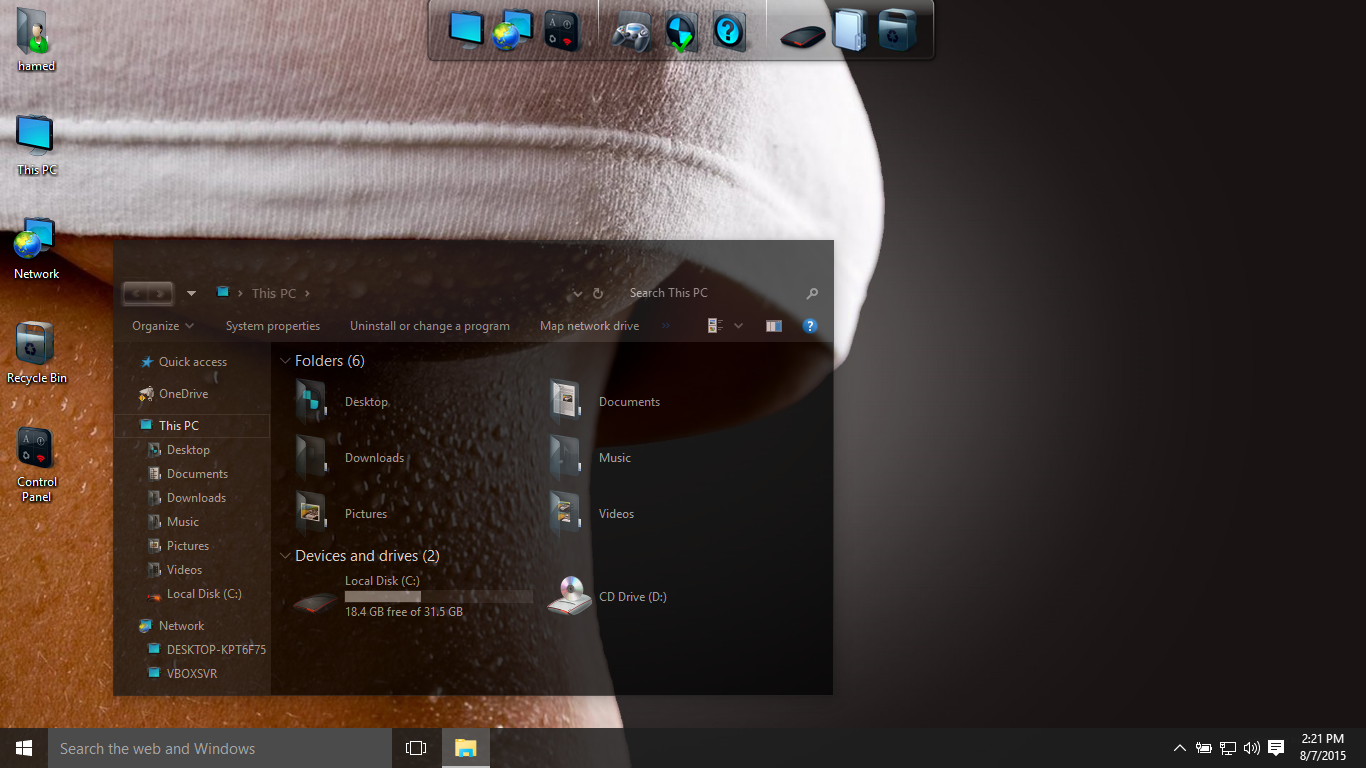
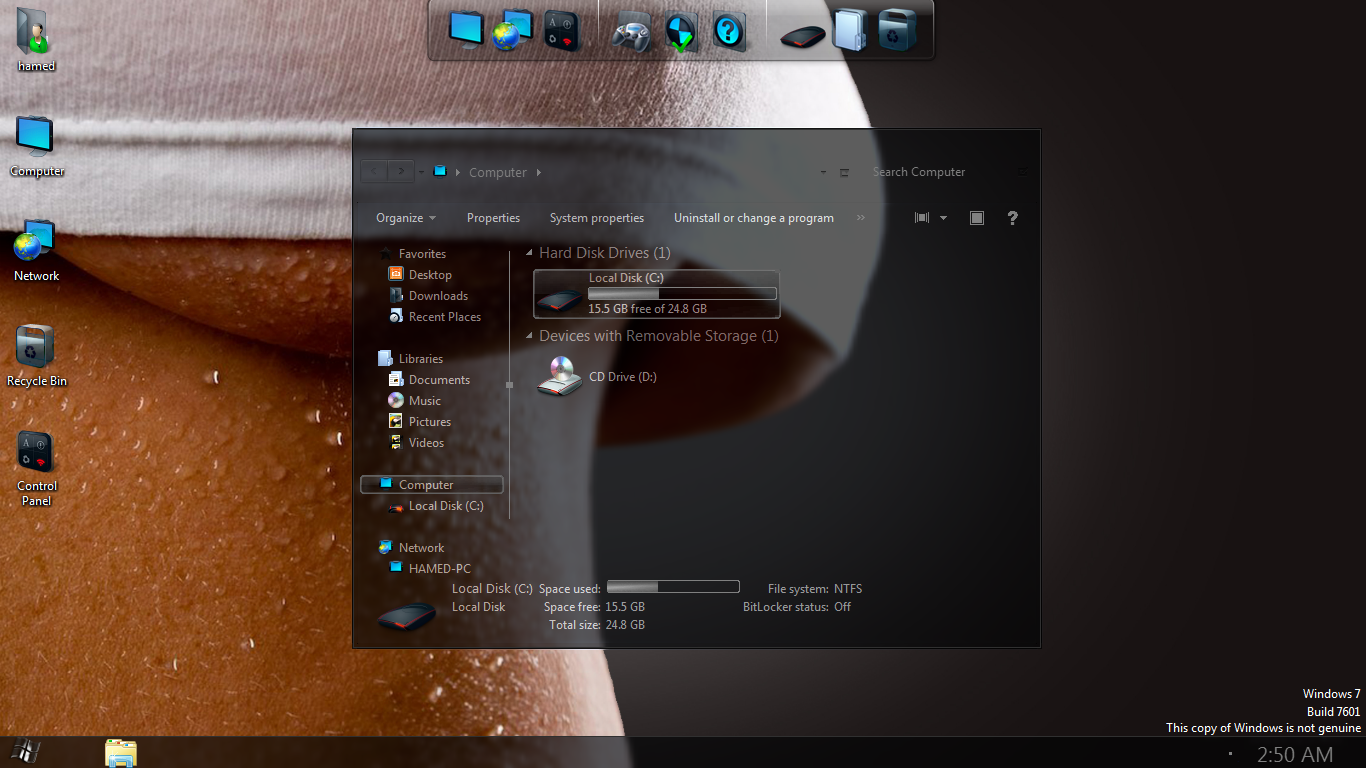
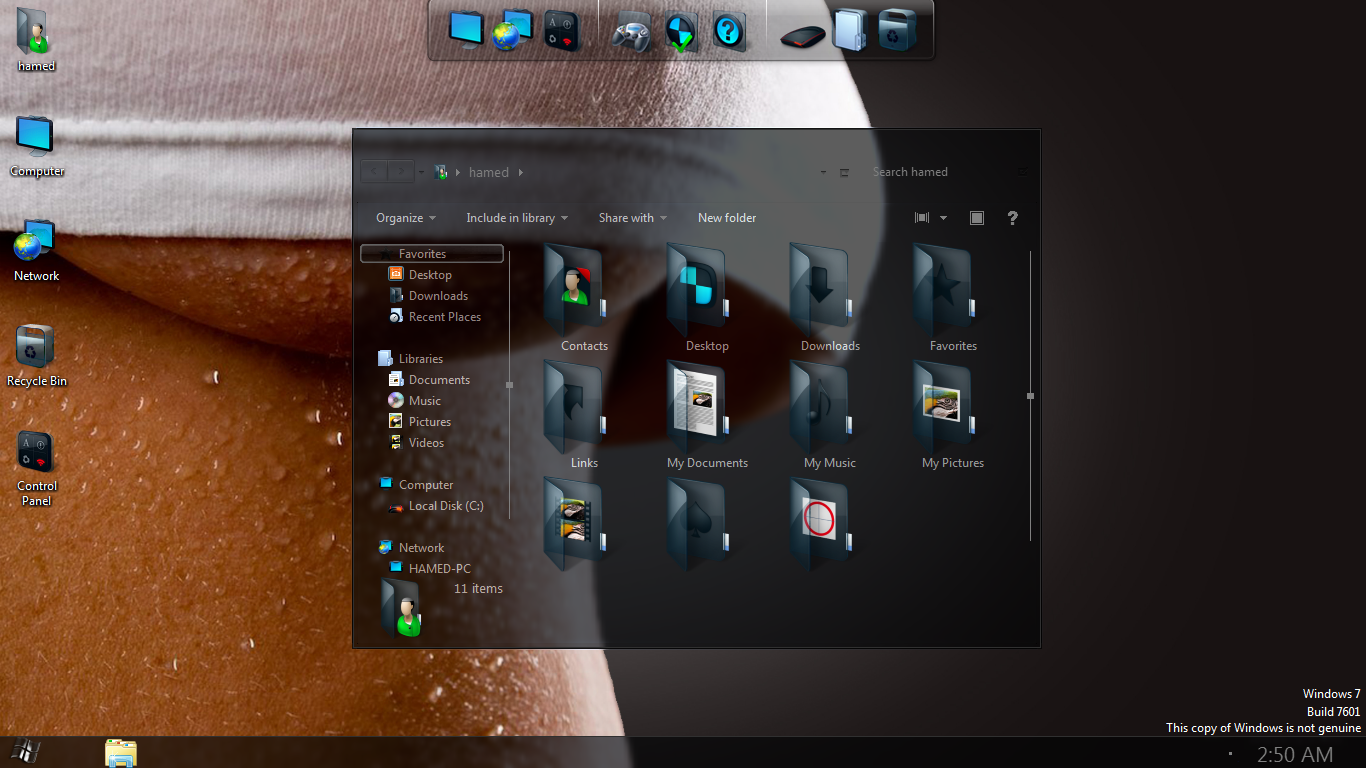

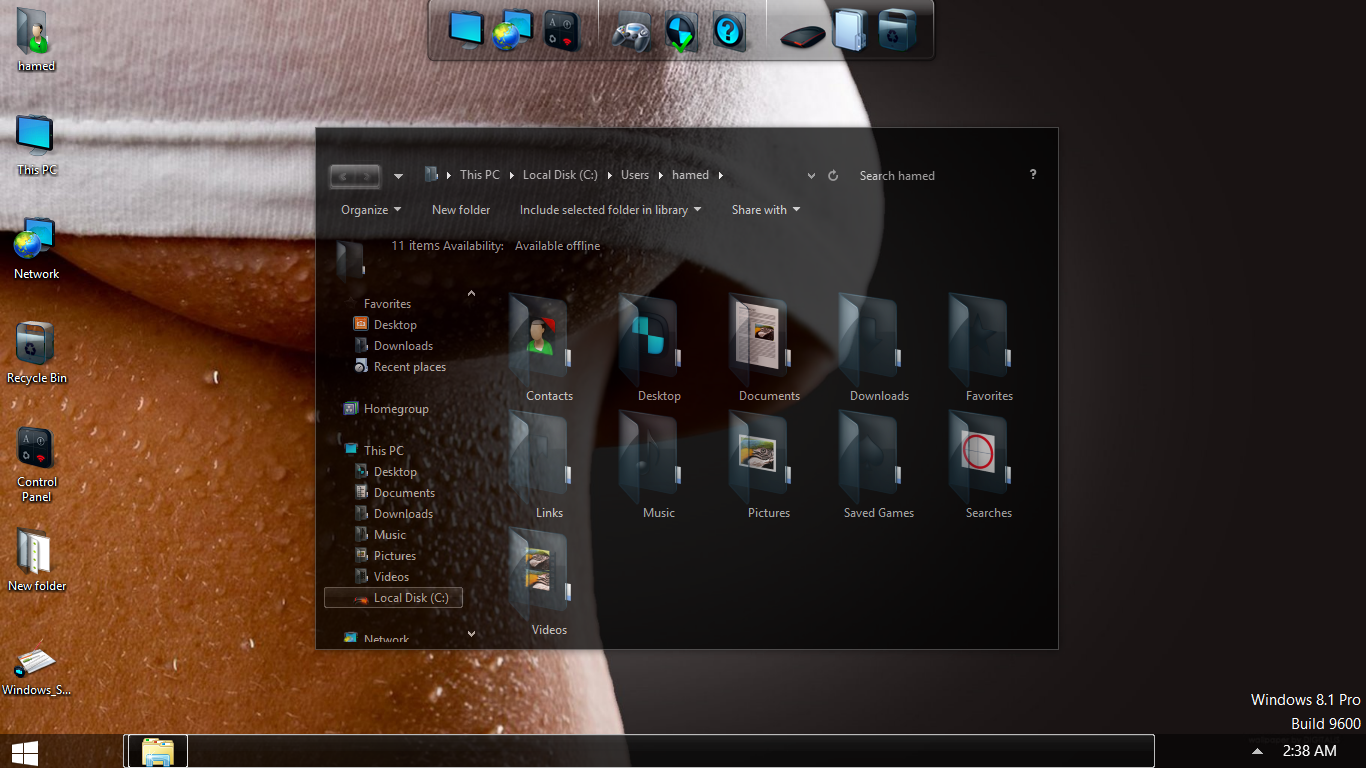
Transform Windows 7\8.1\10 to Dark Glass
 Download for $4.99with icons and extra
The Windows 11 theme’s themselves are experimental, much of the overall look and results will vary depending on each users dpi settings, Best work on 100% scale and layout size, you need to set it from display setting, Also for enable start menu and taskbar skin you need to install startisback from startisback.com
Password: skinpacks.com
Malware/virus warning? Read the FAQ.
Windows 7\8.1\10 21H1 [X86_X64]
Note: Please unistall old or other version of skin packs before install new one. if your theme not changed or its like classic windows you need to install uxtheme patcher from here and after restart select new theme from personalization.
Because skin packs will change file system (imageres.dll) to change icons so anti virus give warning, please disable temporary if you’re using anti virus. all theme have been fully tested, once purchase has been completed no refund will be available, however we will try to provide all possible technical assistants as required.
You’re advised to Create a System Restore Point before installing skinpack.If you have problem with install or uninstall skinpack, please check our help page.


Please reply, “Windows license clitch”
Could it be that when I install the skinpack, my windows license for 8.1Pro deactivate?
I couldn’t turn it on again… Tried everything..
So, I reinstall the whole Windows 8.1, bought even a new license key, but when I install, it takes a 25minutes, and my windows couldn’t be activated again.. It automatically deactivate the license.. License key could not activate.. whatever license I use, no one works anymore..
I saw in my system, if have the glass system, the word genuine in the right corner.. could this be, that my laptop get confused, and that system part of licensing the system, crashed?
” I need this theme, I always wanted such dark glass theme, except of the high white contrast, or deviantart noobs…”
Please reply, so I know if a fix can be made for it. I paid for the theme!
Again, I love it! Only one on the whole world wide web..
Also, more people got this problem? Then please reply, so I know I am not the only one..
Kindly regards, customer.
read about it here: https://www.glass8.eu/
Thankyou! I clicked the link, but have already winaero.. is included in my intel 4000graphics driver..
What the problem is, is the white contrast, in the filespaces exc~
This glass theme, could eliminate that for a 100%..
Hope to hear a reply back.. thnx for the fast reply… did not expect that..
can you send screen shot of problem?
It was difficult ashell, to made a screenshot, witht explaining the problem, but I did it, with much hope.
Thnx for the fast reply’s!
https://drive.google.com/file/d/1fjAR-40C3GG7pReZgBRsYyMD3PbYdO7P/view?usp=sharing
And the text, in the screenshot, is what the huge problem beholds.
Here the screenshot.
I do not install the darkglass theme again, till there is a fix.
If I install the theme, then suddenly, after a restart of my windows,
“After a update, or just a few restarts…” My license suddenly is not activated…”
I know 100% it’s theme related, since I installed
my windows, 4times again, and 4 times, after theme install, it got deactivated
The bad of this is, that it is a crash in the activation system,
and whatever I do, even call microsoft, and type in the code I recieved,
then he say: thnkyou, it’s all done..
But in the end, still the same drama, and it’s still
“windows isn’t activated” And then I can reinstall my win 8.1Pro
Even bought a second brand new license “so much is this theme worth for me.
But again, it couldn’t activate the license.. Please fix this.
This theme is all I dreamed of, as a active webdesigner.
All the white, like in this canvas, was gone. But I can’t use the theme, with this huge clitch..
Hope to hear a reply forwards from you🙏
Kindly regards, Dennis.
Is a solution in the make? Because I love this theme. I even wotrk from my external hdd, because I want to install this theme asap, with a fix.. So my licnese stays on, and windows do not say, it is not a genuine.. If that happne, I can erase my whole drive, to install win8.1pro again.. Please let me hear from you soon! It takes already days… If no solution, then please, let me know that also.. Reply before, is with a screenshot, without the theme, and telling what happened if had the theme installed, is written in the screenshot.
Kindly regards, Dennis
we test it and there is no problem i think its problem of your windows not us
There is wrote theme for win 8/8.1, but skinpack it’s not even remotely compatible with 8 and 8.1.
What happens to the installer, everything is fine at the beginning but when it reaches 10% it gives an error and starts again to stay at 10%, is it a mistake or what is the problem …?
selective font dont show
https://www.dropbox.com/s/ygmfv9pac1biv2a/dark.jpg?dl=0
also in search area font dont show..only black as here
https://www.dropbox.com/s/9uycc0f6t6sch0a/dark1.jpg?dl=0
this search area i talking about
do i need to pay for future updates?
[…] For Win7 Glass Onion Skin Pack | For Win7 Glass Skin Pack | For Win7/8/8.1 Glass Dark Skin Pack | For Win7/8/8.1/10 Gnome Skin Pack | For Win7/8/8.1 GTA V Skin […]
copie bague or et cartier diamant
An impressive share! I have just forwarded this onto a coworker who had been doing a little homework on this. And he actually ordered me breakfast due to the fact that I stumbled upon it for him… lol. So let me reword this…. Thank YOU for the meal!! Bu…
Will this theme work with rs2?
not yet, you need to wait for update
Hi, I was wondering if there was a way to use this theme without hiding the ribbon and the directory up button. As a content developer and programmer those things are very useful for navigating, controlling, opening, and viewing things in file explorer. I agree that it would look ugly with just white, but I need the functionality more than I need the full aesthetic. Also, Task manager derps up with this pack, can I disable this just for task manager somehow and let the windows 10 built in dark theme handle that window? Ty.
read about it here: http://www.msfn.org/board/topic/170375-oldnewexplorer-118/
[…] For Win7 Glass Onion Skin Pack | For Win7 Glass Skin Pack | For Win7/8/8.1 Glass Dark Skin Pack | For Win7/8/8.1/10 Gnome Skin Pack | For Win7/8/8.1 GTA V Skin […]
hi, how i can download it? I download with download manager but tell me incorect password(skinpack,com)
skin pack for windows 7
hello, can anyone help? after installing this theme, caption on internet download manager gone blank. what should i do?
this is bad, no themes can download for free
how to download
how to download this theme…?
[…] bạn thích bộ skinpacks này thì truy cập trang này để tải nhé, lưu ý đọc kĩ hướng dẫn trước khi cài đặc biết nếu đang […]
NSIS Error?
There is a problem, Windows explorer colour wont change it’s always white in windows 10.
Great skin. Only problem I have is when I select properties on a file the text colours are the same as the background making it impossible to read. Anyone have the same problem or have a solution?
I got the same Problem, do you find a fix ? Can you text me if you find it ?
Same Problem here, Dropdown boxes are just black! Anyone got a fix?
http://postimg.org/image/6ai82bfr9/
Not Working in New Build of Windows 10 (1511) Explorer backgrounds are still white.
I like this theme a lot. But it is possible to define exceptions for programs? In Word the transparent background is very distracting. If I remove the transparency, it is gray. In Word, I would have liked that it remains white. Can i change it?
[…] Glass Dark Skin Pack | New! – Support Win7/8/8.1/10 […]
pswd plsss SkinPack DarkGlass SkinPack Steam OS skin pak ios9
skinpacks.com
Lo instale y es lo mejor que he encontrado para el window10, gracias por el tema :)
whats the password?
skinpacks.com
[…] Visit Download Page […]
for win 10
How to you change the transparency? Windows 8.
not working properly….the file explorer background has not changed to dark as it should be , instead it is white and the text are faded more ….nay solution plz do reply !!!
Minor glitch with some window control elements, most notably dropdown boxes and their labels:
http://i690.photobucket.com/albums/vv263/Eudaimonium/Pizdarije/Glitch_zpstzfwkk6m.jpg~original
Problem with theme or my installation settings? How would I fix this? I love the theme, it would be a shame for this to keep happening.
Same Problem here, Dropdown boxes are just black! Anyone got a fix?
How to install this??? plese help me some1..
just open my computer and you see on the top you see unstiall or change the programe just clik on it and you the all sowftware in your pc and one of them is dark glass theme clik on this and uninstall it
first left click on it and extract it and then open the setup and install it
sorry to say but its infected according to Avast Premiere 2015 and setup.exe is immediately deleted as soon as you rename it or you start the cmd file….. please find a solution because DARK GLASS is a really COOL idea…. :-)
disable antivirus for sometime in avast tray icon
Its not the actual pack, its just there are optional programs that are malware in the installer. Just read carefully and decline all those unneeded programs. Hope it helps.
just awesome , here has setup file, rename the setup.ex_ to setup.exe !!
no lo puedo ejecutar
there is no setup
very nice
this is the worst skin pack. after instaling this you destroyed my recommended screen resolution. now i i use the recommended screen res. the tasbar is shown half and the desktop is not fiited to the screen. how to fix this ?
use driver booster
cool
[…] Visit Download Page […]
[…] Visit Download Page […]