
Ads


 Transform Windows 10 to Windows 11 Dark
 Download from gumroad for $4.99
 Windows 11 SkinPack Win10
 Windows SkinPack Collections
The Windows 11 theme’s themselves are experimental, much of the overall look and results will vary depending on each users dpi settings, Best work on 100% scale and layout size, you need to set it from display setting, Also for enable start menu and taskbar skin you need to install startisback from startisback.com
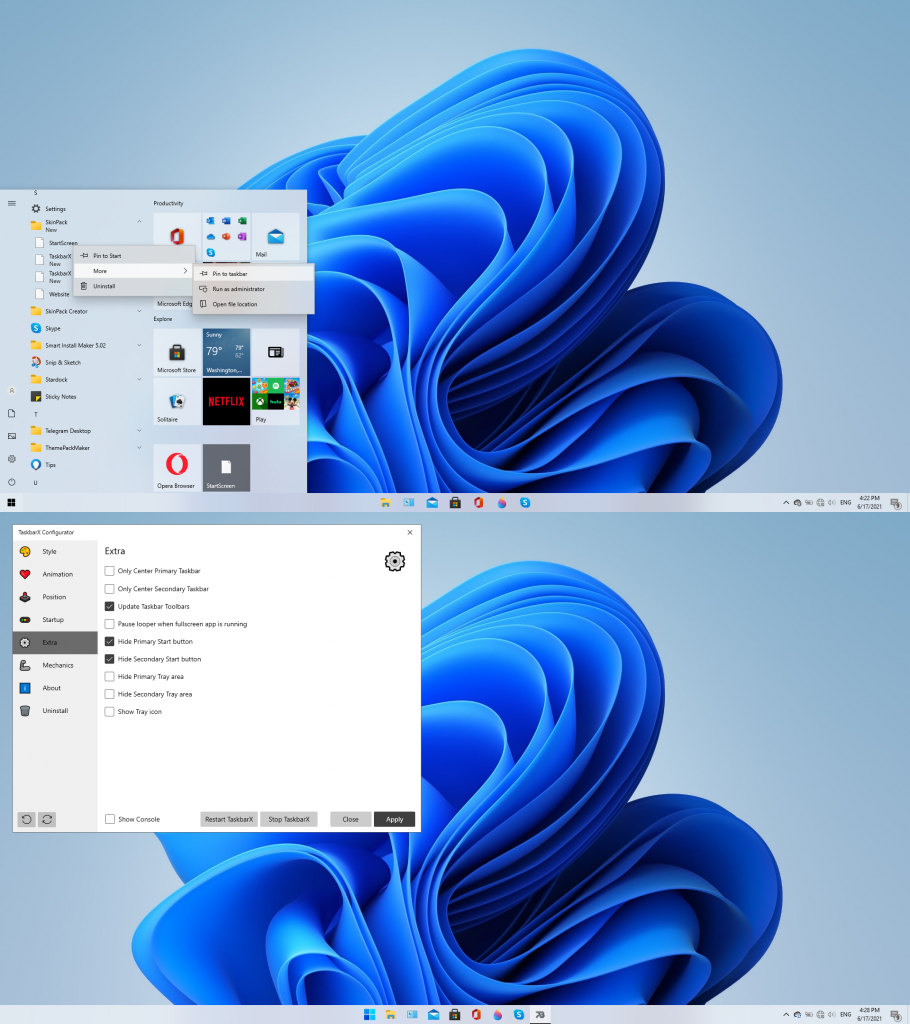
Note: if you have problem with taskbar, start button or start menu then set taskbarx, start button and start menu setting like this:
Password: skinpacks.com
Malware/virus warning? Read the FAQ.
Windows 10 [X86_X64]
Note: Please unistall old or other version of skin packs before install new one. if your theme not changed or its like classic windows you need to install uxtheme patcher from here and after restart select new theme from personalization.
Because skin packs will change file system (imageres.dll) to change icons so anti virus give warning, please disable temporary if you’re using anti virus. all theme have been fully tested, once purchase has been completed no refund will be available, however we will try to provide all possible technical assistants as required.
You’re advised to Create a System Restore Point before installing skinpack.If you have problem with install or uninstall skinpack, please check our help page.


No free version ):
Damn, there is no free version.
Bonjour,
Merci pour le travail.
Est il possible d’avoir word et excel avec la feuille blanche ?
Merci
Bonjour,
Merci pour le travail.
Avez vous une solution pour remettre une feuille blanche à word et excel ?
Merci
lol
It work thanks
Permission download bro
hi
Hello, can this skinpack also be used in Windows 10?
sure
[…] Kunin Windows 11 Madilim […]
[…] Получать Windows 11 Тёмная […]
[…] Werden Windows 11 dunkel […]
Why can’t the free version be downloaded?
[…] Pegue Windows 11 escuro […]
I´ve bought your skinpack “Windows 11 Dark SkinPack” for Windows 10 21h1, can I use this skinpack also on Windows 10 LTSC 64 bits?
I dunno, it probs won’t work on Windows 10 LTSC, ya gotta listen to the requirements.
[…] Windows 11 Dark SkinPack – Skin Pack Theme for Windows 10 […]
[…] Windows 11 Dark SkinPack – Skin Pack Theme for Windows 10 […]
Hi, Can You Make Free Version Have All Features in All SkinPacks and Change Full Version Name To Paid Version?
I just paid for the Dark Skinpack for Wind11 but they did not send me the password
password: skinpacks.com
Can I get my money back? For me it didn’t work on Windows 11 21h2
mmm.. i’m not from the skinpacks team but let me say this at least.
try to read everything carefully before you decide anything, especially if it concerns about money. it is clearly stated that the skinpack only support Win 10 21h1 not 21h2, is it really that hard to read everything?
21h1 to 21h2 is such a small thing. It is not difficult to read, but it is ridiculous not to bear it. For a person who is not on the team, you are quite annoyed.
we will update it after release windows 10 21h2 final
can this support windows 7 also? im scared downloading it, because i did a windows 10 skinpack and it supports windows 7, can this also support windows 7?
no
Can this skinpacks also be used in Windows 10?
yes
Not working properly in Version 21H2 (OS Build 22000.71)
as you can see in details its support 21h1 not 21h2
hi! i like the theme so far.. i downloaded the free version, but i there’s something i want to ask, what should i do to keep some app like ms excel and powerpoint white/bright? my ms excel background is also darkened along with the theme and some part of my presentation as well, even tho i’ve changed the office theme to white. it’s hard for me to read the data and numbers.. thank’s before..
https://github.com/matafokka/ExcelDarkThemeFix
Thanks! is this method also work on presentations (powerpoint) or just for excels? anyway, thanks for replying and have a nice day (or night depending on your timezone haha) :))
i paid 2x too and i can’t download
…..or just run Windows 11 which is a free upgrade for 10 users!
It didn’t install startscreen and taskbarx, it only installed theme, and icons, not startscreen and taskbarx.
free version not have this feature
I’ve bought full version, and there is no the “startscreen” option in apps. 😤
its in all programs, you need to pin it to taskbar by your self
There is nothing in the skinpack folder, only shows uninstall and website. there is no startscreen and also no taskbar x like it shows on the picture.
free version not have this feature
The problem is, there is no startscreen and taskbarx in the skin pack folder. It’s only uninstall and website. So i can’t pin anything to taskbar. I check the installation folder. The “startscreen” and “taskbarx” is not there. So how can I pin those two to the taskbar if the file is not there. I bought the full version, and that’s the problem. I understand about your explanation that you show in the link and the screenshot. But, the problem is the file is not exist.
this features just availabe on full version
Me too, do you solve the problem?
to have taskbar like screen shot first pin startscreen from all programs and disable start button from taskbarx setting like this: https://skinpacks.com/download/windows-7/windows-11-skinpack/untitled-16/
to have taskbar like screen shot first pin startscreen from all programs and disable start button from taskbarx setting like this: https://skinpacks.com/download/windows-7/windows-11-skinpack/untitled-16/
Me too, I’ve bought the full version, but there is no startscreen option in skin pack folder. So do you solve the problem?
to have taskbar like screen shot first pin startscreen from all programs and disable start button from taskbarx setting like this: https://skinpacks.com/download/windows-7/windows-11-skinpack/untitled-16/
I bought it and it is nothing else than in the free advertising (no icons) am I doing something wrong?
unistall free version then install full version
This is great article it is very useful thank you so much.
[…] Visit Download Page Share 0 Tweet Share Share Share […]
[…] 3. Windows 11 Dark SkinPack […]
Thanks for the information keep sharing such informative post keep suggesting such post.
[…] Download Theme/SkinPack […]
[…] Download Theme/SkinPack […]
Nao usar skin, perigoso para o note.
[…] users like the dark mode of any operating system. If you are one of them, then the Windows 11 dark skin pack theme is for you. It gives you a dark color that looks very pretty and makes your 10 windows more […]
how often are the ads for the free version?
its install adwares
Thanks for sharing this post. I will surely follow these tips on making this problem solved.
does the lite one has dark theme!!
yes
when i try to install It give me this error “Windows Cannot find ‘C:\Windows\Resources\Themes\win11.theme’.make sure you typed the name correctly, and then try again.'”
[…] Visit Download Page (adsbygoogle = window.adsbygoogle || []).push({}); Share 0 Tweet Share Share 0 Share 0 Share […]
One for w7 please
i cannot use my task bar! what happen?
mine is still white after install patcher, do i need to uninstall the skinpack first, install the patcher and then install the skin pack again? thx
Nice Work Thanks for RS4 Support :)
skinpack.com is incorrect password
not skinpack.com its skinpacks.com
your post is informative..but you share me something more about it then it’s superb because I want to know more about it…share its related links with us.
[…] Visit Download Page […]
Funciona para Windows 7 Ultimate
link corrompido
fixed, thanks for report.
corrupt file and please for windows 7
fixed, thanks for report
nor tor me
fixed, thanks for report.
I need to get the free dvd player for my windows 10 operating system,please enlighten the path.
This Windows 11 21H2 skinpacks are not working booth of us explorer not open please fix it…
hi, backgound of explorer ist still white, what to do`? thx for help
you need to install uxtheme patcher first
mine is still white after install patcher, do i need to uninstall the skinpack first, install the patcher and then install the skin pack again? thx
and need to change this
i like it,,,,!!1
we can not see down load
yes, me too
Website you are visiting may be harmful. download not working plz help….
where is win7 version?
Idk no Windows 7 version
[…] Visit Download Page […]