
Ads
About
SecureUxTheme is a piece of software that removes signature verification of styles in Windows.
Features
- No system file modifications
- No driver needed
- Secure boot compatible
- Probably quite future-proof
- Fixes LogonUI resetting some colors on locking
Limitations
Styles must still have a format-wise valid signature appended, it is just not verified. For this reason themes need to be applied with the tool, rather than in Personalization / Themes.
Operating System Support*
- Windows 8.1
- Windows 10
- Windows 11 (tested: 21H2, 22H2)
- Future versions**
- Windows 7 or older will never be supported due to the way themes are implemented.
** The current code doesn’t depend on any code, binary or memory layout of uxtheme and related dlls, therefore should work unless major changes are made to how themes in general work.
Download
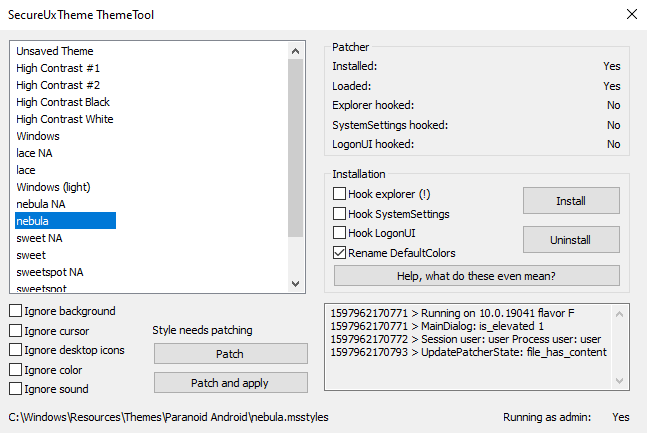
Screenshot:
This is only a tool for enabling custom themes, no actual visual changes will be made. Regardless, here’s a cool theme for illustration
Where to get themes
I recommend skinpacks.com for finding themes, although it is a bit noisy. Also, you can just search for themes with your favorite search engine. Make sure that the theme you’re about to apply is compatible with your windows version.





For those looking to streamline their digital identity, having a solid custom face icon workflow is key. Tools that allow for easy adjustments to shape, color, and accessories can really speed up the process of creating a unique profile picture for various platforms. It’s all about finding a balance between personalization and recognizability.
This is a useful point about turning ideas into short videos without a full editing setup. For readers comparing prompt-based workflows, this video tool is a relevant reference for text, image, preview, and export settings.
It’s interesting how different digital tools can help preserve memories. For those working on restoring older family photos, improving clarity, or even colorizing them, Photo Revival Studio Notes offers a comprehensive approach to enhancing and saving those precious images for future generations.
This is a helpful resource for anyone looking to clean up old family pictures. The AI approach for handling faded or blurry images before archiving is quite effective.
this is a useful tool for applying custom themes in windows. the explanation about how it bypasses signature verification without depending on uxtheme’s internal code is clear. it’s good that the article emphasizes compatibility checks before applying any theme. the distinction between the tool and the visual changes themselves is well made.
great post
Thanks!
thank this post
thanks this post
Thank you
I just wanted dark theme in the rest of the explorer, no to change the whole god damn windows taskbar, icons and crap animations naaaaa bad!!!!