Ads
What’s on your desktop?
Rainmeter allows you to display customizable skins on your desktop, from hardware usage meters to fully functional audio visualizers.
You are only limited by your imagination and creativity.
If this is your first experience with Rainmeter, then you’re in the right place! Getting Started is a guide designed to walk you through the basics of setting up Rainmeter, using, customizing, and ultimately creating your own skins.
Before you begin, here are some frequently-asked questions about what Rainmeter is and how it works.
What is Rainmeter?
Rainmeter is a free, open-source application for Windows PCs. It is a platform that enables skins to run on the desktop.
What is a “skin”?
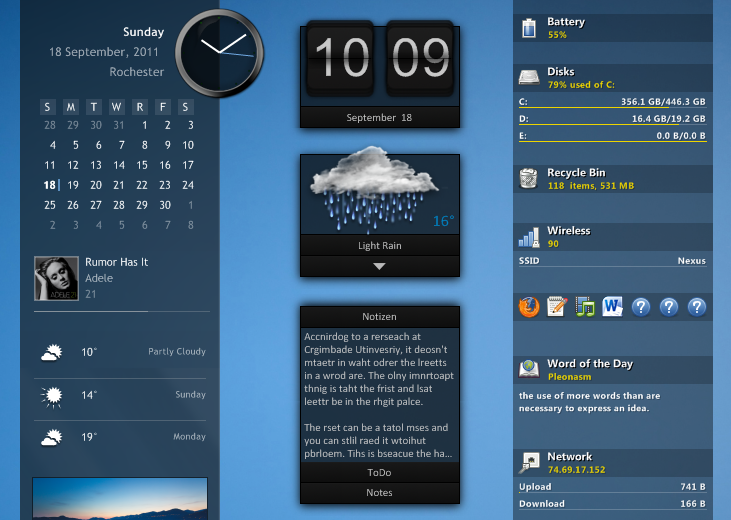
Some Rainmeter skins. Each skin is a separate window, and can be moved around on the desktop by clicking and dragging. Rainmeter can run any number of skins at one time, even from different sources.
A skin can be many things. Some skins are very simple, single-purpose tools, like Windows desktop gadgets, or “widgets” on an Android device. Others are more complex, like miniature applications themselves. Some skins even come bundled in large “suites” and include their own tools for customizing their form and appearance, within or alongside Rainmeter’s basic user interface. Every skin works differently, depending on the choices of that skin’s individual author.
However, all skins are made from the same building blocks: measures, which gather information from your computer, a website, a text file, or some other source; and meters, which create visual elements in the skin’s window, such as frames, borders, backgrounds, images, text, charts, or buttons.
Skins can interact with other skins and applications using special commands, called bangs, and they can be customized by changing short lines of text, called variables. All of these things are made possible by Rainmeter’s unique code language, which allows a skin to access functions and resources built into the Rainmeter application. Every skin’s code is completely open, and can be tweaked, modified or even completely rewritten using any text editing software.
Need help?
New users will want to read through Getting Started to get ready with Rainmeter. Don’t forget to check out the Documentation.
For help, visit the forum, go on the unofficial Rainmeter Discord or jump on board the #rainmeter IRC channel on Libera.Chat.
Discover
Rainmeter comes with a few simple starter skins, but the biggest part of the community are skins which you install onto your system.
Check out the discover page for some of the better places where you can get new skins to use and modify.
Fast
Rainmeter uses very little hardware resources and will run perfectly well on any PC using Microsoft Windows 7 through Windows 11.
Customizable
Create and modify your own skins in a simple language that’s easy to learn. Rainmeter is not just an application, it is also a robust toolkit.
Helpful
Over the last few years, a thriving community has built up around Rainmeter creating beautiful skins and helping each other.