
Ads
Password of all themes is: skinpacks.com
Microsoft and other major antivirus vendors have flagged SkinPack as malware by wrong!
NOTE: if you do not want to modify and change windows system file then use WindowBlinds version of each skinpacks.
some times installer not works on some system because of windows security so you need to use portable version, also after windows update you need to install uxthemepatcher again and select theme from personalize.
after uninstall skinpack if your windows explorer not worked just select default windows theme from personalize to fix it.
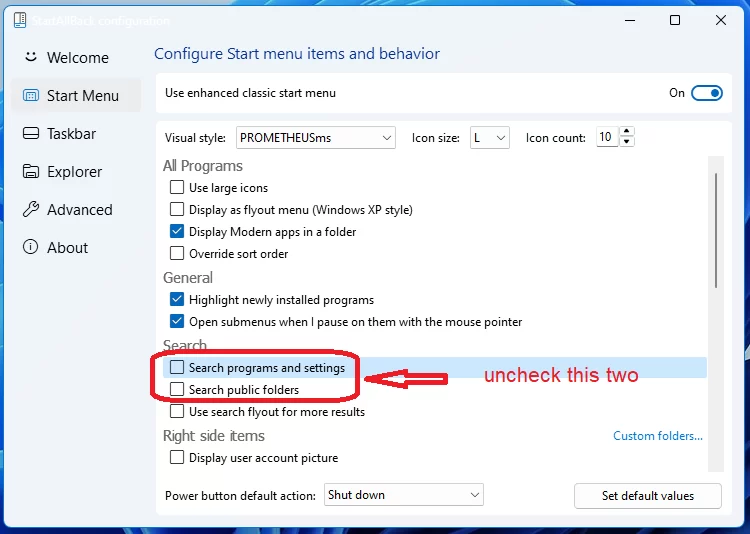
if you have problem with start menu you can fix it from start is back settings like this picture.
Dear visitors
We would like to inform you that all Our premium themes are compatible with all versions of Windows 11 and Windows 10. However, please note that there are some minor imperfections with Windows 11, not only for our skins, but for all Windowblinds skins, that cannot be fixed due to Windowblinds’ limitations. As a result, some parts of Windowblinds skins are no longer supported by Microsoft Windows 11.
If you decide to purchase any theme from us, please note that you will receive it as is, and we will not be able to provide any refunds.
Thank you for your continued support!
Refund Policy : We don’t offer a refund. Please read the description and compatibility content thoroughly before purchasing as we don’t offer a refund if you buy it by mistake.
all theme have been fully tested, once purchase has been completed no refund will be available, however we will try to provide all possible technical assistants as required
Without limitation, you agree not to (a) publish, copy, modify, reverse engineer, rent, lease, decompile, disassemble, distribute, offer for sale or create derivative works of any portion of the SkinPack; (b) circumvent, modify, decipher, break, tamper with or otherwise circumvent the functionality or protections of the SkinPack through the use of any hardware or software that causes the SkinPack to function other than as intended; (c) download, install or use any unauthorized version of the SkinPack; and… .
You acknowledge that if you fail to comply with the above restrictions, SkinPack may render the SkinPack or the relevant SkinPack Device permanently unusable.
Microsoft and other major antivirus vendors have flagged SkinPack File as “malware”. This is likely due to Microsoft’s hatred against SkinPack’s customization, not because it contains a virus or such. Flags from Microsoft usually spread to other antivirus vendors.
Microsoft doesn’t want you to customize Windows, so it identifies skin packs as malicious files.
ATTENTION
Some of our beta testers reported that some AVs detect configuration tools in SkinPack as malicious.
Please note that it’s a false positive and all files in this installation are clean.
In case of a false-positive detection, please select “Ignore” and optionally email the detection log to us. We are already working with some AV vendors to whitelist our configuration tools.
Moreover, if you have your doubts about using SkinPack because of such false-positive detection, it is understandable.
However please keep in mind that this project is 100% Open Source, and our code is available here: https://skinpacks.com/download/skin-pack-installer-system/
As these tools help us go far beyond the limitations of Windows, the SkinPack experience would be diminished without them.
We welcome you to review the code and compile the configuration tools yourself
Thank you for understanding
P.S. The installation will work even if the additional utilities are blocked, however SkinPack will be limited and such functionality will not be available: Item Settings, Managing Layouts, Panel Alignment, Panel Creator, Power Buttons, etc
- If you are downloading from this page, please temporarily disable real-time protection or save to a folder excluded from antivirus scans.
- Failure to exclude SkinPack’s installer files may result in inability to install/uninstall SkinPack File and
explorer.exebeing unable to start. - If you do not trust this process, please refrain from using SkinPack File and use portable version or look for alternatives instead like WindowBlinds Skins.
Because skin packs will change file system (imageres.dll) to change icons so anti virus give warning, please disable temporary if you’re using anti virus.
The Windows 11 theme’s themselves are experimental, much of the overall look and results will vary depending on each users dpi settings, Best work on 100% scale and layout size, you need to set it from display setting, Also for enable start menu and taskbar skin you need to install startisback from startisback.com
To have skinned taskbar and start menu on Windows 10 and 11 you need to install Start is back from here. start is back from startisback.com not skinpacks.com so you need to buy it from startisback.com
Note: Anti Virus apps cannot correctly distinguish between apps that modify Windows system files with the user’s consent and apps that maliciously modify the files, so disable your antivirus or windows defender temporarily when you want to download and install skinpack.
Download is MALWARE???
Some silly antiviruses tend to flag the skinpack as malware, because it’s elevated and unsigned
we are submitting all releases before release to Microsoft for analysis if they’re detected, but we can’t guarantee the same for all the other AVs.
Since we are not planning to have our IRL name plastered everywhere, we won’t be getting a signing certificate either.
I get a malware, virus, spyware, trojan warning.
This is triggered due to the skinpack. Also if you see security error on chrome or firefox just click on Details and then click on visit this site or try other browser or use download manager apps like orbit and IDM.
I cannot open the download file.
Disable your anti-virus or windows defender app temporarily and try again.
SkinPack make changes to your system files, SkinPack works that way! It modifies your system files to change icons. SkinPack will modify system files like imageres.dll to change icons and antivirus dont permission to do that! Modifying system files and changing system configuration may get reported as malware by some antivirus or windows defender software. You need to temporary turn-off antivirus or windows defender software so that program won’t be interfered during download/installation/uninstallation.
Why does my antivirus say your theme is a virus?
Don’t worry. Some antiviruses give warnings because of the change system icon files.
it changes DLLs in the system32 folder. In fact, some antiviruses also gives warnings.
if you manually change anything in the system32 folder. It seems like only Avast and Avira do that.
However, you shouldn’t have any problems if you use Kaspersky Internet Security or BitDefender.
How to start your pc in safe mode
The first thing you have to understand is that Custom Windows themes apply only to Win32/classic apps that inherit the Windows UI and don’t have a skinning system of their own like for example Windows Setiings, taskbar or start menu. So in order to style the titlebar and caption buttons of UWP/modern apps (like the Settings panel, Calculator, Windows Mail, Calendar, etc.) you can use Curtains.
Unfortunately, the visual styles on Windows 10 can not change the entire GUI like in previous versions of the OS, but only the style of windows, wallpaper, cursors and sounds. The taskbar and start menu remains unchanged.
HOW TO INSTALL AND USE WINDOWS 11 THEMES
HOW TO INSTALL AND USE WINDOWS 10 THEMES
on Win10 to remove 3D Objects folder, OneDrive and Quick access from This PC and Navigation Pane use Winaero Tweaker from here
Then grab the latest version of UXThemePatcher and install it or SecureUxTheme is a new method for running themes without modifying system files. It also fixes the issue with colors reverting to defaults on some builds.
Fixes Microsoft Excel appearance when custom Windows theme is used
Theme for Chrome:
Titlebar fix for Chrome and Edge 120+
If your theme not changed or its like classic windows you need to install uxtheme patcher from here and after restart select new theme from personalization. In rare cases after the Windows 10 Creators Update, the patcher is not able to take ownership of the necessary files in c:\windows\system32 (uxtheme.dll, UXInit.dll, themeui.dll).
Only solution today: Sign in as Administrator, take ownership to the 3 files and grant full authorization, reboot and afterwards use the patcher again as Administrator. The modification should work now. on Windows 10 4k monitor uses a special secured connection from PC to Monitor, therefor signed (unmodified) files are necessary. In this case you can not use UXTheme Patcher, sorry!
I see a blank screen after the login screen, the taskbar and desktop icons is absent.
Press Control + Shift + Escape. The Task Manager will open. Click File -> Run new task. Click Browse. Type %windir%\system32 in the File name: textbox and press Enter.Right-click cmd.exe and click Run as administrator. Type sfc /scannow in the window that appears and press Enter. Restart. The app you’re using may have been superseded by SkinPack which has excellent stability and very less likely to cause errors.
If you can’t login to your PC after installing SkinPack, something in your system is conflicting with the pack. Try uninstalling it from Safe-Mode by running “uninst.exe” in “C:\SkinPack\”. Or from Windows Recovery (for power users) by running “uninst.exe” in “C:\SkinPack\”. And if you’re only getting black screen, please follow this steps:
1. Boot Windows normally until you see black screen.
2. Open task manager by either holding CTRL+SHIFT and hit ESC or holding ALT+CTRL and hit DELETE then choose task manager.
3. Click on ‘File’ menu and select ‘Run new task’
4. Click ‘Browse…’ and select file ‘C:\SkinPack\uninst.exe’.
5. Click ‘Open’ and then ‘OK’ to run uninstaller.
6. After finishing uninstallation, reboot and install fixed build again.
If you can’t open task manager at all, it’s probably not caused by error with explorerframe.dll file. There’re many kinds of mysterious black screen problems so it’s hard to track them all. Please try using recovery to repair your computer instead by following this guide. after uninstall if your icons not back to normal then you need to refresh icon cache.
Every time I try to install or uninstall your application the monitor remains black after the restart. How can I fix this?
Fast Startup/FastBoot is the problem. 1) disable Fast Startup, 2) shut down (do not restart), 3) boot up, 4) Is this too late, only a repair installation (inplace upgrade) or a complete new installation helps.
Problems: AntiVirus software detects malicious software
The skinpack will not run on systems with Avast AntiVirus installed. This is because Avast falsely (!) detects the skinpack as a virus. Some AntiVirus applications for some reason detect a false positive for AutoIt Binaries (the coding language the skinpack is writtten in). Nevertheless, I guarantee that my files are virus free!
In order to execute the skinpack you have to temporarily disable Avast and enable it after installation again. Note that you need to do so every time you update or reapply the skinpack!
Another solution would be to add the skinpack files to the whitelistet files in your AntiVirus software.
Other AntiVirus applications might show this behavior as well and the steps described above need to be applied in order to install the skinpack.
Problems: Icons not replaced
There are several potential reasons why various icons may remain un-changed after the skinpack has run:
If you have used some other piece of icon customization software such as IconPackager to apply an icon set, those settings will continue to take prece-dence over the default theme in your system files. Reset any affected icons to their default setting using the software you used to perform the customization.
Some icons simply aren’t set to be changed yet, because the skinpack icon theme or its derivatives don’t include appropriate icons, or they do, I haven’t gotten to using it yet. If you’re pretty sure an appropriate resource is available, bring it to my attention and I’ll try to get it replaced in the next point release.
The skinpack may have failed to completely clear the icon cache.
The resource hacker may have failed to modify a file. If you know the name of the file, check for a file named “.log” in the Logs subdirectory of the skinpack folder, and if it contains an error, pass it along to me for analysis.
Problems: Uninstallation fails
In the event that the Uninstaller fails to restore your backup files (or the functions responsible for keeping the backup files up to date have gotten confused and stuck a patched file in by mistake), leaving skinpack! icons behind after you have uninstalled it, here are some suggestions for restoring your system:
1. Repair Windows System Files via Console
Open the Command Prompt (as an Admin) and run: sfc /scannow
This will restore 99% of your system files to their original versions. You will need to reapply any hotfixes that you have installed.
2. Make a Repair Install
Boot your system from the Windows CD, and perform a repair install. This will be necessary if the skinpack leaves the system in an unbootable state, anyways. You’ll need to reinstall your drivers, and some software, but your user data will remain intact.
3. Re-Install latest Service Pack
If you have a fast internet connection, download and install the latest Service Pack (if available) from Microsoft.
7 Methods For Trying To Fix A Black Screen
Problem – Patcher is patching, but after a reboot nothing is modified
In rare cases after a Windows 10 Update, the patcher is not able to take ownership of the necessary files in c:\windows\system32 (uxtheme.dll, UXInit.dll, themeui.dll). Only solution today: Sign in as Administrator, take ownership to the 3 files and grant full authorization, reboot and afterwards use the patcher again as Administrator. The modification should work now.
Problem – After patching on Windows 10 and login into, the PC get black screen and reboots
A 4k monitor or higher uses a special resolution, therefor themes are necessary that support 200% DPI
Problem – After uninstalling the monitor remains black after restart
Fast Startup/FastBoot is the problem. 1) disable Fast Startup, 2) shut down (do not restart), 3) boot up, 4) uninstall UxTheme Patcher!. Is this too late, only a repair installation (inplace upgrade) or a complete new installation helps.
Problem – Completely undo changes
First, always a standard Windows 10 theme should be set, otherwise it may cause problems when booting (see problem 3). Thereafter, the application should simply be removed through software -> uninstall. All backups will be restored so the original files are back!
Problem – No file explorer folders will open from the start menu or in certain apps save dialogs look broken
Please uninstall the patcher and run sfc.exe /scannow from the comand line! After a reboot a reinstall of the patcher should work again
Problem – Explorer crashes or display errors after update
Themes of older Windows 10 Versions are not compatible with the latest Windows 10 Version. Therefore, please contact the developer of the theme, I can not help you here!
Problem – SFC.exe finds modified system files
UXTheme Patcher works that way! It modifies your system files to enable windows 10 themes. If you do not wnat this, you can not use it!
- Question : Why does my antivirus say your theme is a virus?
- Answer : Don’t worry. Some antiviruses give warnings because of the changes icons on DLLs in the system32 folder. In fact, some antiviruses also gives warnings.
- if you manually change anything in the system32 folder. It seems like only Avast and Avira do that.
- However, you should have any problems if you use Kaspersky Internet Security or BitDefender.
- If you still don’t feel comfortable, contact us and we will send you new theme file package
that shouldn’t give antivirus warnings, but it unfortunately won’t include the icon pack.
Best Methods For Backing Up Your Computer
The pack I choose to install messed up my system beyond repair, what should I do now?
You’ve been advised in the download page to Create a Restore Point, so when such a rare thing happens, you can easily Restore your System to the pre-installation status. We’re not responsible if you choose not to take such a precaution. please read our Terms of Service page.
Please temporarily deactivate anti-virus software if you need to alter iconography to avoid false positives. No SkinPack for you if you don’t want this feature! After a transaction has been made, we cannot provide a return due to the fact that every theme has been thoroughly checked, however we will do our best to give any necessary technical support.
you can use free theme by other people that have free time to make free theme, we do not have free time to make free theme sorry!
useful links:
Best Tools for Windows Customization
- UltraUXThemePatcher– by Manuel Hoefs – modifies your system files so that 3. party themes can be used.
- SecureUXTheme-by namazso – is a software that removes signature verification of styles from Windows.
- UXTheme hook – for Windhawk – by rounk-ctrl – apply custom themes on Windows 11 without the need to patch. Helps with some control panel color issues.
- Titlebar fix for Chrome and Edge 120+
- OldNewExplorer Removing ribbon menu from Explorer Windows 10
- ExcelDarkThemeFix Fixes Microsoft Excel appearance when custom Windows theme is used
- DARK COLORS REGISTRY FIX – Fix for colors reverting after restart/sleep, etc.
- StartIsBack (Skins the Start Menu and Taskbar – Windows 10)
- StartAllBack (improvements overall explorer look including taskbar and startmenu – Windows 11)
- ExplorerPatcher which seems to accomplish many of the same things as SAB but for free
- Winaero Tweaker (Change fonts and other system tweaks)
- Advanced System Font Changer another tool helpful in changing system fonts.
- Windows Custom Visual Styled Titlebars in Browsers
- Remove Address Bar (NA) tool
- TbarIconBlanker – cleaner taskbar and titlebars.
- RoundedTB – creates a margin around the taskbar for a floating appearance.
- Blank it for Windows 10 or 11 for a cleaner addessbar
- Mica For Everyone! a tool to customize system backdrop on Win32 apps
- Classic Color Panel – complements the system-level color adjustment capabilities of Windows 10/11
- cute-borders – Makes focused and unfocused window borders have a different border color.
- WinPaletter – Advanced Windows Appearance Editor
- Windhawk – The customization marketplace for Windows programs
- DWMBlurGlass – Add custom effect to global system title bar, support win10 and win11.
- ExplorerBlurMica – Add background Blur effect or Acrylic (Mica for win11) effect to explorer for win10 and win11
- Tacky borders – Change border size and color/gradient/animation.
- xoblite – Blackbox lite.
- Folder thumbnail remover – icons instead of thumbnails. Useful for most 7tsp packs.
- Windows Style Builder make/edit themes
- msstyleEditor in order to change the look and properties of the theme
- Complete Guide for Theme Building for all Windows
- How to install 7tsp icon pack in windows
- System Restore Point
- Add or Remove Gallery in File Explorer Navigation Pane in Windows 11
- Add or Remove Home in Navigation Pane of File Explorer in Windows 11

[…] Help & FAQ […]
[…] Help & FAQ […]
[…] Help & FAQ […]
[…] Help & FAQ […]
[…] Help & FAQ […]
[…] Help & FAQ […]
[…] Help & FAQ […]
[…] Help & FAQ […]
[…] Help & FAQ […]
[…] Help & FAQ […]
[…] Help & FAQ […]
[…] Help & FAQ […]
[…] Help & FAQ […]
[…] Help & FAQ […]
[…] Help & FAQ […]
[…] Help & FAQ […]
[…] Help & FAQ […]
[…] Help & FAQ […]
[…] Help & FAQ […]
[…] Help & FAQ […]
[…] Help & FAQ […]
[…] Help & FAQ […]
[…] Help & FAQ […]
[…] Help & FAQ […]
[…] Help & FAQ […]
[…] Help & FAQ […]
[…] Help & FAQ […]
[…] Help & FAQ […]
[…] Help & FAQ […]
[…] Help & FAQ […]
[…] Help & FAQ […]
[…] Help & FAQ […]
[…] Help & FAQ […]
[…] Help & FAQ […]
[…] Help & FAQ […]
[…] Help & FAQ […]
[…] Help & FAQ […]
[…] Help & FAQ […]
[…] Help & FAQ […]
[…] Help & FAQ […]
[…] Help & FAQ […]
[…] Help & FAQ […]
[…] Help & FAQ […]
[…] Help & FAQ […]
[…] Help & FAQ […]
[…] Help & FAQ […]
[…] Help & FAQ […]
[…] Help & FAQ […]
[…] Help & FAQ […]
[…] Help & FAQ […]
[…] Help & FAQ […]
[…] Help & FAQ […]
[…] Help & FAQ […]
[…] Help & FAQ […]
[…] Help & FAQ […]
[…] Help & FAQ […]
[…] Help & FAQ […]
[…] Help & FAQ […]
[…] Help & FAQ […]
[…] Help & FAQ […]
[…] Help & FAQ […]
[…] Help & FAQ […]
[…] Help & FAQ […]
[…] Help & FAQ […]
[…] Help & FAQ […]
[…] Help & FAQ […]
[…] Help & FAQ […]
[…] Help & FAQ […]
[…] Help & FAQ […]
[…] Help & FAQ […]
[…] Help & FAQ […]
[…] Help & FAQ […]
[…] Help & FAQ […]
[…] Help & FAQ […]
[…] Help & FAQ […]
[…] Help & FAQ […]
[…] Help & FAQ […]
[…] Help & FAQ […]
[…] Help & FAQ […]
[…] Help & FAQ […]
[…] Help & FAQ […]
[…] Help & FAQ […]
[…] Help & FAQ […]
[…] Help & FAQ […]
[…] Help & FAQ […]
[…] Help & FAQ […]
[…] Help & FAQ […]
[…] Help & FAQ […]
[…] Help & FAQ […]
[…] Help & FAQ […]
[…] Help & FAQ […]
[…] Help & FAQ […]
[…] Help & FAQ […]
[…] Help & FAQ […]
[…] Help & FAQ […]
[…] Help & FAQ […]
[…] Help & FAQ […]
[…] Help & FAQ […]
[…] Help & FAQ […]
[…] Help & FAQ […]
[…] Help & FAQ […]
[…] Help & FAQ […]
[…] Help & FAQ […]
[…] Help & FAQ […]
[…] Help & FAQ […]
[…] Help & FAQ […]
[…] Help & FAQ […]
[…] Help & FAQ […]
[…] Help & FAQ […]
[…] Help & FAQ […]
[…] Help & FAQ […]
[…] Help & FAQ […]
[…] Help & FAQ […]
[…] Help & FAQ […]
[…] Help & FAQ […]
[…] Help & FAQ […]
[…] Help & FAQ […]
[…] Help & FAQ […]
[…] Help & FAQ […]
[…] Help & FAQ […]
[…] Help & FAQ […]
[…] Help & FAQ […]
[…] Help & FAQ […]
[…] Help & FAQ […]
[…] Help & FAQ […]
[…] Help & FAQ […]
[…] Help & FAQ […]
[…] Help & FAQ […]
[…] Help & FAQ […]
[…] Help & FAQ […]
[…] Help & FAQ […]
[…] Help & FAQ […]
[…] Help & FAQ […]
[…] Help & FAQ […]
[…] Help & FAQ […]
[…] Help & FAQ […]
[…] Help & FAQ […]
[…] Help & FAQ […]
[…] Help & FAQ […]
[…] Help & FAQ […]
[…] Help & FAQ […]
[…] Help & FAQ […]
[…] Help & FAQ […]
[…] Help & FAQ […]
[…] Help & FAQ […]
[…] Help & FAQ […]
[…] Help & FAQ […]
[…] Malware/virus warning? Read the FAQ. […]
[…] Help & FAQ […]
[…] Help & FAQ […]
[…] Help & FAQ […]
[…] Help & FAQ […]
[…] Help & FAQ […]
[…] Help & FAQ […]
[…] Help & FAQ […]
[…] Help & FAQ […]
[…] Help & FAQ […]
[…] Help & FAQ […]
[…] Help & FAQ […]
[…] Help & FAQ […]
[…] Help & FAQ […]
[…] Help & FAQ […]
[…] Help & FAQ […]
[…] Help & FAQ […]
[…] Help & FAQ […]
[…] Help & FAQ […]
[…] Help & FAQ […]
[…] Help & FAQ […]
[…] Help & FAQ […]
[…] Help & FAQ […]
[…] Help & FAQ […]
[…] Help & FAQ […]
[…] Help & FAQ […]
[…] Help & FAQ […]
[…] Help & FAQ […]
[…] Help & FAQ […]
[…] Help & FAQ […]
[…] Help & FAQ […]
[…] Help & FAQ […]
[…] Help & FAQ […]
[…] Help & FAQ […]
[…] Help & FAQ […]
[…] Help & FAQ […]
[…] Help & FAQ […]
[…] Help & FAQ […]
[…] Help & FAQ […]
[…] Help & FAQ […]
[…] Help & FAQ […]
[…] Help & FAQ […]
[…] Help & FAQ […]
[…] Help & FAQ […]
[…] Help & FAQ […]
[…] Help & FAQ […]
[…] Help & FAQ […]
[…] Help & FAQ […]
[…] Help & FAQ […]
[…] Help & FAQ […]
[…] Help & FAQ […]
[…] Help & FAQ […]
[…] Help & FAQ […]
[…] Help & FAQ […]
[…] Help & FAQ […]
[…] Help & FAQ […]
[…] Help & FAQ […]
[…] Help & FAQ […]
[…] Help & FAQ […]
[…] Help & FAQ […]
[…] Help & FAQ […]
[…] Help & FAQ […]
[…] Help & FAQ […]
[…] Help & FAQ […]
[…] Help & FAQ […]
can we use windows 10 skinpacks on windws 11?
no
Please help asap!!!
My icons did not revert back to the normal Windows 11 21H2 themes after i uninstalled the theme :( i tried using the refresh icon cache but it did not work…
run cmd and type sfc/scannow then enter
[…] Help & FAQ […]
[…] Help & FAQ […]
[…] Help & FAQ […]
[…] Help & FAQ […]
[…] Help & FAQ […]
[…] Help & FAQ […]
Terrific products!! I just bought the Win11 skin for Win10, but the menu text remains gray and the default button is gray with cyan text. That makes things appear as if they’re disabled. And I can’t seem to change it no matter what I do. Is there a file I can modify to restore the menu text to black and the default buttons to light gray like all the other buttons?
[…] Help & FAQ […]
Emperador premium skinpack cannot be installed to the last. The installation ends when the theme is installed, and then there is nothing. What should I do?
select theme after restart
[…] Help & FAQ […]
my startisback needs license now. i already bought and it was fine for months, now it says end of trail. how can i get my license key.
http://startisback.com/
Please I installed Windows 11 21H2 transformation pack and my laptop crashed and shows me a black screen till now and I can’t open any software or application so it’s not even possible to say I want to uninstall it. Is my system gone forever? Can recover my files and data?
Thanks for your quick response.
Hello, how do I get the taskbar from the default centre to the left? When I have several programmes open, some icons disappear to the right and can no longer be opened. Thank you for your prompt reply.
With kind regards
Wolfgang Rumpenhorst
[…] Help […]
[…] Help […]
Hello there: I’ve read thru this posting for issues with regards to the program, I do not really see a solution to my issue. It is with the free program vs the paid subscription program. I 1st dl’ed the free program & installed it & it went in as it should. the program did alter the borders back to W7 & applied the glass to the borders & also altered the Hard drive space bar config to W7. Now the program didn’t include icons, so I purchased the paid program & installed that, I had to remove the free program 1st to allow installing the paid program. After installing the paid program it removed the borders & the W7 hard drive space design that is used in W7.
What has caused this? …I also cannot reinstall the free program at all again. Even if I try to use the free exe the paid exe steps in reinstalls the full program. I no longer have the proper 7 glass borders & hard drive space bar.
can you send screen shot of problem?
also can you uninstall it and restart then install again and restart, then if you see problem send screen shot to us
Excuse me you FCKHEADS, but a theme I installed cannot BE uninstalled. I am stuck on a Warcraft Theme, which changed all icons – including hard drive, trash can, all of it, and it’s entirely replaced the default files.
Windows 10 works, but… how the FCK do I proceed with restoring everything to 100% default? Or do I have to just reinstall the entire computer?
just refresh icon chache or run cmd and type sfc/scannow
I need help, I buy 2 themes and both give me problems with firefox, I did the tutorial in the faq section but it does not solve it and I do not see what I write on some pages, I have to use word and then copy and paste.
[…] Help […]
[…] Help […]
[…] Help […]
[…] Help […]
What is the post price https://skinpacks.com
Thanks
[…] Help […]
[…] Help […]
[…] Help […]
Hi admin. I purchased ‘skin pack iOS 14.sfx’ but I wrote my e-mail account wrong and got no password. I have send you an e-mail so I hopr you please check it and give help. Thank you
password: skinpacks.com
Hi.. I infected with ransomware soooo… All the theme files are encrypted, and I want to download another skinpack … but I can’t uninstall it …
What I can do
HI SKINPACKS.COM! USING SKINPACKS WAS AN AWESOME EXPERIENCE. AFTER UNINSTALLING IT FROM MY OLD COMPUTER MY LOCKSCREEN REMAINED AS IT AS WINDOWS 10. BUT I NEED THE OLD WINDOWS 7 SCREEN BACK PLEASE HELP
[…] https://skinpacks.com/help-faq/ […]
Please help my pc is not working if have done all you said please help me
Otherwise I get suffered so much
try to boot pc and when the windows logo pops up and then shut it down imidiately do that 2-3 times until you get windows auto repair and then enter safe mode and restore your system with the system restorwe point that yu createdy
mac 테마를 설치했습니다. 유료버전으로 결제하고 설치했습니다. 그런데 아이콘에 나오는 글자의 퀄리티가 많이 떨어집니다. 사진에 보기에는 괜찮은데 내가 설치한 것은 글자의 화질이 안좋습니다. 어떻게 하면 아이콘과 글자의 퀄리티가 좋아질까요?
MODPanel이라고 윈도우 폰트 변경 프로그램 있어요. 제 모니터에선 아이폰 폰트M 으로 사이즈 11로 쓰니까 적당하니 좋네요.
Hi, I installed the big sur skin on my computer. But the color of the letters is so bright that I can’t How can I change the color of the system letters?
My computer is stuck while turning on. Mac glass theme I have installed but it’s not working and stuck after loading and only shows power off key and ease of acess
google in how to enter safe mode via windows auto repair and sytem restore
I have an unsolved issue downloading iconpacks recently from skinpacks com;every time i click on a download iconpack button i get redirected to the skinpacks website,and can never download an windows 7 iconpack directly and would like to know how i may down an iconpack directly…any tips pointers (I use windows 7 PC with Firefox,Chrome,and MS Edge installed if that helps?!)…
…also may i contact a skinpacks website rep to resolve the aforementioned issue??
Thanks in advance for any,all helpful replies!!!
inst hud-pac – red works fine.. BUT the window inside colore is white and the icons are now showing up. how can i change the ugly white window screen amd make the icons showing up? icons are there, u can see them when u try to move them arround, but without doing this they seem to be gone or living a ghost life…
how do i uninstall it?
Helpme please !!!
Iconpack “The application was unable to start correctly (oxc000007b).Click OK to close the aplication”
hi admin, my file explorer’s look doesnt change after i istalled iMac Dark ThemePack.its only change my wallpaper and taskbar color, how do i fix this?
Password please
skinpacks.com
sound issue after installing theme
unistall it lol
I want to change the taskbar to black. What should I do?
you can change it from personalize
Why I can’t open explorer after the installation of the skinpack
I was going to try your software but it is not normal to get virus warnings so no thank you.
Anti Virus apps cannot correctly distinguish between apps that modify Windows system files with the user’s consent and apps that maliciously modify the files, so disable your antivirus or windows defender temporarily when you want to download and install skinpack.
★ Please This Answer! ★
English : Can’t fix all UI to 7 in Windows 10?
The telescope, back and forward, is not the same as Win7. And the telescope is not dark, it’s light. Fix Skinpacks Win 7. Modify the shape of the telescope to Windows 7, and then darken the border.
Korean : Windows 10에서 모든 UI를 7로 수정 할 수 없습니까?
망원경 모양인, 뒤로가기, 앞으로가기 모양이 윈7와 같지 않습니다. 그리고 망원경 모양이 진하지 않고, 연합니다. Skinpacks Win 7을 수정 하십시오. 망원경 모양을 윈도우 7로 수정 후, 테두리를 진하게 해주십시오.
English = Can’t fix all UI to 7 in Windows 10?
The telescope, back and forward, is not the same as Win7. And the telescope is not dark, it’s light. Fix Skinpacks Win 7. Modify the shape of the telescope to Windows 7, and then darken the border.
Korean = Windows 10에서 모든 UI를 7로 수정 할 수 없습니까?
망원경 모양인, 뒤로가기, 앞으로가기 모양이 윈7와 같지 않습니다. 그리고 망원경 모양이 진하지 않고, 연합니다. Skinpacks Win 7을 수정 하십시오. 망원경 모양을 윈도우 7로 수정 후, 테두리를 진하게 해주십시오.
i found ( http://prntscr.com/q86q2e ) this when i try to install the mac os theme, how do i solve it
fixed, try again
[…]
Credits Report DMCA
Password: skinpacks.com
| Malware/virus warning? Read the FAQ. […]
Dude, so i try to uninstall the theme, but the icons remastered.
So i tryd with installing another one BUT…
The Control Panel got empty.
How i can fix this?
please jarvis system sound………..
i had downloaded IOS10 skinpack, it worked so well, i am using it from past 2 weeks but now, i want my default icons and setting and all theme back, i unistalled it from control panel but still ios10 theme is being shown please HELP PLEASE
what is the password
password is: skinpacks.com
Hi, when installing skinpack on Windows 7 i got not responding and suddenly force close after click “Next” in “Select components to install:” and how to fix it ?
I am interested in MacOS themes.
I have a question.
Once I install the theme on my system, can I change wallpapers or color in my system? Or is the wallpaper is a static one?
I am using Win 10.
Please confirm.
yes you can
for all of you facing problems, enable protocols in internet properties.
cannot download skin packs, getting error intenet connection down or firewalled.
hey, thanks for the app
i want to make an iconpack for all icons in windows, is there any tutorials for this ?
Windows 10 Professional 1709 (10.0.16299) 64 bit which version of mac os x skin pack is suitable for me??
https://skinpacks.com/macos-mojave-skinpack-for-windows-78-110-rs6/
i now get product information is missing when i install any skin pack
So i go to install a skinpack and it immediately closes after when i chose my selections of what i want to install, im on windows 10 1809
I cannot download skinpack my firewall is turned off but i keep getting error, Internet connection maybe down or firewalled
i install already but it doesn’t work. help me please
Where is the option for offline installer download
Hi I have a problem when finishing installing the theme, my window taskbar does not work or pop up. When I uninstalled the pack, the taskbar is left with no function. Can you please help me to restore the taskbar? Thank you
some skinpack not support last update of windows 10, you need to wait until we update skinpacks
windows 10 skinpack has stopped working.i am getting this message plz help!!!!!!
can you show a screen of problem
gimna cara downloadnya skin pack untuk win 10?
Will it harm my computer After Installation?
no
Is there an update on the development of x84 1803 yet?
hi!! I have installed the skinpack but not all the features exists. there is no launch pad, no change in folders etc.. only task bar icon instead of windows and the desktop background changed. please suggest. is that possible from boot can get mac os Mojave skin pack?
hi i still have the old windows style minimize and close buttons, im on windows 10rs4
I have this problem when downloading a skinpack through setup: Internet Connection Error
being that my internet is working normally …
I can’t install any macOS skin pack !! (not responding)
my windows version is win 10 pro 1089
*win 10 1809
Hi, i’ve download your SkinPack macOS Dark but the setup does not work correctly (Not Responding) please help me, my windows version is win10 1803, thank a lot!
Thank u :3
I don’t use vpn or proxy but setup says “Internet Connection Error” then I open a proxy and trying install but still not working please fix this setup problem.
How Do i Install two skin packs at a time????
ok but i just buy a alien collection then i only can install if i remove the old ???
pls mine downladed but the setup is not working… in short it cant install
I Tried to uninstall the mac theme and the icons look like the mac icons. how can i fix this?
bro my windows 7 looks like windows 10 but there’s a little very little problem all of the icons is not window 10 its windows 7 and the Windows logo on the left bottom is too laggy everytime i click it
why my taskbar can’t be click and display setting can’t be open it
Your links might need to be fixed
i buy your dark glass
want to change win start orb.
How?
I tried..didnt work
Looking to brand android/iPhone and Mac/Windows Desktop customizations
Can we get an estimate when the Windows 10 pro, RS4 version will be available? Definitely need it. Great work by the way.
HUD SkinPack Collections for Win10/8.1/7
Estimate for RS4 version would be greatly appreciated
I really love this collection
I Have An Error Message Saying File not found when i was making skinpack How Can I Fix This My PC Running Windows 8.1 Pro Build 9600 When I Press Build Installer It Opens CMD
Then Says File Not Found Can You Help Me Fix This Please I Am Using Skin Pack Tools Version
10.0
send us screen shoot of problem
C:\SkinPack\RP.vbs error , how can i fix this
its becuz your system restore is turn off
I just purchased the AW Light Theme.
How do I get the other theme elements to appear, like the start menu, taskbar and login screen
you need to install startisback and iconpack
If I have successfully installed a skinpack, then I can not do the following:
Start menu (Windows key) press or release – right click on taskbar does not always work – settings are not opened –
Windows x64 PRO
Build 17134.rs4_release.180410-1804
you need to wait for update skinpack to support Win10 RS4
sorry i have the same problem, is an update available?
not yet, we working on it and we will release update soon
Hey i have a problem.
If I have successfully installed a skinpack, then I can not do the following:
Start menu (Windows key) press or release – right click on taskbar does not always work – settings are not opened –
Windows x64 PRO
Build 17134.rs4_release.180410-1804
Hello, how are you? (I hope and I hope so)
Any theme that low for free with the advertisements is not open, I put the password “skinpacks.com” and always appears the error “Corrupted file or wrong password” regardless of the theme.
Could you help me to make the same mistake?
I’ve tried everything I could within the little knowledge I have.
Am I sticking advertisement in vain?
fixed, thanks for report.
hi i download macOS Sierra SkinPack is says SkinPack macOS Glass.sfx.exe. Corrupt file or wrong password
fixed, thanks for report.
i cant extract it . plz help
fixed, thanks for report.
Okay I’ll be quick and to the point. Purchased one skinpack for the $2.99 since none of the free ones will successfully install from their .RAR claiming incorrect password or corruption. The skinpack (HUD Gold) installs as I configure it (without RocketDock or “special offers”) and I follow all prompts and instructions throughout the process. Windows 10 since now it matters. Reboot and select the Theme from Themes when it pops up at boot. Nothing apparent changes in doing so, but beside the point.
What does change: Mouse cursor, Wallpaper, Icons, and some of the system text colors and highlighting.
What doesn’t change: File name text colors; most system text colors; Chrome’s address bar color and URL text color (I remember this would change on successful installations prior); Window frames – no skin; Taskbar – no skin; Start Menu – no skin; Start Button – no skin.
I do have StartIsBack++ and it does not show the skins for the Start Menu; Task Bar; or Start Button from the skinpack.
I’ve also downloaded Aero Tweaker and done the three minimum steps indicated prior to installing, but willing to recheck them to make sure.
Worth noting: I’ve recently had to reset Windows because the recent Creators update locked up my login into a looping login. I couldn’t find a way around it so I reset keeping what I could. Since then I’ve had issues with permissions I’m almost certain are mostly cleared up, but can’t finish deleting the Windows.old folder (there are only two empty folder directories left that won’t delete).
In a nutshell it would seem unrestricted configurable things are getting changed, but things gated by the Windows Shell aren’t. I am an admin and should have full admin rights. I am running the installer as an admin. But something seems screwed up with admin rights and I can’t figure out what. Advanced SystemCare also shows nothing wrong, but something is.
which version of windows 10 you have?
Current build 18xx Pro
its not support 18xx (RS4) yet, its just support RS2 and RS3, you need to wait for update
Damn “Creator’s Update” ruining everything…
Hi I installed the hight sierra pack but it doesnt work fully the rockrt dock stopping working and ux style doesn`t working too ,help me pls windows 10 x64.
how to download Allenxred
https://skinpacks.com/download/windows-7/alienxred-skinpack/
Glass skinpack download link
AlienGreen Skin Pack for Windows 10 1803 RS4???
not yet
skinpack not applied correctly
you need to install uxthemepatcher first
How to fix product configuration is missing?
After I removed Mac os skin pack, the name of the Windows was painted in 2 colors: white and black. What to do?
[…] Help […]
it keeps on telling me internet connection error, what do i do?
yep me too it’s pretty fucked up
when i uninstall my pc suddenly shutdown and fault of power supply the desktop icon black noting working
[…] Help […]
[…] Help […]
i need the password
skinpacks.com
why doesn’t my file explorer change {its still white}
you need to install uxtheme patcher first
Is there any way that I could recover my system, like repairing window or reinstalling it etc….I dint took nessary measures…
[…] Help […]
may computer has not show the display after install skinpacks just login further no display show
for the life of me I cant get this to work
hii i was using windows 10 skin pack on windows xp on first time i liked it very much . so i reinstalled window 10 skin pack on windows xp but one this time it give me a error message that the start menu is not there type the correct name and error and windows xp is transformed into windows 10 i tried again two or three but no changes so after that i tried to reinstall my operating system same no changes plz plz help me !!!!!
It’s very good.Thank’s………..
skinpack is not showing in control panel please help
i have downloaded angry birds skin pack from here. here shows folder’s background will become blue after install it, but here icons and wallpaper only changed, i have install UX theme patcher also. please give me a solution
Internet Connection Erorr
i cant remember the installation password
skinpacks.com
onde eu encontro a senha ?
skinpacks.com
Why every time I download to the theme are 1.5M only??
its have download manager
can you help me how to add new apps in new gen startmenu
No matter what skinpack I install on Windows 10, everything works except for windows explorer, it stays white, I have UxThemePatcher and UxStyle installed. Please help!
too much ads!!!
Had to install windows new to get rid of it!
[…] Help […]
[…] Help […]
Hello I dowloaded the Jarvis Red Skinpack. It was working good. But then I changed my mind try to uninstall it. And then I removed the theme.
But the icons still belong to the theme and I can not get the windows theme back.
reply pls?
Um, u need System Restore!
i cant get the password
skinpacks.com
Help when i install skinpacks Ctrl+Alt+Delete dosent work
and when i restart my system the system wont boot at all i really want to install a skinpack in my pc but it just doset work do you have a solution for this
my skinpacks use to say javascript disabled… how am i going to fix this problem
I purchased HUD red theme and Alienware red theme. They look great. I have one problem with both. The panels on the left side of “Security and Maintenance, Windows Firewall, System, Power Options, etc” are still white. I installed the themes with and without UltraUXTheme Patcher 3.1.11. Is there anything that can be done so that the panels are black like everything else? Thanks
tell skinpacks extras to off nobody wants its
when i run the skin pack as admin i am getting that windows find problem in running the skin pack what to do????
Hello I have installed the MAC0SX Leopard pack and its not me so I wanted to uninstalled it but its said that unist.exe and a virus so I can not uninstalled it help me because I want to remove the theme !!!!! !!
https://dl.skinpacks.com/tools/uninst.zip
are you using a Chinese text correcter because thats not proper grammer
Hello we’re sorry what happened like we said di restore point and it is your risk
My destop icon is not changing when i install alienware skin pack
Hi there,
I have installed the Jarvis skinpack. I see the icon, as well as the new wallpaper background, but the rest, like the background of any window i open (windows explorer etc) stays the normal white? Nothing else changes? How do I fix this?
you need to install uxtheme patcher
[…]
Credits Report DMCA
Password: skinpacks.com
| Malware/virus warning? Read the FAQ. […]
what is the passord for encript file to open
skinpacks.com
Hello. I can’t download any skinpacks. When i try download it says me to install searchmgr …
Just click skip and it tells you lets remain friends and click skip again tell that annoying search mgr to off
Hello,
i downloaded Jarvis Skin Pack for Windows 10,
but i cant seem to get it working on Windows 10 1607.
Is this not supported?
Thanks
you need to install uxthemepatcher first
Hey! I just downloaded Alienware Evolution Skin Pack and it is making my Chrome Search Bar and Office 365 black. Any way to stop this please. ANYONE!
try to restart your pc
I install the skin pack and now I want to quit it and I can’t do it. How I can do it?
what’s the Password ?
skinpacks.com
why do you even make them have passwords
why do you even make them have passwords
Hi, When I’m using SkinPacks macOS I can’t reveal an auto hidden task bar or RocketDock if they’re located at the bottom or the right of the screen. I have to close the OSX style menu bar by exiting it and then I can get the task bar to reveal, but not the rocketdock. The skin seems to be “pushing” the display to the bottom left ever so slightly to cause this.
ANy suggestions on how to fix? (Without uninstalling the SkinPack)
we work to fix it but for now you can exit finderbar
I am having the same problem love the skin but there is no way to move it to the bottom of the screen instead of the top
every body click this link https://www.avast.com/free-antivirus-download
I can’t seem to download anything?
Thanks you bro
When I am at the download page for mac OS Sierra I cant download the file, I click download but it takes me to a link that doesn’t load and then stops. Pls help me
My Mac OS X 9 skinpack is not compatible with the new windows 10 upgrade
ive just paid for a mac skin pack how do i download it
we cant find any payment with your email for mac skinpack we just find jarvis
the payment was refunded a few hours ago not sure why
Can you help me to solve my problem?
I got a problem where the UXtheme patcher does not work, please help me! I am using windows 10
try to use uxstyle or ultra uxthemepatcher
plz give me skin pack v10 passward
skinpacks.com
G’day I’ve been using your skinpacks for a long time, and thanks for all your hard work. I have a problem at the moment though.
I just got a 4k laptop and the minimize, max and close buttons are very small for all skins. Here is a screenshot: http://imgur.com/a/tMzKE
Is there a way to fix this? I’ve tried googling around with no luck. Most programs which have a similar problem you go to compatability settings of the program and disable high dpi scaling, but I don’t know how to do this with the windows shell itself.
Cheers
Hello! I have a problem, I installed a theme/skinpack (windows xp) and there is no text for my windows whereas when I remove the theme there is the text that comes back … Can you help me?
Just why the text dissapear with every theme….
Please help me skinpack!
can you show a screen shoot of problems
at the time of extraction its asking for password …where do i get the password??
skinpacks.com
It’s not fully working on my windows 10. I paid for no ads. The folder windows are still bright white
can you send a screen shoot of problems
How i can unistall the pack because is caused me lag. Howww???
Hi,
After using your skin pack (which is really awesome) I decided to delete this for a while. I am not able to find the skinpack-file under ”uninstall all programs and features”. What should I do?
you can run it from c:\skinpack
I am in that folder but cannot find the uninstall file.
https://dl.skinpacks.com/tools/uninst.zip
uhm I need help, so today I installed on my pc the MacOS theme, when I came back home after university I turned on my pc and I couldn’t log into my pc, restarted my pc and got in. Now the theme again derped out by starting to show normal windows10 bar on top of screen, on top of MacOS themed bar, how to fix that?
its just support win10RS1
Admin why im instaling skin packs on windows 10 14393 it’s cannot open show hidden icons/system tray?
I installed Alienware HQ SP along with Ultra UXtheme Patcher and the theme isn’t correct. The file explorer isn’t themed correctly along with control panel & the taskbar ext., but it did install all the file Icons & the rotating bar at the top. I’m on Windows 10 v1607. This is the first theme I’ve ever installed so any help would be greatly appreciated.
If your theme not changed or its like classic windows you need to install uxtheme patcher from here and after restart select new theme from personalization.
NSIS error coming when i’m trying to instole
run it as admin
guys how can I move the top access menu from my main screen to my 2nd monitor? thanks
guys I have a duel monitor set up. How can I move the top access bar from my main gaming screen (my computer,network etc) to my 2nd monitor?
Как пользоватся skin pack tools 10.0
Hi, my virus checker has a threat warning: win32:evo-gen
Whats up with that?
Anti-malware apps cannot correctly distinguish between apps that modify Windows system files with the user’s consent and apps that maliciously modify the files, so dont worry about it just install it and enjoy
I have the Alien red skinpack installed on Win10 1607, the menu tray in the bottom right next to the clock doesnt work? it worked until i rebooted. Any ideas?
[…]
Credits Report DMCA
Password: skinpacks.com
| Malware/virus warning? Read the FAQ. […]
need the password for installing the pack
skinpacks.com
i need help i cant uninstal the skinpack
you can find unistaller from allprograms
there is no uninstall option even after i search c:\skinpack can’t uninstall…
https://dl.skinpacks.com/tools/uninst.zip
its encreypted
The password is “skinpacks.com”.
I used iobit to delete files,it also has a function of searching for and deleting residual files,the downside is that its always pushing the in-app purchases if you can cope with that……enjoy.
i can’t uninstall the program? Why?
[…]
Credits Report DMCA
Password: skinpacks.com
| Malware/virus warning? Read the FAQ. […]
[…]
Credits Report DMCA
Password: skinpacks.com
| Malware/virus warning? Read the FAQ. […]
whenever i apply a skin pack the icons and borders, cursor change but the main window remains white. what am i diong wrong?
you need to install uxtheme patcher first
how to uninstall it …i have skinpack colorOSX….:(
After installed the skinpack the title bar of windows are still the same how do i make them like mac?
you need to install uxtheme patcher first
I have
where get password
please tell me
password is: skinpacks.com
how to download mac os theme for free here?
https://skinpacks.com/download/windows-7/mac-os-x-skin-pack
i am not getting windows 10 file explorer on my windows 7 1 gb ram computer
i have installed iron man theme right now it completely blacked out !! how to solve this ??? reply ASAP ….. in such urgency
i have windows10 pro when i install skinpack after log in the whol screen becomes dark
which version of windows 10?
windows10 professional
i mean which update? th2 or rs1?
i cant understand it is written as, windows10 pro
run cmd and then you can see version of your windows
it is written version 10. 0. 10240
your update version is RTM and its too old, as you can see skinpack just support last windows update know as RS1 so you need to update your windows to last version and then try to use skinpack
I cant install it says contact admin how to fix windows 10 home Lenovo 100s intel atom core plzzzzzzzzzzzzzzzz help me theme lepord macosx
opps meant uninstall
you need to install it as admin
i have downloaded win10 theme for my PC running on win 7. i wanted to know that is there any way to disable that welcome note which appears when i start my pc. i talking about that blue theme which appears in the beginning when i need to enter my password.
if i try to extract ,it says wrong password
skinpacks.com
where actually can take password or please tell me
thank you
skinpacks.com
i need to password for skinpack alienware
password is: skinpacks.com
hey, im using win8 the icons are there nd there is no theme…..i already installed uxtheme before installing skinpack… what to do ?
jerry
I delight in the info on your web site. Thank you!.
Thanks for the support I really appreciate it :)
I get this kind of error “checksum error in Skinpacks JarvisGreen.exe” while extracting it
disable your AV
I am using Windows 7. I installed UXStyle, but the skin pack i am trying to install (MacOS Sierra) still appears as Windows basic
you need to install uxtheme patcher first
I have done that, and it worked fine the first time, but after reboot it is back at Windows basic.
install uxtheme patcher
So..uninstall the skin pack, uninstall uxtheme, restart PC , install uxtheme , install uxtheme patcher, install skin pack.. Is this the correct order?
yes
How can I unsubscribe myself? I dont want to get emails….
Hi all… I need help. I installed ultra uxtheme patcher; then restarted my laptop. Then I installed the red alienware theme. Everything was fine until I restarted my laptop. Following the Dell start up process, the screen goes gray then black. I am using Windows 10, not sure what version because I can’t access my laptop. How can I fix this?
we need to know your win10 version, anyway you can restore your os from system recovery
Hi…I managed to restore the PC using system recovery. My laptop details are as follows:
– Windows 10 Home Single Language; version 1607 (OS Build 14393.103)
-Intel (R) Core i7-6500U CPU @ 2.50GHz 2.60 GHz; 8GM RAM; 64-bit OS, x64-based processor
I really like the alienware themes, is my laptop compatible?
Thanks.
its not support for last version of win10 yet for now you can use this packs or wait for update
https://skinpacks.com/download/windows-7/jarvis-skinpack/
https://skinpacks.com/download/windows-7/ironman-skinpack/
https://skinpacks.com/download/windows-7/jarvis-red-skinpack/
https://skinpacks.com/download/windows-7/jarvis-green-skinpack/
https://skinpacks.com/download/windows-7/batman-skinpack/
Thanks, I managed to do a system restore. I am currently using Windows 10 Hone Single Laguage, Version 1607 (OS Build 14393.103). I really like the alienware themes, is my laptop compatible?
-other info:
1. Interl Core i7-6500U CPU @ 2.50GHz 2.60GHz; 8GB RAM
its not support for last version of win10 yet for now you can use this packs or wait for update
https://skinpacks.com/download/windows-7/jarvis-skinpack/
https://skinpacks.com/download/windows-7/ironman-skinpack/
https://skinpacks.com/download/windows-7/jarvis-red-skinpack/
https://skinpacks.com/download/windows-7/jarvis-green-skinpack/
https://skinpacks.com/download/windows-7/batman-skinpack/
How to delete this skin?
i installed a skin and now my desktop in blinking gray how can i reverse that?
what is version of you windows?
Windows 10 caused problems
what is version of your windows 10?
She most likely has the latest version. I’m having the exact same issue and I have the latest version of Windows. What do we do? Your skinpack was completely useless and is leaving us with the only option of restoring. I’m not complain about the restoring part. I’m complaining about the fact that you won’t help any of us. There are many people that have this issue and you haven’t released a single fix for any of them. So let’s start over. We are stuck at a grey screen or a blinking grey screen after installing a skinpack. What’s wrong and how do we fix it? (We expect a useful response this time)
in os support section of each skinpack we say which os is supported, and as you can see we dont support win10RS1 yet, we will update it soon, we need more test on new update.
i’m having the same issue with my windows 10 Home. During the installation, there was this error which appeared. After installing ios 9 skinpack all i can see is a grey screen. Have to install windows all again.
its just support win10RS1 you need to restore your os
At my pc only icons will applied theme is not appling plzzz hlp me
you need to install ultra uxtheme patcher first: https://uxthemepatcher.com/
Can I install it without graphic card
yes
I installed the skin then uninstalled it but the ads keeps coming and coming
you need to uninstall skinpack extra
i downloaded it(free) and the blank screen happens.So i recently just CTRL+ALT+DELETE and click on log off and log on again and then my desktop appears. I was trying to remove the skin pack because i don’t want the ads on my computer.After the uninstall,the ads are still there. i have tried every ad blocker to remove it but still nothing happens. Any way i can solve this?
you need to uninstall skinpack extra
how can i download
In order to be clear. After the installation I still get the classic windows.
So what do you request :
– Install uxtheme patcher first before install skinpacks Mac OS Sierra ?
Or
– install uxtyle 5 then uxtheme patcher then skinpacks Mac OS Sierra ?
Thank you
if you have win10, you need to install this: https://skinpacks.com/uxthemepatcher-for-windows-10-november-update-10586/
How to delete skinpack?
i need a password …i try it but not password
i need a passward
The password is skinpacks.com
I need help, I tried installing uxtheme patcher first, then restart, then installing some skinpack but I still get the classic windows. I tried several times with different skinpacks, different installation steps but I still can’t figure out what is wrong.
you need to install manual uxtheme patcher
Help Me! A skin pack was installed on my Mom’s Android device and I don’t know how to uninstall it! She is FREEKING OUT!! Help!
I have done everything properly as it says but the theme is still incomplete. Icons and cursor are changed and ribbon is disable. But the Start menu, taskbar, and explorer just changed the text color. I also tried to install UXtheme patcher alone and uncheck the one that comes during installation of skinpack but it doesn’t work either. What seems to be the problem? I used these skinpacks before on windows 7 and they worked just fine. But now, it doesn’t work on my Windows 10 pro. Your help would be greatly appreciated.. Thanks..
you need to install manual uxtheme patcher for win10
and how is this done i have the same problem
hi, i ve downloaded many themes from this site, they all installed icons, cursor and dock but none of them changed the start button and folder look, it just changes everything to white windows classic, i ve tried disabling antivirus in case anything got blocked but it doesnt work, i m on win7, does anyone know why and how can i resolve it?
you need to install uxtheme patcher first
[…] Note: Please unistall old or other version of skin packs before install new one. if your theme not changed or its like classic windows you need to install uxtheme patcher from here and after restart select new theme from personalization. Use it at your own risk! Because skin packs will change file system (imageres.dll) to change icons so anti virus give warning, please disable temporary if you’re using anti virus. If you do not want this, you can not use SkinPack, sorry! all theme have been fully tested, once purchase has been completed no refund will be available, however we will try to provide all possible technical assistants as required. You’re advised to Create a System Restore Point before installing skinpack.If you have problem with install or uninstall skinpack, please check our help page. […]
I installed the watch os 2 skinpack on windows 8 and I keep getting a random error that says webbrowser has stopped working, with the following details:
Problem Event Name: APPCRASH
Application Name: ynso474D.exe
Application Version: 1.0.0.1
Application Timestamp: 5726367b
Fault Module Name: ynso474D.exe
Fault Module Version: 1.0.0.1
Fault Module Timestamp: 5726367b
Exception Code: 40000015
Exception Offset: 0012cdda
OS Version: 6.3.9600.2.0.0.768.101
Locale ID: 1033
Additional Information 1: b0d9
Additional Information 2: b0d99bdc6487f2ae9d76a71e11778ce2
Additional Information 3: 0c68
Additional Information 4: 0c68e3976befa9d20deb0dcee68edaa8
The program is located somewhere in skinpack extras, do you know which program it is so that I may replace it with something that doesn’t throw errors?
i cant get the mac taskbar pls help
You need to use Classic Shell to skin the taskbar.
this skin pack cannot work properly in win10.only font colour and icon change.start menu and explorer not change
i need a password
Read…..especially at the beginning of this article.
when i tried to extract alienware skin pack it asked for a password how do i resolve that kind of issue???? plz help me
Resolve it by putting password. Common sense. Password is given to you upfront. You should have seen it first on the list before the skinpack.
skin packs.com Make sure that you only install programs that you want and any programs that do get installed such as skinpack extras delete them in the usual way . I use iobit because it has a deep clean function,be also aware that it has in app purchases.All the functions of the themes themes for some reason don’t get installed.Anyway don’t forget the password is skin packs.com,good luck………Dave.
i need password??
same here
The password is at the top of this page ,skinpacks.com it’s also mentioned in all of my posts…………………read!!!!!
sagemore = safe mode.
i am also running windows 10 64x
i do not have my pc specs but i think i can get them
i need a password so as i install the pack
pls help me. i really like this website and i using most of the theme. i am using windows 10 but when i chnge the theme why the icon didnt change according to the theme?
why after I install hud skinpack, my folder background, my taskbar, and other cannot same as in the picture ? what is the problem ? is it Uxtheme ? but I have already install it . Can anyone help me ?
After restart the computer, aome widget el capitan has lost.
Why my theme of file manager not changing after I install Mac Os X El Capitan Skinpack? I dont have any antivirus, so it wont be the reason.. What should I do? please help me
Please i cant download anything from this site any help pleas
ios9 skin pack showing error while installing
PLEASE WHAT DO I DO WHEN I QUIT THE TASKBAR AT THE BOTTOM!!!!???
hi i am limon mohonta i am success to instillation this theme …jut you follow the above instillation rule. you will do this my believe
I first installed an iconpack, then a skinpack, But after i uninstalled both of them, and tried to install other, it always shows uninstall previous skinpack even if i had already uninstalled it….please help me i am very frustrated because of this….
I want to ask.. Why my icons not changing after I install Mqc Os X El Capitan Skinpack? I dont have any antivirus, so it wont be the reason.. What should I do? Thanks
7 Skin pack.exe file setup and than our computer Turn off button not workable. when restart button click pc restart than show this problem, value creation failed “at line 25 , please tell me . how is solve problem?
Hi, I’m finally planning on installing Windows 10 on my PC which at the moment runs on Windows 7. I have the red Alienware skin-pack installed and to avoid conflicts with W10 and ’cause I’ll need to install a newer version of the pack anyway, I’ve tried to uninstall the W7 version of the skin-pack before downloading W10. But… Although I didn’t uninstall the uninstaller and back-up (cache), my pc auto starts system restore after reboot showing a simplified interface. And once it finished the proces my PC restarts normal with the red Alienware skin-pack. I did notice that when you open the start menu and go to skin-pack’s map in and click on it, than click on AlienwareDock, I get a warning that this has been removed. (Something I hold my virus scanner responsible for.) Can this be the cause of my problem? If not, any suggestions?
Hi! I downloaded the Ribbon Disabler. When I run the app, it asks if I want to uninstall the app. I don’t want to uninstall the app. All I want is to get rid of the pesky Ribbon.
use sandbox programs to isolate the installation to prevent curious file auto escaping, then look at the sandbox folder for your installed file. see it if you can customize it manually. never trust exe file easily.
I’ve not been able to use skin packs lock screens. How do I activate the lock screen of the skin pack I’ve installed? Thanks!
I have problem with task bar…
is nothing installed there
me too bro..
why my taskbar dont change just like the others??
Love this site! And appreciate the developers work.
Skinpack works flawlessly, But does not customize Windows minimize, maximize and close control buttons, on Windows 10. Help please?
Nobody’s come back to me regarding the issue
Hello,
I installed the packs and most things look alright, but the folder general look doesn’t change (the icons changed, but the folder background and general UI is still the same).
I installed UXStyle, is there anything else I need (other than Skinpack of course)
I am having this same issue. Have you received a response yet?
I install skinpack but when I uninstall it my usual them changed and start button disappear, and I can not load Personalization pag!!!!!
Please help to me?
HOW I uninstall skin pack please tell meee its urgent adminnnnn……
Have you found a solution to this?? Cannot figure out how to get rid of this stupid thing!
I have installed the Skinpack HUD-Blue version 3.0 ,i’ve got the wallpaper,icon carousel and folders have changed that is all,the menu colours are still the same as is my taskbar etc.Can you advise regarding fix please ?………………………..Dave.
Same. on windows 10. i used to have the HUD red on windows 8.1 and it worked fine but it doesn’t change everything on 10.
Thankyou for your prompt reply,Very impressed.
OS: Windows 10
PC Type: ASUS X553M
Error: Last time I downloaded, it told me to restart and my laptop wouldn’t let me log in
Resolution: I had to reset my laptop, and it was back to normal
Question: Is this error common, does it happen persistently, will it happen again?
Pls help me, I fucked up my laptop, by installing themes, now my windows 10 won’t boot up, stuck at black scree and flashing.
same problem face , i cant even open my laptop now… its coming black screen. plz help me out…
the password is [skinpacks.com] copy t and go to paste there u done
help windown 10
script : c:\skinpack\rp.vbs
Line : 10
Char : 1
Error : The service cannot be started, either because it is disabled or because it has no enabled devices associated with it.
Code : 80070422
source: SWbemObjectEx
I download it but it need password
I download it but it need password
Password is skinpacks.com
I got the same problem as yours. Windows Script Host Error.
I install a skin pack but only the icons change file explore does not how do i fix that
I’ve install everything correctly. I get the cursor, icons and the wallpaper. But the theme itself does not change. What am I doing wrong?
I CANT EVEN FIND uninst.exe or whatever in Local disk C help me please:((((
what is the password
me 2
Please compress your images the site is loading slowly…..
Can’t locate C:\Skinpacks\uninstall.exe please help
I had downloaded win 8 skin pack for xp.I installed it but it didnt work.
How do I remove http://www.skinpacks.com from my HOME page on Internet Explorer????
GUYS TO UNINSTALL YOUR SKINPACK YOUR GONNA HAVE TO GO TO BOOTCAMP OR SEARCH IN YOUR FILES FOR THE FILE OF THE SKINPACK THEN UR GONNA HAVE TO UNINSTALL IT.
HOPE THIS HELPS!
Yeah, tried uninstalling it from ‘Uninstall a Program’, and the file explorer and task-bar were still the same, so i restarted my laptop, and it would post, but then it wouldn’t boot. I have to get my laptop re-imaged now. Any ideas for uninstalling if i were to add a new skin?
Thanks for the help
Hamed what zen guy you are when i read some comment here it’s piss me off really how did you don’t get hungry with those comments about password or hating.Come on guys RTFM.
Can you tell me how to download this exe.???
could you tell me, how to get the password of themes skin pack …???
how can I download themes windows 7 from internet ……. ???
could you give me any ways …. ????
how to I download themes widows 7 from internet ???
May you give me any way ???
I installed the software. But after running it, I can see it has only changed the icons and cursor. It hasnt changed the windows or start bar. Which is the main thing I wanted. Im running Windows 10
i installed ios theme pack but it asks password what is the password for that …..can u please help me with that >
i am having problem. i have installed auto ux and when i try to install theme, it installs icons and signs me out automatically while it installs theme and when i do login, nothing happens except installed icons.. please help
i m getting problem with my activation of windows , after uninstalling my skin packs…
i m not getting my windows screen back after uninstaling my skin pack.what should i do ?
Please give me of this passward
i cant remove skinpack(ios9)..how to remove??
i mean how to uninstall
Hello, The OSX Captain is working great in my Windows 10, Thanks. Only question is how to set up so that it starts automatically with Windows Start?
I think your gonna have to download a Windows 10 startup skin-pack.
I Really Really need help, Does anyone know how to remove the entire widget bar extension from OS X El capitan skinpack
are you talking about the little toolbar/dock located at the top or bottom of your desktop screen
how to uninstall
If you go to file explorer click on this PC os or hard drive then delete skin packs but make sure you select a different them or skin before deleting also be aware this will delete all skin packs downloaded from here
So if I were to download this skin pack, would I be able to switch it between this and my normal windows while it is installed without having to uninstall it? Or would it need to be removed to switch between themes?
error fix unistall download to google TotalUninstall or portable
download it nothing changed just icons help me please
i have an error here
when i’m installing a skinpacks it says
Windows Script Host
Script: C:\SkinPack\RP.vbs
Line: 10
Char: 1
Error: The service cannot be started, either because it is disabled or because it has no enabled devices associated with it.
Code: 80070422
Source: SWbemObjectEx
i can still ignore the message by pressing OK
but the theme didn’t installed successfully, nothing change except wallpaper
I get the same error 80070422
same here
Same problem on 1 of mine PCs
please help
i am unable to uninstall the windows 10 skinpack
taking too long to create restore point. Please give solution
how can I change the start button icon to other more small?
I have installed skinpack 10 on windows 7. But metro sidebar does not work. How to fix it? Plz help me.
Hi! I now install the latest version of the Windows 10 skin.The installation stucks at “Install UXStyle”.I choosen to make a restore point,but Windows say an error….
Help me!
P.S. I install this on Windows 8.1 with Bing
the uninstallion stuck and i cant remove the skin or intalling it….and this happened with all the skins
i solved the problem just delete the folder skinpack in c or d drive
I Install Skin Packs, And After Install That Skinpacks,Start Menu No Changes As In Screenshot, But Changes Being Windows Classic Start Menu
there’s no uninst.exe in my C:/SkinPack :( what should i do? i want to uninstall this skin. Anyone please help.
https://dl.skinpacks.com/tools/uninst.zip
the download link is throwing 403 error. Please help me to get the uninstaller for Mac OS X El Capitan SkinPack.
https://dl.skinpacks.com/tools/uninst.zip
The zipped download file has a password, how can i get the password.?
skinpacks.com
what is the password.. how can we able to see or install this application?
please. give this setup password!
the password is skinpacks.com
it’s at the top of the page.
the rocketdock stoped working after instalation, win 10 x64, can u help me guys?
I try to logoff but crash, I’m force to restart the computer at force… how can I log off without any problem? (win 7 ultimate x64)
Windows 10 Dark Glass Application Launcher disappeared after reboot.. how can I get this option back?
I installed Green Hud on Win 8.1. The color of the ribbon above the window is still unchanged, is it supposed to be like that or there is something to repair that ??
none of skins change the shape or color of inside the window. how can i change that!?
After uninstalling a skinpack, and returning to normal, I still have different icons left behind. How do I return the icons to default?
you need to refresh icon cache
O TO CONTROL PANEL A GET THEMES.SELECT THE WINDOWS 7 THEMES.FINISH ;)
PLS HOW DID U UNINSTALLING THE SKINPACK? HELP
ITS STUCK ON THE INSTALLATION PLEASE HELP. Its stuck on Installing Icons, Preparing Installation, Create Restore point, Install Icons. (windows 10)
which skinpack?
HOW CAN I GET THE PASSWORD
skinpacks.com
I installed mountain lion skin pack on my laptop. Sadly, the screen is just balck and I can’t use my desktop. Please help! T.T
You’ll have to uninstall the skinpack. This is done by opening task manager (ctrl+alt+delete)
the click new task, and type the path of the uninstaller example: C:\Skinpacks\uninstall.exe
That path is not correct – just an example – it depends on where you installed it. Anyway, run the uninstaller, then restart. should be good.
hi guys
how can i channge the background just for office application? the skinpack is awesome but i can’t really work on excel word etc on official documents while the colors are not the proper.
has someone experienced their setup stopping at half?
YES! Omg it gets sooooo annoying. Mine stops and won’t load anymore half way through the ‘install icons’ bit which sucks, because I don’t get the rocket dock or anything!!!
Plz help someone!
P.S I’ve tried HEAPS of skinpacks and it happens with all of them!!
can you give us video or shot of problems
having same problem
plz give me the password of setup
skinpacks.com
I have windows 10 home installed. And the side bar is not working and showing that METROSIDE BAR FOR WINDOWS HAS STOPPED WORKING, I tried installing .NET framework 4.5 and when I tried that it is showing it is already a part of your operating system or higher version is already installed in your system.
What to do to get working sidebar in this skin? cuzz I really loving this skin except the sidebar not working !!
Please help me out .
Thank you.
Sign out of your pc then login again
how to uninstall skin pack..and i went to control panel there is skin pack not there,what should i do
help please i uninstall the skin pack. but the icons did not change i cant fix it.
please hepl me password
skinpacks.com
plz help for skinpack password
skinpacks.com
pls give me this setup password
skinpacks.com
plz give this setup password
skinpacks.com
please. give this setup password!
skinpacks.com
hello pls it not working on my window 8.1
pls what can i do to make it work
i installed alienware green on Windows 10, but when i open some document i have black background, how can i fix this? thnx
How to Completely Remove The Skin . Because Whenever i Install Another Skin pack Icons Does Not Changes WHY??? GOD WHY???
how to uninstall the theme completely
é ir em pornto de restauração do sistema e clikar no que vc crio.
i Dont know either im tring to figure out
where is password for theme??
skinpacks.com