
Ads
7TSP GUI for Windows 11 and Windows 10
7TSP GUI (7 Theme Source Patcher) is a portable Windows customization tool that lets you install compatible custom icon packs by patching selected Windows system resources. Use it to personalize the appearance of your Windows desktop with specially prepared 7TSP icon packs.
7TSP GUI works on all versions of Windows 11 and Windows 10. The icon pack you choose should still be compatible with your Windows setup. Before patching system files, create a system restore point and keep a backup so you have a recovery option if something goes wrong.
7TSP GUI requirements and features
- Windows compatibility: Works on all versions of Windows 11 and Windows 10.
- .NET Framework 3.5: The original 2019 Edition instructions specify that .NET Framework 3.5 should be enabled for the tool to run properly.
- Portable application: 7TSP GUI does not require a traditional installation.
- Custom icon packs: Applies compatible icon packs by patching selected Windows resources.
- System backup: Create a restore point before making changes to Windows system files.
How to use 7TSP GUI
- Choose a 7TSP icon pack that supports your Windows installation.
- Enable .NET Framework 3.5 if it is not already enabled.
- Create a Windows system restore point before patching.
- Download and extract the 7TSP GUI package using the download button below.
- Run the portable 7TSP GUI application and follow the instructions provided with your icon pack.
- Restart Windows if requested, then check that the icons have been applied correctly.
Important: 7TSP modifies Windows system resources. Use compatible icon packs and keep a restore point or backup in case you need to recover your original system files.
Frequently asked questions
What is 7TSP GUI?
7TSP GUI, also known as 7 Theme Source Patcher, is a portable utility for applying compatible custom icon packs to Windows by patching selected system resources.
Does 7TSP GUI work on Windows 11?
Yes. 7TSP GUI works on all versions of Windows 11. Make sure the icon pack you use is compatible with your Windows setup.
Does 7TSP GUI work on Windows 10?
Yes. 7TSP GUI works on all versions of Windows 10. Choose an icon pack that supports your Windows installation.
Do I need .NET Framework 3.5?
The original 2019 Edition instructions specify that .NET Framework 3.5 should be enabled for the tool to run properly.
Should I create a restore point before using 7TSP?
Yes. Since the tool modifies Windows system resources, create a restore point and keep a backup before applying an icon pack.
7TSP GUI 2019 Edition – Download
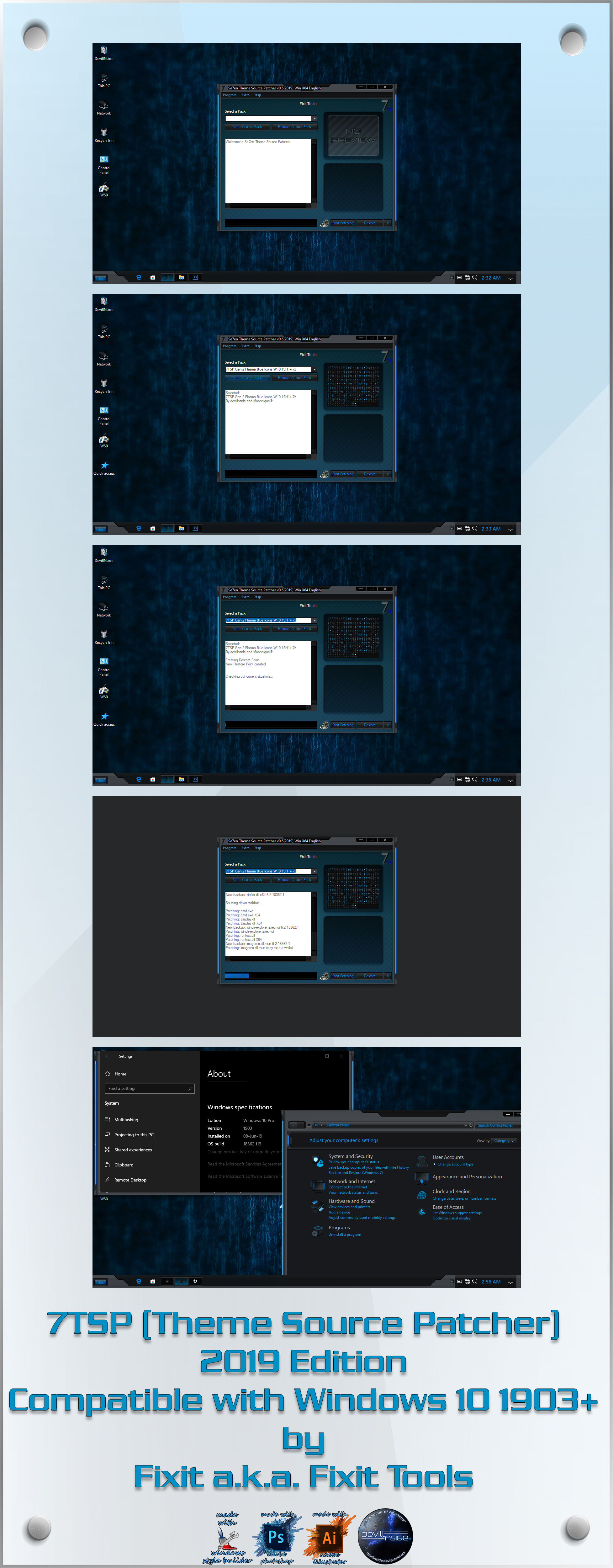
7TSP (Theme Source Patcher) 2019 Edition
Compatible with all versions of Windows 11 and Windows 10
Author: Fixit aka Fixit Tools
Prerequisites:
.NET Framework 3.5 needs to be enabled in order for this to run properly on Windows 10.
KEY FEATURE – ORIGINAL 2019 EDITION NOTES:
Patches the necessary (.mun) files & ignores .res files on Windows 10 1903 19H1 & above builds, hence avoiding boot loops & black screens when installing custom icons/icon packs.
(Note that patching .mun files will only work on a clean system. If you have pre patched .exe, .dll and .mui files prior to using 7TSP, the corresponding .mun file patch does not have any effect).
Features:
7TSP is portable, no need to install.
More complete modification possible.
Faster Patching.
Patches any file in *.res format.
7TSP knows all file locations, just drop your *.res file in the resources folder in your pack and 7TSP figures it out.
Additional features documented in the original 2019 release:
Never patches explorer.exe and shell32.dll on windows 8, 8.1 and 10 systems even if the res file exists in the used pack.
The backup routine checks and saves all file versions to detect windows update changes.
Includes .mun file patching support for custom icons and icon packs. These build-specific notes describe features introduced in the 2019 release; they do not represent the overall Windows 11 and Windows 10 compatibility of 7TSP GUI.
Changelog:
25 Jun 2019 v0.6 RC1 Build 2019.
Create restorepoint fixed for all windows versions.
Fixed regedit not being patched on x64 systems.
Added a new default skin created by devillnside
Added .mun file patching support – any .mun file can be added in *.mun.res format (experimental, not recommended).
Many small script updates.
Removed misc options from Extra section.
Removed update check from info menu.
 Download


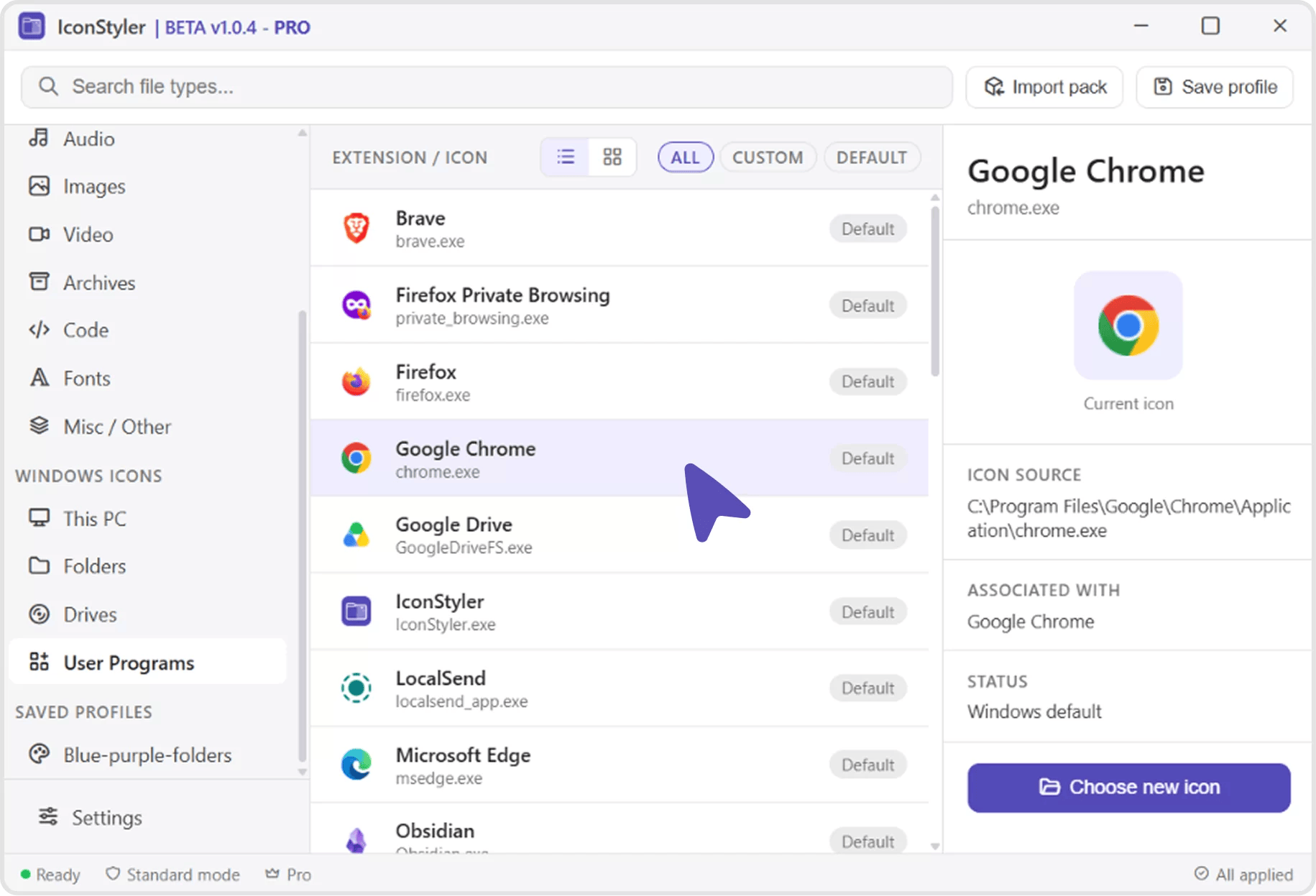

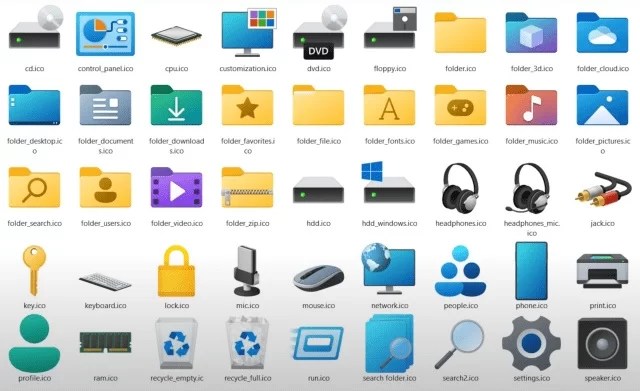


[…] 2- To use this icon pack first you need to download 7TSP […]
Exciting news, can we expect more updates soon
Thank you for starting this thread, it’s been very informative so far
[…] 2- To use this icon pack first you need to download 7TSP […]
[…] In the 7tsp program, click on “Add a Custom Pack”. Select the downloaded set in Explorer (it must […]
[…] 2- To use this icon pack first you need to download 7TSP […]
[…] In the 7tsp program, click on “Add a Custom Pack”. Select the downloaded set in Explorer (it must […]
[…] In the 7tsp program, click on “Add a Custom Pack”. Select the downloaded set in Explorer (it must […]
[…] In the 7tsp program, click on “Add a Custom Pack”. Select the downloaded set in Explorer (it must […]
[…] In the 7tsp program, click on “Add a Custom Pack”. Select the downloaded set in Explorer (it must […]
[…] In the 7tsp program, click on “Add a Custom Pack”. Select the downloaded set in Explorer (it must […]
[…] In the 7tsp program, click on “Add a Custom Pack”. Select the downloaded set in Explorer (it must […]
[…] In the 7tsp program, click on “Add a Custom Pack”. Select the downloaded set in Explorer (it must […]
[…] In the 7tsp program, click on “Add a Custom Pack”. Select the downloaded set in Explorer (it must […]
[…] In the 7tsp program, click on “Add a Custom Pack”. Select the downloaded set in Explorer (it must […]
[…] In the 7tsp program, click on “Add a Custom Pack”. Select the downloaded set in Explorer (it must […]
[…] 2- To use this icon pack first you need to download 7TSP […]
[…] 2- To use this icon pack first you need to download 7TSP […]
[…] 2- To use this icon pack first you need to download 7TSP […]
[…] In the 7tsp program, click on “Add a Custom Pack”. Select the downloaded set in Explorer (it must […]
[…] In the 7tsp program, click on “Add a Custom Pack”. Select the downloaded set in Explorer (it must […]
[…] In the 7tsp program, click on “Add a Custom Pack”. Select the downloaded set in Explorer (it must […]
[…] In the 7tsp program, click on “Add a Custom Pack”. Select the downloaded set in Explorer (it must […]
[…] In the 7tsp program, click on “Add a Custom Pack”. Select the downloaded set in Explorer (it must […]
[…] In the 7tsp program, click on “Add a Custom Pack”. Select the downloaded set in Explorer (it must […]
[…] 2- To use this icon pack first you need to download 7TSP […]
[…] 2- To use this icon pack first you need to download 7TSP […]
[…] 2- To use this icon pack first you need to download 7TSP […]
[…] 2- To use this icon pack first you need to download 7TSP […]
[…] 2- To use this icon pack first you need to download 7TSP […]
[…] In the 7tsp program, click on “Add a Custom Pack”. Select the downloaded set in Explorer (it must […]
[…] In the 7tsp program, click on “Add a Custom Pack”. Select the downloaded set in Explorer (it must […]
[…] In the 7tsp program, click on “Add a Custom Pack”. Select the downloaded set in Explorer (it must […]
[…] In the 7tsp program, click on “Add a Custom Pack”. Select the downloaded set in Explorer (it must […]
[…] In the 7tsp program, click on “Add a Custom Pack”. Select the downloaded set in Explorer (it must […]
[…] 2- To use this icon pack first you need to download 7TSP […]
[…] 2- To use this icon pack first you need to download 7TSP […]
[…] 2- To use this icon pack first you need to download 7TSP […]
[…] 2- To use this icon pack first you need to download 7TSP […]
[…] 2- To use this icon pack first you need to download 7TSP […]
[…] In the 7tsp program, click on “Add a Custom Pack”. Select the downloaded set in Explorer (it must […]
[…] In the 7tsp program, click on “Add a Custom Pack”. Select the downloaded set in Explorer (it must […]
[…] In the 7tsp program, click on “Add a Custom Pack”. Select the downloaded set in Explorer (it must […]
[…] In the 7tsp program, click on “Add a Custom Pack”. Select the downloaded set in Explorer (it must […]
[…] In the 7tsp program, click on “Add a Custom Pack”. Select the downloaded set in Explorer (it must […]
[…] 2- To use this icon pack first you need to download 7TSP […]
[…] 2- To use this icon pack first you need to download 7TSP […]
[…] 2- To use this icon pack first you need to download 7TSP […]
[…] In the 7tsp program, click on “Add a Custom Pack”. Select the downloaded set in Explorer (it must […]
[…] 2- To use this icon pack first you need to download 7TSP […]
[…] 2- To use this icon pack first you need to download 7TSP […]
[…] 2- To use this icon pack first you need to download 7TSP […]
[…] 2- To use this icon pack first you need to download 7TSP […]
[…] 2- To use this icon pack first you need to download 7TSP […]
[…] 2- To use this icon pack first you need to download 7TSP […]
[…] 2- To use this icon pack first you need to download 7TSP […]
[…] 2- To use this icon pack first you need to download 7TSP […]
[…] 2- To use this icon pack first you need to download 7TSP […]
[…] 2- To use this icon pack first you need to download 7TSP […]
[…] 2- To use this icon pack first you need to download 7TSP […]
[…] 2- To use this icon pack first you need to download 7TSP […]
[…] 2- To use this icon pack first you need to download 7TSP […]
[…] In the 7tsp program, click on “Add a Custom Pack”. Select the downloaded set in Explorer (it must […]
[…] 2- To use this icon pack first you need to download 7TSP […]
[…] 2- To use this icon pack first you need to download 7TSP […]
[…] 2- To use this icon pack first you need to download 7TSP […]
[…] 2- To use this icon pack first you need to download 7TSP […]
[…] In the 7tsp program, click on “Add a Custom Pack”. Select the downloaded set in Explorer (it must […]
[…] In the 7tsp program, click on “Add a Custom Pack”. Select the downloaded set in Explorer (it must […]
[…] In the 7tsp program, click on “Add a Custom Pack”. Select the downloaded set in Explorer (it must […]
[…] In the 7tsp program, click on “Add a Custom Pack”. Select the downloaded set in Explorer (it must […]
[…] In the 7tsp program, click on “Add a Custom Pack”. Select the downloaded set in Explorer (it must […]
[…] 2- To use this icon pack first you need to download 7TSP […]
[…] 2- To use this icon pack first you need to download 7TSP […]
[…] 2- To use this icon pack first you need to download 7TSP […]
[…] 2- To use this icon pack first you need to download 7TSP […]
[…] In the 7tsp program, click on “Add a Custom Pack”. Select the downloaded set in Explorer (it must […]
[…] In the 7tsp program, click on “Add a Custom Pack”. Select the downloaded set in Explorer (it must […]
[…] In the 7tsp program, click on “Add a Custom Pack”. Select the downloaded set in Explorer (it must […]
[…] In the 7tsp program, click on “Add a Custom Pack”. Select the downloaded set in Explorer (it must […]
[…] In the 7tsp program, click on “Add a Custom Pack”. Select the downloaded set in Explorer (it must […]
[…] In the 7tsp program, click on “Add a Custom Pack”. Select the downloaded set in Explorer (it must […]
[…] In the 7tsp program, click on “Add a Custom Pack”. Select the downloaded set in Explorer (it must […]
[…] In the 7tsp program, click on “Add a Custom Pack”. Select the downloaded set in Explorer (it must […]
[…] In the 7tsp program, click on “Add a Custom Pack”. Select the downloaded set in Explorer (it must […]
[…] In the 7tsp program, click on “Add a Custom Pack”. Select the downloaded set in Explorer (it must […]
[…] In the 7tsp program, click on “Add a Custom Pack”. Select the downloaded set in Explorer (it must […]
[…] In the 7tsp program, click on “Add a Custom Pack”. Select the downloaded set in Explorer (it must […]
[…] In the 7tsp program, click on “Add a Custom Pack”. Select the downloaded set in Explorer (it must […]
[…] In the 7tsp program, click on “Add a Custom Pack”. Select the downloaded set in Explorer (it must […]
[…] In the 7tsp program, click on “Add a Custom Pack”. Select the downloaded set in Explorer (it must […]
[…] In the 7tsp program, click on “Add a Custom Pack”. Select the downloaded set in Explorer (it must […]
[…] In the 7tsp program, click on “Add a Custom Pack”. Select the downloaded set in Explorer (it must […]
[…] In the 7tsp program, click on “Add a Custom Pack”. Select the downloaded set in Explorer (it must […]
[…] In the 7tsp program, click on “Add a Custom Pack”. Select the downloaded set in Explorer (it must […]
[…] In the 7tsp program, click on “Add a Custom Pack”. Select the downloaded set in Explorer (it must […]
[…] In the 7tsp program, click on “Add a Custom Pack”. Select the downloaded set in Explorer (it must […]
[…] In the 7tsp program, click on “Add a Custom Pack”. Select the downloaded set in Explorer (it must […]
[…] In the 7tsp program, click on “Add a Custom Pack”. Select the downloaded set in Explorer (it must […]
[…] In the 7tsp program, click on “Add a Custom Pack”. Select the downloaded set in Explorer (it must […]
[…] In the 7tsp program, click on “Add a Custom Pack”. Select the downloaded set in Explorer (it must […]
[…] In the 7tsp program, click on “Add a Custom Pack”. Select the downloaded set in Explorer (it must […]
[…] In the 7tsp program, click on “Add a Custom Pack”. Select the downloaded set in Explorer (it must […]
[…] In the 7tsp program, click on “Add a Custom Pack”. Select the downloaded set in Explorer (it must […]
[…] In the 7tsp program, click on “Add a Custom Pack”. Select the downloaded set in Explorer (it must […]
[…] In the 7tsp program, click on “Add a Custom Pack”. Select the downloaded set in Explorer (it must […]
[…] In the 7tsp program, click on “Add a Custom Pack”. Select the downloaded set in Explorer (it must […]
[…] In the 7tsp program, click on “Add a Custom Pack”. Select the downloaded set in Explorer (it must […]
[…] In the 7tsp program, click on “Add a Custom Pack”. Select the downloaded set in Explorer (it must […]
[…] In the 7tsp program, click on “Add a Custom Pack”. Select the downloaded set in Explorer (it must […]
[…] 2- To use this icon pack first you need to download 7TSP […]
[…] 2- To use this icon pack first you need to download 7TSP […]
[…] 2- To use this icon pack first you need to download 7TSP […]
[…] 2- To use this icon pack first you need to download 7TSP […]
[…] 2- To use this icon pack first you need to download 7TSP […]
[…] 2- To use this icon pack first you need to download 7TSP […]
[…] 2- To use this icon pack first you need to download 7TSP […]
[…] 2- To use this icon pack first you need to download 7TSP […]
[…] 2- To use this icon pack first you need to download 7TSP […]
[…] 2- To use this icon pack first you need to download 7TSP […]
[…] 2- To use this icon pack first you need to download 7TSP […]
[…] 2- To use this icon pack first you need to download 7TSP […]
[…] 2- To use this icon pack first you need to download 7TSP […]
[…] 2- To use this icon pack first you need to download 7TSP […]
[…] 2- To use this icon pack first you need to download 7TSP […]
[…] 2- To use this icon pack first you need to download 7TSP […]
[…] 2- To use this icon pack first you need to download 7TSP […]
[…] 2- To use this icon pack first you need to download 7TSP […]
[…] 2- To use this icon pack first you need to download 7TSP […]
[…] 2- To use this icon pack first you need to download 7TSP […]
[…] 2- To use this icon pack first you need to download 7TSP […]
[…] 2- To use this icon pack first you need to download 7TSP […]
[…] 2- To use this icon pack first you need to download 7TSP […]
[…] 2- To use this icon pack first you need to download 7TSP […]
[…] 2- To use this icon pack first you need to download 7TSP […]
[…] 2- To use this icon pack first you need to download 7TSP […]
[…] 2- To use this icon pack first you need to download 7TSP […]
[…] 2- To use this icon pack first you need to download 7TSP […]
[…] 2- To use this icon pack first you need to download 7TSP […]
[…] 2- To use this icon pack first you need to download 7TSP […]
[…] 2- To use this icon pack first you need to download 7TSP […]
[…] 2- To use this icon pack first you need to download 7TSP […]
[…] 2- To use this icon pack first you need to download 7TSP […]
[…] 2- To use this icon pack first you need to download 7TSP […]
[…] 2- To use this icon pack first you need to download 7TSP […]
[…] 2- To use this icon pack first you need to download 7TSP […]
[…] 2- To use this icon pack first you need to download 7TSP […]
[…] 2- To use this icon pack first you need to download 7TSP […]
[…] 2- To use this icon pack first you need to download 7TSP […]
[…] 2- To use this icon pack first you need to download 7TSP […]
[…] 2- To use this icon pack first you need to download 7TSP […]
[…] 2- To use this icon pack first you need to download 7TSP […]
[…] 2- To use this icon pack first you need to download 7TSP […]
[…] 2- To use this icon pack first you need to download 7TSP […]
[…] 2- To use this icon pack first you need to download 7TSP […]
[…] 2- To use this icon pack first you need to download 7TSP […]
[…] 2- To use this icon pack first you need to download 7TSP […]
[…] 2- To use this icon pack first you need to download 7TSP […]
[…] 2- To use this icon pack first you need to download 7TSP […]
[…] 2- To use this icon pack first you need to download 7TSP […]
[…] 2- To use this icon pack first you need to download 7TSP […]
[…] 2- To use this icon pack first you need to download 7TSP […]
[…] 2- To use this icon pack first you need to download 7TSP […]
[…] 2- To use this icon pack first you need to download 7TSP […]
[…] 2- To use this icon pack first you need to download 7TSP […]
[…] 2- To use this icon pack first you need to download 7TSP […]
[…] 2- To use this icon pack first you need to download 7TSP […]
[…] 2- To use this icon pack first you need to download 7TSP […]
[…] 2- To use this icon pack first you need to download 7TSP […]
[…] 2- To use this icon pack first you need to download 7TSP […]
[…] 2- To use this icon pack first you need to download 7TSP […]
[…] 2- To use this icon pack first you need to download 7TSP […]
[…] 2- To use this icon pack first you need to download 7TSP […]
[…] 2- To use this icon pack first you need to download 7TSP […]
[…] 2- To use this icon pack first you need to download 7TSP […]
[…] 2- To use this icon pack first you need to download 7TSP […]
[…] 2- To use this icon pack first you need to download 7TSP […]
[…] 2- To use this icon pack first you need to download 7TSP […]
[…] 2- To use this icon pack first you need to download 7TSP […]
[…] 2- To use this icon pack first you need to download 7TSP […]
[…] 2- To use this icon pack first you need to download 7TSP […]
[…] 2- To use this icon pack first you need to download 7TSP […]
[…] 2- To use this icon pack first you need to download 7TSP […]
[…] 2- To use this icon pack first you need to download 7TSP […]
[…] 2- To use this icon pack first you need to download 7TSP […]
[…] 2- To use this icon pack first you need to download 7TSP […]
[…] 2- To use this icon pack first you need to download 7TSP […]
[…] 2- To use this icon pack first you need to download 7TSP […]
[…] 2- To use this icon pack first you need to download 7TSP […]
[…] 2- To use this icon pack first you need to download 7TSP […]
[…] 2- To use this icon pack first you need to download 7TSP […]
[…] 2- To use this icon pack first you need to download 7TSP […]
[…] 2- To use this icon pack first you need to download 7TSP […]
[…] 2- To use this icon pack first you need to download 7TSP […]
[…] 2- To use this icon pack first you need to download 7TSP […]
[…] 2- To use this icon pack first you need to download 7TSP […]
[…] 2- To use this icon pack first you need to download 7TSP […]
[…] 2- To use this icon pack first you need to download 7TSP […]
[…] 2- To use this icon pack first you need to download 7TSP […]
[…] 2- To use this icon pack first you need to download 7TSP […]
[…] 2- To use this icon pack first you need to download 7TSP […]
[…] 2- To use this icon pack first you need to download 7TSP […]
[…] 2- To use this icon pack first you need to download 7TSP […]
[…] 2- To use this icon pack first you need to download 7TSP […]
[…] 2- To use this icon pack first you need to download 7TSP […]
[…] 2- To use this icon pack first you need to download 7TSP […]
[…] 2- To use this icon pack first you need to download 7TSP […]
[…] 2- To use this icon pack first you need to download 7TSP […]
[…] 2- To use this icon pack first you need to download 7TSP […]
[…] 2- To use this icon pack first you need to download 7TSP […]
[…] 2- To use this icon pack first you need to download 7TSP […]
[…] 2- To use this icon pack first you need to download 7TSP […]
[…] 2- To use this icon pack first you need to download 7TSP […]
[…] 2- To use this icon pack first you need to download 7TSP […]
[…] 2- To use this icon pack first you need to download 7TSP […]
[…] 2- To use this icon pack first you need to download 7TSP […]
[…] 2- To use this icon pack first you need to download 7TSP […]
[…] 2- To use this icon pack first you need to download 7TSP […]
[…] 2- To use this icon pack first you need to download 7TSP […]
[…] 2- To use this icon pack first you need to download 7TSP […]
[…] 2- To use this icon pack first you need to download 7TSP […]
[…] 2- To use this icon pack first you need to download 7TSP […]
[…] 2- To use this icon pack first you need to download 7TSP […]
[…] 2- To use this icon pack first you need to download 7TSP […]
[…] 2- To use this icon pack first you need to download 7TSP […]
[…] In the 7tsp program, click on “Add a Custom Pack”. Select the downloaded set in Explorer (it must […]
[…] In the 7tsp program, click on “Add a Custom Pack”. Select the downloaded set in Explorer (it must […]
[…] 2- To use this icon pack first you need to download 7TSP […]
[…] 2- To use this icon pack first you need to download 7TSP […]
[…] 2- To use this icon pack first you need to download 7TSP […]
[…] 2- To use this icon pack first you need to download 7TSP […]
[…] In the 7tsp program, click on “Add a Custom Pack”. Select the downloaded set in Explorer (it must […]
[…] In the 7tsp program, click on “Add a Custom Pack”. Select the downloaded set in Explorer (it must […]
[…] In the 7tsp program, click on “Add a Custom Pack”. Select the downloaded set in Explorer (it must […]
[…] In the 7tsp program, click on “Add a Custom Pack”. Select the downloaded set in Explorer (it must […]
[…] In the 7tsp program, click on “Add a Custom Pack”. Select the downloaded set in Explorer (it must […]
[…] 2- To use this icon pack first you need to download 7TSP […]
[…] 2- To use this icon pack first you need to download 7TSP […]
[…] In the 7tsp program, click on “Add a Custom Pack”. Select the downloaded set in Explorer (it must […]
[…] In the 7tsp program, click on “Add a Custom Pack”. Select the downloaded set in Explorer (it must […]
[…] In the 7tsp program, click on “Add a Custom Pack”. Select the downloaded set in Explorer (it must […]
[…] In the 7tsp program, click on “Add a Custom Pack”. Select the downloaded set in Explorer (it must […]
[…] In the 7tsp program, click on “Add a Custom Pack”. Select the downloaded set in Explorer (it must […]
[…] 2- To use this icon pack first you need to download 7TSP […]
[…] 2- To use this icon pack first you need to download 7TSP […]
[…] 2- To use this icon pack first you need to download 7TSP […]
[…] 2- To use this icon pack first you need to download 7TSP […]
[…] In the 7tsp program, click on “Add a Custom Pack”. Select the downloaded set in Explorer (it must […]
[…] In the 7tsp program, click on “Add a Custom Pack”. Select the downloaded set in Explorer (it must […]
[…] In the 7tsp program, click on “Add a Custom Pack”. Select the downloaded set in Explorer (it must […]
[…] In the 7tsp program, click on “Add a Custom Pack”. Select the downloaded set in Explorer (it must […]
[…] In the 7tsp program, click on “Add a Custom Pack”. Select the downloaded set in Explorer (it must […]
[…] 2- To use this icon pack first you need to download 7TSP […]
[…] 2- To use this icon pack first you need to download 7TSP […]
[…] 2- To use this icon pack first you need to download 7TSP […]
[…] 2- To use this icon pack first you need to download 7TSP […]
[…] In the 7tsp program, click on “Add a Custom Pack”. Select the downloaded set in Explorer (it must […]
[…] In the 7tsp program, click on “Add a Custom Pack”. Select the downloaded set in Explorer (it must […]
[…] In the 7tsp program, click on “Add a Custom Pack”. Select the downloaded set in Explorer (it must […]
[…] In the 7tsp program, click on “Add a Custom Pack”. Select the downloaded set in Explorer (it must […]
[…] 2- To use this icon pack first you need to download 7TSP […]
[…] 2- To use this icon pack first you need to download 7TSP […]
[…] 2- To use this icon pack first you need to download 7TSP […]
[…] 2- To use this icon pack first you need to download 7TSP […]
[…] 2- To use this icon pack first you need to download 7TSP […]
[…] In the 7tsp program, click on “Add a Custom Pack”. Select the downloaded set in Explorer (it must […]
[…] In the 7tsp program, click on “Add a Custom Pack”. Select the downloaded set in Explorer (it must […]
[…] In the 7tsp program, click on “Add a Custom Pack”. Select the downloaded set in Explorer (it must […]
[…] 2- To use this icon pack first you need to download 7TSP […]
[…] 2- To use this icon pack first you need to download 7TSP […]
[…] 2- To use this icon pack first you need to download 7TSP […]
[…] 2- To use this icon pack first you need to download 7TSP […]
[…] In the 7tsp program, click on “Add a Custom Pack”. Select the downloaded set in Explorer (it must […]
[…] 2- To use this icon pack first you need to download 7TSP […]
[…] 2- To use this icon pack first you need to download 7TSP […]
[…] 2- To use this icon pack first you need to download 7TSP […]
[…] 2- To use this icon pack first you need to download 7TSP […]
[…] 2- To use this icon pack first you need to download 7TSP […]
[…] In the 7tsp program, click on “Add a Custom Pack”. Select the downloaded set in Explorer (it must […]
[…] In the 7tsp program, click on “Add a Custom Pack”. Select the downloaded set in Explorer (it must […]
[…] In the 7tsp program, click on “Add a Custom Pack”. Select the downloaded set in Explorer (it must […]
[…] In the 7tsp program, click on “Add a Custom Pack”. Select the downloaded set in Explorer (it must […]
[…] 2- To use this icon pack first you need to download 7TSP […]
[…] In the 7tsp program, click on “Add a Custom Pack”. Select the downloaded set in Explorer (it must […]
[…] In the 7tsp program, click on “Add a Custom Pack”. Select the downloaded set in Explorer (it must […]
[…] In the 7tsp program, click on “Add a Custom Pack”. Select the downloaded set in Explorer (it must […]
[…] In the 7tsp program, click on “Add a Custom Pack”. Select the downloaded set in Explorer (it must […]
[…] In the 7tsp program, click on “Add a Custom Pack”. Select the downloaded set in Explorer (it must […]
[…] In the 7tsp program, click on “Add a Custom Pack”. Select the downloaded set in Explorer (it must […]
[…] 2- To use this icon pack first you need to download 7TSP […]
[…] 2- To use this icon pack first you need to download 7TSP […]
[…] 2- To use this icon pack first you need to download 7TSP […]
[…] 2- To use this icon pack first you need to download 7TSP […]
[…] In the 7tsp program, click on “Add a Custom Pack”. Select the downloaded set in Explorer (it must […]
[…] In the 7tsp program, click on “Add a Custom Pack”. Select the downloaded set in Explorer (it must […]
[…] In the 7tsp program, click on “Add a Custom Pack”. Select the downloaded set in Explorer (it must […]
[…] In the 7tsp program, click on “Add a Custom Pack”. Select the downloaded set in Explorer (it must […]
[…] In the 7tsp program, click on “Add a Custom Pack”. Select the downloaded set in Explorer (it must […]
[…] 2- To use this icon pack first you need to download 7TSP […]
[…] 2- To use this icon pack first you need to download 7TSP […]
[…] 2- To use this icon pack first you need to download 7TSP […]
[…] 2- To use this icon pack first you need to download 7TSP […]
[…] 2- To use this icon pack first you need to download 7TSP […]
[…] In the 7tsp program, click on “Add a Custom Pack”. Select the downloaded set in Explorer (it must […]
[…] In the 7tsp program, click on “Add a Custom Pack”. Select the downloaded set in Explorer (it must […]
[…] In the 7tsp program, click on “Add a Custom Pack”. Select the downloaded set in Explorer (it must […]
[…] In the 7tsp program, click on “Add a Custom Pack”. Select the downloaded set in Explorer (it must […]
[…] In the 7tsp program, click on “Add a Custom Pack”. Select the downloaded set in Explorer (it must […]
[…] 2- To use this icon pack first you need to download 7TSP […]
[…] 2- To use this icon pack first you need to download 7TSP […]
[…] 2- To use this icon pack first you need to download 7TSP […]
[…] 2- To use this icon pack first you need to download 7TSP […]
[…] 2- To use this icon pack first you need to download 7TSP […]
[…] In the 7tsp program, click on “Add a Custom Pack”. Select the downloaded set in Explorer (it must […]
[…] In the 7tsp program, click on “Add a Custom Pack”. Select the downloaded set in Explorer (it must […]
[…] In the 7tsp program, click on “Add a Custom Pack”. Select the downloaded set in Explorer (it must […]
[…] In the 7tsp program, click on “Add a Custom Pack”. Select the downloaded set in Explorer (it must […]
[…] In the 7tsp program, click on “Add a Custom Pack”. Select the downloaded set in Explorer (it must […]
[…] 2- To use this icon pack first you need to download 7TSP […]
[…] 2- To use this icon pack first you need to download 7TSP […]
[…] 2- To use this icon pack first you need to download 7TSP […]
[…] 2- To use this icon pack first you need to download 7TSP […]
[…] 2- To use this icon pack first you need to download 7TSP […]
[…] In the 7tsp program, click on “Add a Custom Pack”. Select the downloaded set in Explorer (it must […]
[…] In the 7tsp program, click on “Add a Custom Pack”. Select the downloaded set in Explorer (it must […]
[…] In the 7tsp program, click on “Add a Custom Pack”. Select the downloaded set in Explorer (it must […]
[…] In the 7tsp program, click on “Add a Custom Pack”. Select the downloaded set in Explorer (it must […]
[…] In the 7tsp program, click on “Add a Custom Pack”. Select the downloaded set in Explorer (it must […]
[…] 2- To use this icon pack first you need to download 7TSP […]
[…] 2- To use this icon pack first you need to download 7TSP […]
[…] 2- To use this icon pack first you need to download 7TSP […]
[…] 2- To use this icon pack first you need to download 7TSP […]
[…] In the 7tsp program, click on “Add a Custom Pack”. Select the downloaded set in Explorer (it must […]
[…] In the 7tsp program, click on “Add a Custom Pack”. Select the downloaded set in Explorer (it must […]
[…] In the 7tsp program, click on “Add a Custom Pack”. Select the downloaded set in Explorer (it must […]
[…] In the 7tsp program, click on “Add a Custom Pack”. Select the downloaded set in Explorer (it must […]
[…] In the 7tsp program, click on “Add a Custom Pack”. Select the downloaded set in Explorer (it must […]
[…] 2- To use this icon pack first you need to download 7TSP […]
[…] 2- To use this icon pack first you need to download 7TSP […]
[…] 2- To use this icon pack first you need to download 7TSP […]
[…] 2- To use this icon pack first you need to download 7TSP […]
[…] 2- To use this icon pack first you need to download 7TSP […]
[…] In the 7tsp program, click on “Add a Custom Pack”. Select the downloaded set in Explorer (it must […]
[…] In the 7tsp program, click on “Add a Custom Pack”. Select the downloaded set in Explorer (it must […]
[…] In the 7tsp program, click on “Add a Custom Pack”. Select the downloaded set in Explorer (it must […]
[…] In the 7tsp program, click on “Add a Custom Pack”. Select the downloaded set in Explorer (it must […]
[…] In the 7tsp program, click on “Add a Custom Pack”. Select the downloaded set in Explorer (it must […]
[…] 2- To use this icon pack first you need to download 7TSP […]
[…] 2- To use this icon pack first you need to download 7TSP […]
[…] 2- To use this icon pack first you need to download 7TSP […]
[…] In the 7tsp program, click on “Add a Custom Pack”. Select the downloaded set in Explorer (it must […]
[…] In the 7tsp program, click on “Add a Custom Pack”. Select the downloaded set in Explorer (it must […]
[…] In the 7tsp program, click on “Add a Custom Pack”. Select the downloaded set in Explorer (it must […]
[…] In the 7tsp program, click on “Add a Custom Pack”. Select the downloaded set in Explorer (it must […]
[…] In the 7tsp program, click on “Add a Custom Pack”. Select the downloaded set in Explorer (it must […]
[…] 2- To use this icon pack first you need to download 7TSP […]
[…] 2- To use this icon pack first you need to download 7TSP […]
[…] 2- To use this icon pack first you need to download 7TSP […]
[…] 2- To use this icon pack first you need to download 7TSP […]
[…] 2- To use this icon pack first you need to download 7TSP […]
[…] In the 7tsp program, click on “Add a Custom Pack”. Select the downloaded set in Explorer (it must […]
[…] In the 7tsp program, click on “Add a Custom Pack”. Select the downloaded set in Explorer (it must […]
[…] In the 7tsp program, click on “Add a Custom Pack”. Select the downloaded set in Explorer (it must […]
[…] In the 7tsp program, click on “Add a Custom Pack”. Select the downloaded set in Explorer (it must […]
[…] 2- To use this icon pack first you need to download 7TSP […]
[…] 2- To use this icon pack first you need to download 7TSP […]
[…] 2- To use this icon pack first you need to download 7TSP […]
[…] 2- To use this icon pack first you need to download 7TSP […]
[…] 2- To use this icon pack first you need to download 7TSP […]
[…] In the 7tsp program, click on “Add a Custom Pack”. Select the downloaded set in Explorer (it must […]
[…] In the 7tsp program, click on “Add a Custom Pack”. Select the downloaded set in Explorer (it must […]
[…] In the 7tsp program, click on “Add a Custom Pack”. Select the downloaded set in Explorer (it must […]
[…] 2- To use this icon pack first you need to download 7TSP […]
[…] 2- To use this icon pack first you need to download 7TSP […]
[…] 2- To use this icon pack first you need to download 7TSP […]
[…] In the 7tsp program, click on “Add a Custom Pack”. Select the downloaded set in Explorer (it must […]
[…] In the 7tsp program, click on “Add a Custom Pack”. Select the downloaded set in Explorer (it must […]
[…] In the 7tsp program, click on “Add a Custom Pack”. Select the downloaded set in Explorer (it must […]
[…] In the 7tsp program, click on “Add a Custom Pack”. Select the downloaded set in Explorer (it must […]
[…] 2- To use this icon pack first you need to download 7TSP […]
[…] 2- To use this icon pack first you need to download 7TSP […]
[…] 2- To use this icon pack first you need to download 7TSP […]
[…] 2- To use this icon pack first you need to download 7TSP […]
[…] 2- To use this icon pack first you need to download 7TSP […]
[…] In the 7tsp program, click on “Add a Custom Pack”. Select the downloaded set in Explorer (it must […]
[…] In the 7tsp program, click on “Add a Custom Pack”. Select the downloaded set in Explorer (it must […]
[…] In the 7tsp program, click on “Add a Custom Pack”. Select the downloaded set in Explorer (it must […]
[…] In the 7tsp program, click on “Add a Custom Pack”. Select the downloaded set in Explorer (it must […]
[…] In the 7tsp program, click on “Add a Custom Pack”. Select the downloaded set in Explorer (it must […]
[…] 2- To use this icon pack first you need to download 7TSP […]
[…] 2- To use this icon pack first you need to download 7TSP […]
[…] 2- To use this icon pack first you need to download 7TSP […]
[…] 2- To use this icon pack first you need to download 7TSP […]
[…] In the 7tsp program, click on “Add a Custom Pack”. Select the downloaded set in Explorer (it must […]
[…] In the 7tsp program, click on “Add a Custom Pack”. Select the downloaded set in Explorer (it must […]
[…] In the 7tsp program, click on “Add a Custom Pack”. Select the downloaded set in Explorer (it must […]
[…] In the 7tsp program, click on “Add a Custom Pack”. Select the downloaded set in Explorer (it must […]
[…] In the 7tsp program, click on “Add a Custom Pack”. Select the downloaded set in Explorer (it must […]
[…] 2- To use this icon pack first you need to download 7TSP […]
[…] 2- To use this icon pack first you need to download 7TSP […]
[…] 2- To use this icon pack first you need to download 7TSP […]
[…] 2- To use this icon pack first you need to download 7TSP […]
[…] 2- To use this icon pack first you need to download 7TSP […]
[…] In the 7tsp program, click on “Add a Custom Pack”. Select the downloaded set in Explorer (it must […]
[…] In the 7tsp program, click on “Add a Custom Pack”. Select the downloaded set in Explorer (it must […]
[…] In the 7tsp program, click on “Add a Custom Pack”. Select the downloaded set in Explorer (it must […]
[…] In the 7tsp program, click on “Add a Custom Pack”. Select the downloaded set in Explorer (it must […]
[…] In the 7tsp program, click on “Add a Custom Pack”. Select the downloaded set in Explorer (it must […]
[…] 2- To use this icon pack first you need to download 7TSP […]
[…] 2- To use this icon pack first you need to download 7TSP […]
[…] 2- To use this icon pack first you need to download 7TSP […]
[…] 2- To use this icon pack first you need to download 7TSP […]
[…] 2- To use this icon pack first you need to download 7TSP […]
[…] In the 7tsp program, click on “Add a Custom Pack”. Select the downloaded set in Explorer (it must […]
[…] In the 7tsp program, click on “Add a Custom Pack”. Select the downloaded set in Explorer (it must […]
[…] In the 7tsp program, click on “Add a Custom Pack”. Select the downloaded set in Explorer (it must […]
[…] In the 7tsp program, click on “Add a Custom Pack”. Select the downloaded set in Explorer (it must […]
[…] In the 7tsp program, click on “Add a Custom Pack”. Select the downloaded set in Explorer (it must […]
[…] In the 7tsp program, click on “Add a Custom Pack”. Select the downloaded set in Explorer (it must […]
[…] 2- To use this icon pack first you need to download 7TSP […]
[…] In the 7tsp program, click on “Add a Custom Pack”. Select the downloaded set in Explorer (it must […]
[…] 2- To use this icon pack first you need to download 7TSP […]
[…] In the 7tsp program, click on “Add a Custom Pack”. Select the downloaded set in Explorer (it must […]
[…] In the 7tsp program, click on “Add a Custom Pack”. Select the downloaded set in Explorer (it must […]
[…] 2- To use this icon pack first you need to download 7TSP […]
[…] In the 7tsp program, click on “Add a Custom Pack”. Select the downloaded set in Explorer (it must […]
[…] 2- To use this icon pack first you need to download 7TSP […]
[…] In the 7tsp program, click on “Add a Custom Pack”. Select the downloaded set in Explorer (it must […]
[…] 2- To use this icon pack first you need to download 7TSP […]
[…] In the 7tsp program, click on “Add a Custom Pack”. Select the downloaded set in Explorer (it must […]
[…] In the 7tsp program, click on “Add a Custom Pack”. Select the downloaded set in Explorer (it must […]
[…] In the 7tsp program, click on “Add a Custom Pack”. Select the downloaded set in Explorer (it must […]
[…] In the 7tsp program, click on “Add a Custom Pack”. Select the downloaded set in Explorer (it must […]
[…] In the 7tsp program, click on “Add a Custom Pack”. Select the downloaded set in Explorer (it must […]
[…] In the 7tsp program, click on “Add a Custom Pack”. Select the downloaded set in Explorer (it must […]
[…] In the 7tsp program, click on “Add a Custom Pack”. Select the downloaded set in Explorer (it must […]
[…] In the 7tsp program, click on “Add a Custom Pack”. Select the downloaded set in Explorer (it must […]
[…] In the 7tsp program, click on “Add a Custom Pack”. Select the downloaded set in Explorer (it must […]
[…] In the 7tsp program, click on “Add a Custom Pack”. Select the downloaded set in Explorer (it must […]
[…] In the 7tsp program, click on “Add a Custom Pack”. Select the downloaded set in Explorer (it must […]
[…] In the 7tsp program, click on “Add a Custom Pack”. Select the downloaded set in Explorer (it must […]
[…] 2- To use this icon pack first you need to download 7TSP […]
[…] In the 7tsp program, click on “Add a Custom Pack”. Select the downloaded set in Explorer (it must […]
[…] 2- To use this icon pack first you need to download 7TSP […]
[…] 2- To use this icon pack first you need to download 7TSP […]
[…] In the 7tsp program, click on “Add a Custom Pack”. Select the downloaded set in Explorer (it must […]
[…] 2- To use this icon pack first you need to download 7TSP […]
[…] In the 7tsp program, click on “Add a Custom Pack”. Select the downloaded set in Explorer (it must […]
[…] 2- To use this icon pack first you need to download 7TSP […]
[…] In the 7tsp program, click on “Add a Custom Pack”. Select the downloaded set in Explorer (it must […]
[…] 2- To use this icon pack first you need to download 7TSP […]
[…] 2- To use this icon pack first you need to download 7TSP […]
[…] 2- To use this icon pack first you need to download 7TSP […]
[…] In the 7tsp program, click on “Add a Custom Pack”. Select the downloaded set in Explorer (it must […]
[…] In the 7tsp program, click on “Add a Custom Pack”. Select the downloaded set in Explorer (it must […]
[…] In the 7tsp program, click on “Add a Custom Pack”. Select the downloaded set in Explorer (it must […]
[…] In the 7tsp program, click on “Add a Custom Pack”. Select the downloaded set in Explorer (it must […]
[…] In the 7tsp program, click on “Add a Custom Pack”. Select the downloaded set in Explorer (it must […]
[…] 2- To use this icon pack first you need to download 7TSP […]
[…] 2- To use this icon pack first you need to download 7TSP […]
[…] 2- To use this icon pack first you need to download 7TSP […]
[…] 2- To use this icon pack first you need to download 7TSP […]
[…] 2- To use this icon pack first you need to download 7TSP […]
[…] In the 7tsp program, click on “Add a Custom Pack”. Select the downloaded set in Explorer (it must […]
[…] In the 7tsp program, click on “Add a Custom Pack”. Select the downloaded set in Explorer (it must […]
[…] 2- To use this icon pack first you need to download 7TSP […]
[…] 2- To use this icon pack first you need to download 7TSP […]
[…] 2- To use this icon pack first you need to download 7TSP […]
[…] 2- To use this icon pack first you need to download 7TSP […]
[…] 2- To use this icon pack first you need to download 7TSP […]
[…] In the 7tsp program, click on “Add a Custom Pack”. Select the downloaded set in Explorer (it must […]
[…] In the 7tsp program, click on “Add a Custom Pack”. Select the downloaded set in Explorer (it must […]
[…] In the 7tsp program, click on “Add a Custom Pack”. Select the downloaded set in Explorer (it must […]
[…] In the 7tsp program, click on “Add a Custom Pack”. Select the downloaded set in Explorer (it must […]
[…] 2- To use this icon pack first you need to download 7TSP […]
[…] In the 7tsp program, click on “Add a Custom Pack”. Select the downloaded set in Explorer (it must […]
[…] 2- To use this icon pack first you need to download 7TSP […]
[…] 2- To use this icon pack first you need to download 7TSP […]
[…] In the 7tsp program, click on “Add a Custom Pack”. Select the downloaded set in Explorer (it must […]
[…] In the 7tsp program, click on “Add a Custom Pack”. Select the downloaded set in Explorer (it must […]
[…] 2- To use this icon pack first you need to download 7TSP […]
[…] In the 7tsp program, click on “Add a Custom Pack”. Select the downloaded set in Explorer (it must […]
[…] In the 7tsp program, click on “Add a Custom Pack”. Select the downloaded set in Explorer (it must […]
[…] In the 7tsp program, click on “Add a Custom Pack”. Select the downloaded set in Explorer (it must […]
[…] In the 7tsp program, click on “Add a Custom Pack”. Select the downloaded set in Explorer (it must […]
[…] In the 7tsp program, click on “Add a Custom Pack”. Select the downloaded set in Explorer (it must […]
[…] 2- To use this icon pack first you need to download 7TSP […]
[…] 2- To use this icon pack first you need to download 7TSP […]
[…] In the 7tsp program, click on “Add a Custom Pack”. Select the downloaded set in Explorer (it must […]
[…] In the 7tsp program, click on “Add a Custom Pack”. Select the downloaded set in Explorer (it must […]
[…] 2- To use this icon pack first you need to download 7TSP […]
[…] 2- To use this icon pack first you need to download 7TSP […]
[…] In the 7tsp program, click on “Add a Custom Pack”. Select the downloaded set in Explorer (it must […]
[…] In the 7tsp program, click on “Add a Custom Pack”. Select the downloaded set in Explorer (it must […]
[…] In the 7tsp program, click on “Add a Custom Pack”. Select the downloaded set in Explorer (it must […]
[…] In the 7tsp program, click on “Add a Custom Pack”. Select the downloaded set in Explorer (it must […]
[…] In the 7tsp program, click on “Add a Custom Pack”. Select the downloaded set in Explorer (it must […]
[…] In the 7tsp program, click on “Add a Custom Pack”. Select the downloaded set in Explorer (it must […]
[…] In the 7tsp program, click on “Add a Custom Pack”. Select the downloaded set in Explorer (it must […]
[…] In the 7tsp program, click on “Add a Custom Pack”. Select the downloaded set in Explorer (it must […]
[…] 2- To use this icon pack first you need to download 7TSP […]
[…] In the 7tsp program, click on “Add a Custom Pack”. Select the downloaded set in Explorer (it must […]
[…] In the 7tsp program, click on “Add a Custom Pack”. Select the downloaded set in Explorer (it must […]
[…] 2- To use this icon pack first you need to download 7TSP […]
[…] 2- To use this icon pack first you need to download 7TSP […]
[…] 2- To use this icon pack first you need to download 7TSP […]
[…] In the 7tsp program, click on “Add a Custom Pack”. Select the downloaded set in Explorer (it must […]
[…] In the 7tsp program, click on “Add a Custom Pack”. Select the downloaded set in Explorer (it must […]
[…] 2- To use this icon pack first you need to download 7TSP […]
[…] 2- To use this icon pack first you need to download 7TSP […]
[…] 2- To use this icon pack first you need to download 7TSP […]
[…] 2- To use this icon pack first you need to download 7TSP […]
[…] 2- To use this icon pack first you need to download 7TSP […]
[…] In the 7tsp program, click on “Add a Custom Pack”. Select the downloaded set in Explorer (it must […]
[…] In the 7tsp program, click on “Add a Custom Pack”. Select the downloaded set in Explorer (it must […]
[…] In the 7tsp program, click on “Add a Custom Pack”. Select the downloaded set in Explorer (it must […]
[…] In the 7tsp program, click on “Add a Custom Pack”. Select the downloaded set in Explorer (it must […]
[…] 2- To use this icon pack first you need to download 7TSP […]
[…] 2- To use this icon pack first you need to download 7TSP […]
[…] 2- To use this icon pack first you need to download 7TSP […]
[…] 2- To use this icon pack first you need to download 7TSP […]
[…] 2- To use this icon pack first you need to download 7TSP […]
[…] In the 7tsp program, click on “Add a Custom Pack”. Select the downloaded set in Explorer (it must […]
[…] In the 7tsp program, click on “Add a Custom Pack”. Select the downloaded set in Explorer (it must […]
[…] In the 7tsp program, click on “Add a Custom Pack”. Select the downloaded set in Explorer (it must […]
[…] In the 7tsp program, click on “Add a Custom Pack”. Select the downloaded set in Explorer (it must […]
[…] In the 7tsp program, click on “Add a Custom Pack”. Select the downloaded set in Explorer (it must […]
[…] 2- To use this icon pack first you need to download 7TSP […]
[…] 2- To use this icon pack first you need to download 7TSP […]
[…] 2- To use this icon pack first you need to download 7TSP […]
[…] 2- To use this icon pack first you need to download 7TSP […]
[…] 2- To use this icon pack first you need to download 7TSP […]
[…] In the 7tsp program, click on “Add a Custom Pack”. Select the downloaded set in Explorer (it must […]
[…] In the 7tsp program, click on “Add a Custom Pack”. Select the downloaded set in Explorer (it must […]
[…] In the 7tsp program, click on “Add a Custom Pack”. Select the downloaded set in Explorer (it must […]
[…] In the 7tsp program, click on “Add a Custom Pack”. Select the downloaded set in Explorer (it must […]
[…] In the 7tsp program, click on “Add a Custom Pack”. Select the downloaded set in Explorer (it must […]
[…] In the 7tsp program, click on “Add a Custom Pack”. Select the downloaded set in Explorer (it must […]
[…] 2- To use this icon pack first you need to download 7TSP […]
[…] 2- To use this icon pack first you need to download 7TSP […]
[…] 2- To use this icon pack first you need to download 7TSP […]
[…] In the 7tsp program, click on “Add a Custom Pack”. Select the downloaded set in Explorer (it must […]
[…] In the 7tsp program, click on “Add a Custom Pack”. Select the downloaded set in Explorer (it must […]
[…] In the 7tsp program, click on “Add a Custom Pack”. Select the downloaded set in Explorer (it must […]
[…] In the 7tsp program, click on “Add a Custom Pack”. Select the downloaded set in Explorer (it must […]
[…] In the 7tsp program, click on “Add a Custom Pack”. Select the downloaded set in Explorer (it must […]
[…] In the 7tsp program, click on “Add a Custom Pack”. Select the downloaded set in Explorer (it must […]
[…] In the 7tsp program, click on “Add a Custom Pack”. Select the downloaded set in Explorer (it must […]
[…] 2- To use this icon pack first you need to download 7TSP […]
[…] 2- To use this icon pack first you need to download 7TSP […]
[…] In the 7tsp program, click on “Add a Custom Pack”. Select the downloaded set in Explorer (it must […]
[…] In the 7tsp program, click on “Add a Custom Pack”. Select the downloaded set in Explorer (it must […]
[…] In the 7tsp program, click on “Add a Custom Pack”. Select the downloaded set in Explorer (it must […]
[…] In the 7tsp program, click on “Add a Custom Pack”. Select the downloaded set in Explorer (it must […]
[…] In the 7tsp program, click on “Add a Custom Pack”. Select the downloaded set in Explorer (it must […]
[…] In the 7tsp program, click on “Add a Custom Pack”. Select the downloaded set in Explorer (it must […]
[…] 2- To use this icon pack first you need to download 7TSP […]
[…] 2- To use this icon pack first you need to download 7TSP […]
[…] 2- To use this icon pack first you need to download 7TSP […]
[…] 2- To use this icon pack first you need to download 7TSP […]
[…] 2- To use this icon pack first you need to download 7TSP […]
[…] In the 7tsp program, click on “Add a Custom Pack”. Select the downloaded set in Explorer (it must […]
[…] In the 7tsp program, click on “Add a Custom Pack”. Select the downloaded set in Explorer (it must […]
[…] In the 7tsp program, click on “Add a Custom Pack”. Select the downloaded set in Explorer (it must […]
[…] In the 7tsp program, click on “Add a Custom Pack”. Select the downloaded set in Explorer (it must […]
[…] In the 7tsp program, click on “Add a Custom Pack”. Select the downloaded set in Explorer (it must […]
[…] In the 7tsp program, click on “Add a Custom Pack”. Select the downloaded set in Explorer (it must […]
[…] In the 7tsp program, click on “Add a Custom Pack”. Select the downloaded set in Explorer (it must […]
[…] 1- To use this icon pack first you need to download 7TSP […]
[…] 1- To use this icon pack first you need to download 7TSP […]
[…] 1- To use this icon pack first you need to download 7TSP […]
[…] 1- To use this icon pack first you need to download 7TSP […]
[…] 1- To use this icon pack first you need to download 7TSP […]
[…] 1- To use this icon pack first you need to download 7TSP […]
[…] 1- To use this icon pack first you need to download 7TSP […]
[…] 1- To use this icon pack first you need to download 7TSP […]
[…] 1- To use this icon pack first you need to download 7TSP […]
[…] 1- To use this icon pack first you need to download 7TSP […]
[…] 1- To use this icon pack first you need to download 7TSP […]
[…] 1- To use this icon pack first you need to download 7TSP […]
[…] 1- To use this icon pack first you need to download 7TSP […]
[…] 1- To use this icon pack first you need to download 7TSP […]
[…] 1- To use this icon pack first you need to download 7TSP […]
[…] 1- To use this icon pack first you need to download 7TSP […]
[…] 1- To use this icon pack first you need to download 7TSP […]
[…] 1- To use this icon pack first you need to download 7TSP […]
[…] 1- To use this icon pack first you need to download 7TSP […]
[…] 1- To use this icon pack first you need to download 7TSP […]
[…] 1- To use this icon pack first you need to download 7TSP […]
[…] 1- To use this icon pack first you need to download 7TSP […]
[…] 1- To use this icon pack first you need to download 7TSP […]
[…] 1- To use this icon pack first you need to download 7TSP […]
[…] 1- To use this icon pack first you need to download 7TSP […]
[…] 1- To use this icon pack first you need to download 7TSP […]
[…] 1- To use this icon pack first you need to download 7TSP […]
[…] 1- To use this icon pack first you need to download 7TSP […]
[…] 1- To use this icon pack first you need to download 7TSP […]
[…] 1- To use this icon pack first you need to download 7TSP […]
[…] 1- To use this icon pack first you need to download 7TSP […]
[…] 1- To use this icon pack first you need to download 7TSP […]
[…] How To Install : You Need To Use 7TSP […]
[…] How To Install : You Need To Use 7TSP […]
[…] How To Install : You Need To Use 7TSP […]
[…] How To Install : You Need To Use 7TSP […]
[…] How To Install : You Need To Use 7TSP […]
[…] How To Install : You Need To Use 7TSP […]
[…] How To Install : You Need To Use 7TSP […]
[…] How To Install : You Need To Use 7TSP […]
[…] How To Install : You Need To Use 7TSP […]
[…] How To Install : You Need To Use 7TSP […]
[…] How To Install : You Need To Use 7TSP […]
[…] How To Install : You Need To Use 7TSP […]
[…] How To Install : You Need To Use 7TSP […]
[…] How To Install : You Need To Use 7TSP […]
[…] How To Install : You Need To Use 7TSP […]
[…] How To Install : You Need To Use 7TSP […]
[…] How To Install : You Need To Use 7TSP […]
[…] How To Install : You Need To Use 7TSP […]
[…] How To Install : You Need To Use 7TSP […]
[…] How To Install : You Need To Use 7TSP […]
[…] How To Install : You Need To Use 7TSP […]
[…] How To Install : You Need To Use 7TSP […]